
xrat - Xray-core and sing-box proxy manager
xrat is an open-source Rust CLI and TUI proxy configuration manager for XTLS/Xray-core, V2Ray-core, and SagerNet/sing-box. Import proxy subscriptions, test latency, scan Cloudflare/CDN edge IPs, rotate proxies, and run managed local proxy sessions from a single terminal application.
xrat is built for VLESS, VMess, Trojan, Shadowsocks, SOCKS5, HTTP, and Hysteria2 workflows. It can preview Xray and sing-box JSON, expose local SOCKS/HTTP/Shadowsocks inbounds, supervise runtime sessions with a daemon, and serve stored configs through an authenticated HTTP API.
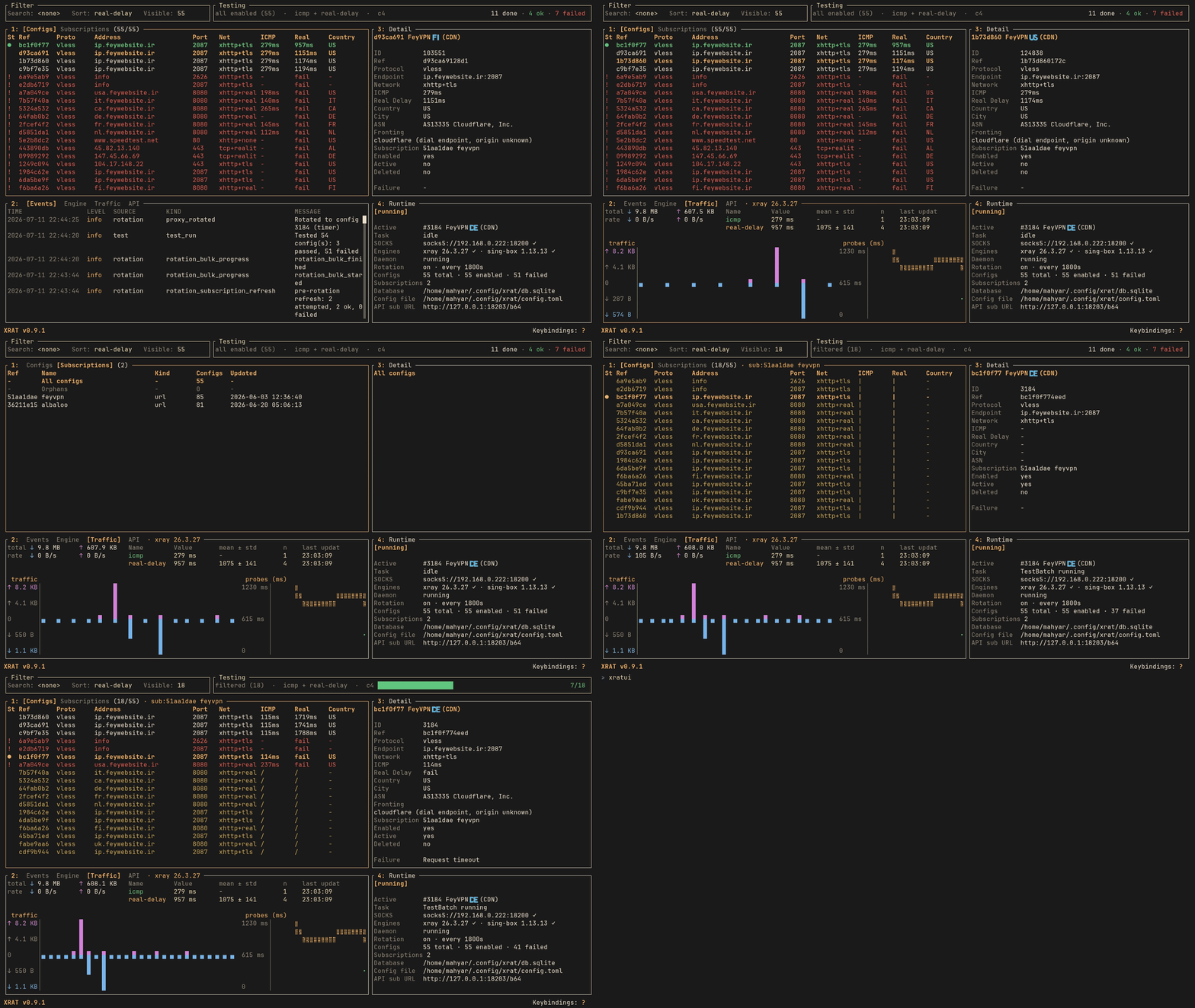
What you can do
- Import subscriptions, files, raw links, base64 lists, SIP008 JSON, and Xray JSON into SQLite or PostgreSQL.
- Support VLESS, VMess, Trojan, Shadowsocks, HTTP, SOCKS5, and Hysteria2 parsing/preview.
- Deduplicate configs with normalized, versioned keys while preserving subscription metadata.
- Test proxies with ICMP, TCP, real-delay, download, and upload stages.
- Rank bulk test results with concurrency control, failure classification, history, and GeoIP enrichment.
- Run Xray-core, V2Ray-core, or sing-box-backed Hysteria2 as a managed local proxy runtime.
- Expose SOCKS5, HTTP, and Shadowsocks inbounds with configurable ports and sniffing.
- Supervise runtime sessions through a daemon with IPC, health checks, and stale-session reattach.
- Rotate proxies automatically on schedule or health failure, with cooldown and manual override.
- Scan Cloudflare/CDN edge IPs and persist reachable endpoints with latency.
- Control configs through CLI, interactive TUI, HTTP API, or systemd user services.
- Serve stored configs as JSON or base64 subscriptions with optional API-key authentication.
- Manage config state with enable, disable, soft delete, restore, purge, and detailed show commands.
- Inspect operational events with
xrat logsfor daemon, runtime, rotation, health, and test activity. - Generate shell completions, man pages, Docker images, and self-upgrade from releases or source.
SagerNet/sing-box support covers
sing-box JSON preview and managed Hysteria2 runtime sessions. Hy2 configs
automatically launch through sing-box because Xray/V2Ray cannot express that
protocol; other managed runtime protocols still use Xray/V2Ray unless
[runtime].engine selects a supported engine.
Sections
| Section | Description |
|---|---|
| Getting Started | Installation, quickstart, configuration |
| CLI Reference | Command reference for all subcommands |
| Features | Deep-dives into each major subsystem |
| Deployment | systemd services, database backends |
| Reference | Protocols, config file, database schema, errors |
| Architecture | Module map, config generation pipeline |
Getting Started
xrat is a Rust-based CLI tool and daemon for managing proxy configurations. It imports subscription links, parses and normalizes proxy URIs, tests connectivity and performance, previews runtime configs for Xray-core and sing-box, manages an Xray/V2Ray local proxy runtime process plus sing-box-backed Hysteria2 sessions, and exposes an HTTP API.
Prerequisites
- Xray-core binary installed and available in
PATH - Proxy cores: Xray is required for runtime use; setup can install Xray, sing-box, and V2Ray as verified user-local tools
- Rust toolchain and just when building from source
Installation
Choose one install path:
- Installation Script — recommended Linux install from the latest verified release archive
- Docker Install — run the published container image with bundled Xray-core
- Manual Binary Install — download, verify, and place release files yourself
- Cargo Install —
cargo install xratfrom crates.io - Build From Source — Justfile-oriented workflow for local development builds and source installs
Configuration Directory
xrat uses a configuration directory with the following resolution order:
--config <path>CLI flagXRAT_PATHenvironment variable~/.config/xrat/
The directory layout:
~/.config/xrat/
├── config.toml      # Application configuration
├── db.sqlite        # SQLite database (default)
├── runtime/         # Runtime session files (generated configs, logs)
└── logs/            # Xray/V2Ray process logs
Next Steps
- Quickstart — import, test, and connect in 3 commands
- Installation Script — recommended install path
- Configuration — config.toml reference
Installation Script
Use the installer script for a normal Linux or macOS install. It downloads the
matching release archive, verifies the checksum, installs xrat, and can run
first-time setup for you.
For other install paths, see Docker Install, Manual Binary Install, or Build From Source.
Requirements
Runtime dependencies
| Tool | Required | Purpose | Upstream |
|---|---|---|---|
xray | Yes | Managed Xray runtime and real-delay tests | XTLS/Xray-core |
sing-box | No | sing-box preview and managed Hysteria2 runtime sessions | SagerNet/sing-box |
v2ray | No | Alternative V2Ray managed runtime | V2Fly/V2Ray |
xrat setup detects these tools, checks their latest stable versions, and can
install verified user-local copies without root access. Managed files live
under ~/.local/share/xrat/cores, with commands linked into ~/.local/bin.
Existing system or package-manager installations are never overwritten.
The upstream system installers remain available when a system-wide service is preferred. Install Xray system-wide:
bash -c "$(curl -L https://github.com/XTLS/Xray-install/raw/main/install-release.sh)" @ install
Install sing-box if you need Hysteria2 (hy2) managed runtime support:
curl -fsSL https://sing-box.app/install.sh | sh
Install V2Ray system-wide on a supported systemd Linux distribution:
bash -c "$(curl -L https://raw.githubusercontent.com/v2fly/fhs-install-v2ray/master/install-release.sh)"
System requirements
| Requirement | Details |
|---|---|
| OS | Linux x86_64/aarch64, or macOS x86_64/arm64 |
| libc | None – Linux release binaries are statically linked |
| SQLite | Bundled – no system SQLite needed |
| PostgreSQL | Optional – version 14+ if used instead of SQLite |
| Network | Outbound HTTPS for imports and release downloads |
Platform Support
Core CLI, config import, parsing, testing, and the TUI work on any Unix-like platform xrat compiles for. Platform integrations vary:
| Feature | Linux | macOS | FreeBSD | OpenBSD |
|---|---|---|---|---|
| CLI / config / import | yes | yes | expected | expected |
| daemon runtime IPC | Unix socket | Unix socket | Unix socket | Unix socket |
| daemon install | systemd user | launchd agent | rc.d (root) | rc.d (root) |
| runtime reattach | sysinfo | sysinfo | sysinfo | sysinfo (cmd) |
| desktop proxy | GNOME/gsettings | networksetup | unsupported | unsupported |
| release upgrade | musl tarball | darwin tarball | source/manual | source/manual |
| clipboard (TUI) | X11/Wayland | native | X11 | X11 |
macOS and BSD integrations are newer; the FreeBSD/OpenBSD rows are expected to work but are not yet verified on hardware. Windows is tracked separately and not yet supported.
Install
curl -fsSL https://raw.githubusercontent.com/mhyrzt/xrat/master/install.sh | bash
To run all setup prompts with yes answers:
curl -fsSL https://raw.githubusercontent.com/mhyrzt/xrat/master/install.sh | bash -s -- --yes
The installer will:
- Detect the OS and architecture and pick the release target triple.
- Download the latest GitHub release archive.
- Verify the archive against
SHASUMS256.txt(sha256sumorshasum). - Install
xratto~/.local/bin/xrat. - Hand off to
xrat setupfor post-install setup: managed dependency checks and optional installs,xrat init, the background daemon, shell completions, man pages, anxratuishortcut, and (Linux/XDG) the desktop launcher and icons.
Setup runs in the binary, so it works the same regardless of how xrat was
installed and can be re-run any time with xrat setup. See the
setup reference for the full step list and --check
diagnostics.
Useful flags (passed through to xrat setup):
| Flag | Purpose |
|---|---|
--from-source | Build from the current checkout instead of downloading |
--install-dir DIR | Binary install directory |
--no-desktop | Skip installing desktop launcher and icon assets |
--linger | Enable boot-before-login daemon start (Linux) |
-y, --yes | Skip prompts and accept setup defaults |
-h, --help | Show installer help |
To install to a different directory:
curl -fsSL https://raw.githubusercontent.com/mhyrzt/xrat/master/install.sh | bash -s -- --install-dir /usr/local/bin
To skip the desktop launcher:
curl -fsSL https://raw.githubusercontent.com/mhyrzt/xrat/master/install.sh | bash -s -- --no-desktop
The desktop launcher starts the TUI in a detected terminal emulator. When the installer finds a supported terminal, it generates a launcher that sets xrat’s window identity for taskbar/dock icon matching on X11 or Wayland. If no supported terminal is found, the launcher falls back to the desktop’s default terminal behavior and the taskbar icon may belong to that terminal window.
| Terminal | X11 identity | Wayland identity | Notes |
|---|---|---|---|
| kitty | --class=xrat | --class=xrat / app id | Preferred cross-session launcher |
| Alacritty | --class xrat,xrat | --class xrat,xrat | Preferred cross-session launcher |
| WezTerm | --class xrat | --class xrat / app id | Preferred cross-session launcher |
| foot / footclient | n/a | --app-id=xrat | Wayland-only terminal |
| Konsole | --desktopfile xrat | --desktopfile xrat | KDE/Qt desktop-file identity hint |
| GNOME Terminal | --class=xrat | fallback only | Used for X11 sessions |
| xterm | -class xrat | n/a | X11-only fallback |
Make sure the install directory is in PATH:
export PATH="$HOME/.local/bin:$PATH"
Add that line to ~/.bashrc, ~/.zshrc, or your shell’s equivalent startup
file if needed.
Build and Install From Local Checkout
Pass --from-source to have the installer build the binary from the repository
instead of downloading a release archive. Run the script directly from the repo
root — piping from curl will not work because the script needs Cargo.toml
present alongside it.
Requirements: cargo must be in PATH. git, curl, tar, and sha256sum
are not needed.
git clone https://github.com/mhyrzt/xrat.git
cd xrat
bash install.sh --from-source
To install to a different directory:
bash install.sh --from-source --install-dir /usr/local/bin
To skip prompts:
bash install.sh --from-source --yes
The script will:
- Run
cargo build --releaseinside the checkout. - Install
xratto the install directory. - Hand off to
xrat setup, which generates man pages, completions, and desktop assets from the built binary the same way as the release path.
For a pure Cargo-managed install or a development workflow, see Build From Source.
First-Time Setup
If you installed xrat another way (e.g. cargo install, a package manager, or a
manual copy), or skipped the installer’s setup, run setup yourself:
xrat setup
This is idempotent and re-runnable, so it also works to finish or repair an install. Check what is and isn’t configured without changing anything:
xrat setup --check
To do just the individual pieces instead: xrat init for the config directory
and database, or xrat daemon install --start for the background daemon.
Then follow the Quickstart to import configs and connect.
State Paths
| Path | Purpose | Override |
|---|---|---|
$HOME/.config/xrat/ | App root | XRAT_PATH env var |
$HOME/.config/xrat/config.toml | Configuration | --config flag |
$HOME/.config/xrat/db.sqlite | SQLite database | --database flag |
$HOME/.config/xrat/runtime/ | Daemon socket, session state | - |
$HOME/.config/xrat/logs/ | Runtime logs | [runtime.log].dir |
$HOME/.config/xrat/mmdb/ | GeoIP data | [mmdb].dir |
$HOME/.local/share/xrat/cores/ | Managed proxy cores/assets | XDG data directory |
$HOME/.local/bin/{xray,v2ray,sing-box} | Managed core CLI links | - |
Docker Install
Use the Docker image when you want xrat, Xray-core, and sing-box in one
container. The image is published to GitHub Container Registry on each tagged
release.
For host-level systemd daemon management, shell completions, or man pages, use the Installation Script or Manual Binary Install instead.
Pull
docker pull ghcr.io/mhyrzt/xrat:latest
For a specific release, use the version tag:
docker pull ghcr.io/mhyrzt/xrat:0.1.2
State
The container stores all xrat state under /data/xrat.
docker volume create xrat-data
Define a reusable alias so setup and read-only xrat commands run with the volume mounted:
alias xrat-docker='docker run --rm -it -v xrat-data:/data/xrat ${XRAT_DOCKER_OPTS:-} ghcr.io/mhyrzt/xrat:latest'
Add it to your shell profile if you want it available in new terminals. Then initialize the data directory:
xrat-docker init
Import and List
xrat-docker import "https://example.com/sub.txt"

xrat-docker list
Serve the HTTP API
Bind the API to all container interfaces and publish the generated default API port on the host:
XRAT_DOCKER_OPTS="-p 18203:18203"
xrat-docker serve --host 0.0.0.0
Then verify it from the host:
curl http://localhost:18203/health
Run a Local Proxy
xrat connect talks to the local daemon IPC socket, so the proxy container must
keep the daemon running while you connect from another command. Publish the
proxy ports you enable in config.toml; the generated defaults use SOCKS on
18200, HTTP on 18201, Shadowsocks on 18202, and the API server on
18203.
docker run -d --name xrat \
  -v xrat-data:/data/xrat \
  -p 127.0.0.1:18200:18200 \
  ghcr.io/mhyrzt/xrat:latest daemon run-server

docker exec -it xrat xrat connect <config-id>
The generated config already binds the SOCKS proxy to 0.0.0.0 inside the
container. Keep the Docker publish address restricted to 127.0.0.1 unless you
intentionally want LAN access.
[runtime.socks]
enabled = true
host = "0.0.0.0"
port = 18200
If you also enable the HTTP proxy, Shadowsocks inbound, or API server in
config.toml, publish their matching container ports:
-p 127.0.0.1:18201:18201  # HTTP proxy
-p 127.0.0.1:18202:18202  # Shadowsocks inbound
-p 127.0.0.1:18203:18203  # HTTP API, requires [server].host = "0.0.0.0"
Stop the long-running container when finished:
docker stop xrat
docker rm xrat
Build Locally
docker build -t xrat .
docker run --rm -it -v xrat-data:/data/xrat xrat --help
Manual Binary Install
Use this path when you want to inspect or place release files yourself instead of running the installer script.
For the recommended path, see Installation Script. To compile from this repository, see Build From Source.
Download
Go to the latest GitHub release and download the archive for your platform:
| File | Platform |
|---|---|
xrat-vX.Y.Z-x86_64-unknown-linux-musl.tar.gz | Linux x86_64 (most PCs) |
xrat-vX.Y.Z-aarch64-unknown-linux-musl.tar.gz | Linux ARM64 (Pi, Graviton) |
xrat-vX.Y.Z-x86_64-apple-darwin.tar.gz | macOS Intel |
xrat-vX.Y.Z-aarch64-apple-darwin.tar.gz | macOS Apple Silicon |
Download SHASUMS256.txt from the same release.
Verify
Run the checksum verification from the directory containing the archive and
SHASUMS256.txt. On Linux use sha256sum; on macOS use shasum -a 256:
sha256sum -c SHASUMS256.txt --ignore-missing   # Linux
shasum -a 256 -c SHASUMS256.txt --ignore-missing  # macOS
The command should report OK for the archive you downloaded.
Install Binary
tar -xzf xrat-vX.Y.Z-x86_64-unknown-linux-musl.tar.gz
mkdir -p ~/.local/bin
mv xrat ~/.local/bin/xrat
chmod +x ~/.local/bin/xrat
Ensure ~/.local/bin is in PATH:
export PATH="$HOME/.local/bin:$PATH"
Add that line to your shell startup file if needed.
Run Setup
The release archive ships only the binary; man pages, shell completions, and the
desktop launcher are generated from the binary itself. Run xrat setup
to install everything:
xrat setup
This is idempotent and re-runnable. It checks Xray, sing-box, and V2Ray and can
install or update verified user-local copies, runs xrat init, offers to install the background daemon,
and installs shell completions, man pages, an xratui shortcut, and (on
Linux/XDG) a terminal-aware desktop launcher with icons. Use -y to accept
defaults non-interactively, or flags like --no-daemon / --no-desktop to
skip individual steps.
To check what is and isn’t configured without changing anything:
xrat setup --check
If you only want individual pieces: xrat init for the config directory and
database, xrat daemon install --start for the daemon, or
xrat completions <shell> / xrat manpage --output <dir> to print/generate
those assets yourself.
Then follow the Quickstart.
Cargo Install
Install xrat with Cargo. Use this path if you already have a Rust toolchain
and want cargo-managed installs without the install script.
For release binaries, see Installation Script or Manual Binary Install. To build from a checkout, see Build From Source.
Requirements
- Rust toolchain via rustup (
cargoinPATH) - Xray is required for runtime use;
xrat setupcan install it and optional sing-box/V2Ray cores as verified user-local tools
Install with cargo-binstall (recommended)
cargo-binstall downloads the matching prebuilt release binary instead of compiling from source, so it’s as fast as the install script but stays inside your Cargo toolchain:
cargo binstall xrat
Install cargo-binstall itself first if you don’t have it:
cargo install cargo-binstall
Install from crates.io (builds from source)
cargo install xrat
Cargo places the binary in ~/.cargo/bin/xrat. Ensure that directory is in
PATH:
export PATH="$HOME/.cargo/bin:$PATH"
Add that line to your shell startup file if xrat --version cannot find it.
Run Setup
cargo install/cargo binstall only place the binary. Run
xrat setup to complete setup — it checks dependencies,
runs xrat init, offers to install the background daemon, and installs shell
completions, man pages, an xratui shortcut, and (on Linux/XDG) a desktop
launcher with icons:
xrat setup
Setup is idempotent and re-runnable. Use -y to accept defaults
non-interactively, --no-daemon / --no-desktop to skip steps, or
xrat setup --check to report what is and isn’t configured without changing
anything.
Then follow the Quickstart.
Update and Uninstall
cargo binstall xrat       # reinstall/upgrade via prebuilt binary
cargo install xrat        # reinstall/upgrade by building from source
cargo uninstall xrat      # remove the Cargo-installed binary
xrat upgrade self-upgrades a release-archive install; for a Cargo-installed
binary, prefer cargo binstall xrat or cargo install xrat to update.
Build From Source
Use this path when you want to build from a checkout, test local changes, or install a development build. The source workflow is Justfile-oriented; direct Cargo commands are shown only where they help explain what each target does.
For release binaries, use Installation Script or Manual Binary Install.
Requirements
Install:
git- Rust via rustup
just- Xray for runtime use;
xrat setupcan install it as a verified user-local tool - sing-box or V2Ray when needed; setup can install these too
Install just with Cargo if your distribution does not package it:
cargo install just
Check the local task list:
just --list
Clone
git clone https://github.com/mhyrzt/xrat.git
cd xrat
Build
For a development build:
just build
For a release build using the locked dependency graph:
just release
The release binary is written to:
target/release/xrat
Run a local command from the checkout:
just run status
Install From Checkout
Build the current checkout and install it through install.sh:
just install
Pass installer flags after the recipe name:
just install --yes
By default, this installs to ~/.local/bin/xrat, plus generated man pages,
shell completions, and desktop launcher assets. Override the binary directory
with the installer flag:
just install --install-dir /usr/local/bin --yes
Skip desktop launcher assets with the installer flag:
just install --no-desktop --yes
Replace an existing Cargo-installed binary directly with Cargo:
just reinstall
Remove the Cargo-installed binary:
just uninstall
Ensure ~/.local/bin is in PATH for the installer path:
export PATH="$HOME/.local/bin:$PATH"
Add it to your shell startup file if xrat --version cannot find the installed
binary.
Install Man Pages From Source
Generate and install man pages from the local command definitions:
just install-manpages
This writes pages to ~/.local/share/man/man1 and refreshes that man database
when mandb is available. Existing xrat.1 and xrat-*.1 pages are removed
first so renamed or removed commands do not leave stale man pages behind.
Install Completions From Source
The completions target prints generated completions for the requested shell.
Redirect the output to the location your shell reads.
Bash
mkdir -p ~/.local/share/bash-completion/completions
just completions bash > ~/.local/share/bash-completion/completions/xrat
Open a new shell or source your Bash startup file.
Zsh
mkdir -p ~/.zfunc
just completions zsh > ~/.zfunc/_xrat
Add this to ~/.zshrc if needed:
fpath=("$HOME/.zfunc" $fpath)
autoload -Uz compinit
compinit
Fish
mkdir -p ~/.config/fish/completions
just completions fish > ~/.config/fish/completions/xrat.fish
First-Time Setup
Initialize the config directory and database:
xrat init
Install and start the systemd user daemon:
xrat daemon install --start
Then follow the Quickstart.
Source-Tree Checks
Run the same commands as .github/workflows/ci.yml:
just ci
That expands to:
just fmt-rust-check
just lint
just test
For broader local formatting checks across Rust, Markdown, and SQL:
just fmt-check
Useful supporting targets:
| Target | Purpose |
|---|---|
just check | Run cargo check --locked |
just fmt | Format Rust, Markdown, and SQL |
just fmt-check | Check Rust, Markdown, and SQL formatting |
just docs | Serve the mdBook locally |
just clean | Remove Cargo build artifacts |
just postgres-up | Start the local PostgreSQL verification database |
just test-postgres | Run the PostgreSQL real-backend verification test |
just postgres-down | Stop the local PostgreSQL verification database |
Quickstart
This guide walks through the core xrat workflow: import a subscription, test configs, and start a local proxy.
0. Initialize
Run once after installing to create the config directory, default config file, and database:
xrat init
See init for details on what gets created and how to use
a custom path via XRAT_PATH.
1. Import a Subscription
Import from a URL:
xrat import https://example.com/subscription
Import from a local file:
xrat import ./subscription.txt
Import raw subscription text directly:
xrat import "vless://uuid@example.com:443?type=ws&security=tls#MyNode"
xrat automatically detects the input format: subscription URL, local file, raw base64-encoded subscription, plain link list, SIP008 JSON, or Xray JSON.
2. List Imported Configs
xrat list configs
Filter by subscription source:
xrat list configs --subscription f00d
Use enable and disable to control whether a config appears in enabled-only
workflows:
xrat disable a1b2
xrat enable a1b2
3. Test Connectivity
Test a single config by ref:
xrat test a1b2
Bulk-test all enabled configs:
xrat test --enabled-only --concurrency 4
Skip specific stages:
xrat test a1b2 --skip-icmp --skip-download
4. Start a Proxy
Start the daemon first:
xrat daemon start
Connect using a tested config:
xrat connect a1b2
The command sends a daemon IPC request. The daemon starts the Xray (or V2Ray) process with a generated runtime config. By default, it exposes:
- SOCKS5 on
0.0.0.0:18200 - HTTP on
0.0.0.0:18201(if enabled in config.toml)
5. Check Status
xrat status
6. Disconnect
xrat disconnect
Interactive TUI
For an interactive view over configs, sources, tests, runtime status, and diagnostics:
xrat tui
Using the Daemon
For persistent operation with auto-rotation:
xrat daemon start
xrat rotate enable
xrat rotate now
xrat rotate status
xrat daemon stop
xrat connect <id> starts one managed runtime session immediately through the
daemon. xrat rotate enable enables daemon-driven auto-rotation.
See daemon and proxy for details.
Configuration
xrat reads a TOML configuration file from the config directory. The default
location is ~/.config/xrat/config.toml.
Override with --config <path> or the XRAT_PATH environment variable.
Sections
| Section | Purpose |
|---|---|
[paths] | Binary paths for xray, v2ray, sing-box |
[database] | Backend selection and connection settings |
[runtime] | Engine, rotation, logging, inbound and outbound tuning |
[routing] | Domain strategy, direct/block rules |
[geo] | GeoIP auto-update settings |
[dns] | DNS query strategy, servers, hosts |
[parser] | Xray JSON schema validation mode |
[testing] | Concurrency, stage order, per-stage settings |
[server] | HTTP API host, port, API key |
Example
[paths]
database = "db.sqlite"
# xray = "/usr/local/bin/xray"
# v2ray = "/usr/local/bin/v2ray"
# sing_box = "/usr/local/bin/sing-box"

[database]
backend = "sqlite"

[database.sqlite]
path = "db.sqlite"

[database.postgres]
user = { env = "XRAT_POSTGRES_USER" }
password = { env = "XRAT_POSTGRES_PASSWORD" }
host = "localhost"
port = 5432
db_name = "xrat"
max_connections = 10
min_connections = 1
connect_timeout_secs = 10

[server]
enabled = false
host = "127.0.0.1"
port = 18203
key = { env = "XRAT_API_KEY" }
pac_enabled = true
pac_allowed_hosts = ["localhost", "127.0.0.1", "::1"]

[runtime]
engine = "xray"
replace_active_session = true

[runtime.rotation]
enabled = true
interval_secs = 1800
health_trigger_enabled = true
health_failure_threshold = 3
cooldown_secs = 300
test_concurrency = 0
test_stages = ["icmp", "real_delay"]

[runtime.log]
enabled = true
mask = "none"
dir = "logs"
dns_log = false
level = "warning"
keep = true

[runtime.socks]
enabled = true
host = "0.0.0.0"
port = 18200
udp = true
auth = { enabled = true, username = "xrat", password = { env = "XRAT_SOCKS_PASSWORD" } }

[runtime.http]
enabled = false
host = "0.0.0.0"
port = 18201

[runtime.shadowsocks]
enabled = false
host = "0.0.0.0"
port = 18202
method = "aes-128-gcm"
password = { env = "XRAT_SHADOWSOCKS_PASSWORD" }
network = "tcp,udp"

[runtime.sniffing]
enabled = true
dest_override = ["http", "tls", "quic"]
route_only = true
metadata_only = false
domains_excluded = []
ips_excluded = []

# Optional Xray outbound tuning (all disabled/empty by default).
[runtime.mux]
enabled = false

[runtime.fragment]
enabled = false

[runtime.network]
interface = ""
listen_interface = ""

[routing]
domain_strategy = "IPIfNonMatch"

[routing.direct]
domain = []
ip = []
geosite = []
geoip = []

[routing.block]
domain = []
ip = []
geosite = []
geoip = []

[geo]
auto_update = false
update_interval_hours = 168

[[geo.profiles]]
name = "default"
geosite = "https://example.com/geosite.dat"
geoip = "https://example.com/geoip.dat"

[parser]
parse_mode = "strict"

[dns]
query_strategy = "UseIPv4"
servers = ["8.8.8.8", "https://1.1.1.1/dns-query"]
use_system_hosts = true
disable_cache = false
disable_fallback = false
enable_parallel_query = true

[dns.hosts]
"full:example.test" = "127.0.0.1"

# DNS settings are applied to managed runtimes and Xray probe tests. Xray/V2Ray
# supports the full section; sing-box uses modern typed servers and exact/plain
# or full: hosts. Unsupported sing-box strategies or server/host forms fail
# before launch.

[testing]
concurrency = 0
order = ["icmp", "real_delay", "download"]
failure_policy = "continue"

[testing.real_delay]
enabled = true
url = "https://www.gstatic.com/generate_204"
timeout = 10_000
# accepted_status_codes = [200, 204]
# accepted_status_ranges = ["300-399"]
follow_redirects = true

[testing.icmp]
enabled = true
timeout = 3000
attempts = 3

[testing.download]
enabled = false
url = "https://cachefly.cachefly.net/50mb.test"
timeout = 30_000

[testing.tcp]
enabled = true
timeout = 5000
Routing rules affect managed sessions, including daemon rotation, but not
connection-test probes. Direct rules are evaluated before block rules. Xray and
V2Ray support all four routing lists; sing-box currently supports domain rules
and IP/CIDR rules, and rejects geosite/geoip entries until rule-set
translation is available.
Secret Values
Sensitive fields accept either a literal string or an environment variable reference:
password = "literal-value"
password = { env = "XRAT_SOCKS_PASSWORD" }
Full Reference
See config-file for the complete field reference with all defaults and accepted values.
CLI Reference
xrat is a command-first CLI tool. All operations are invoked as subcommands.
Global Flags
These flags apply to every command:
| Flag | Description |
|---|---|
-v, --verbose | Increase log verbosity. Repeat: -v=info, -vv=debug, -vvv=trace |
-q, --quiet | Suppress output except errors. Ignored if RUST_LOG is set |
--database <path> | SQLite database path override |
--config <path> | Config file path override |
--xray <path> | Xray binary path override |
--v2ray <path> | V2Ray binary path override |
--sing-box <path> | sing-box binary path override |
Commands
| Command | Description |
|---|---|
setup | Run post-install setup (init, daemon, completions, desktop) |
import | Import a subscription URL, file, or raw text into the database |
update | Refresh stored subscriptions by ref or all at once |
add | Add a single config URI directly to the database |
stable refs | Use short stable refs instead of numeric database IDs |
list | List stored configs or subscriptions |
show | Show details for a stored config |
enable | Include a config in normal operations |
disable | Exclude a config from normal operations |
delete | Soft-delete or permanently delete a config |
restore | Restore a soft-deleted config |
parse | Parse and validate config links without persisting |
test | Test connectivity and latency for stored configs |
scan | Scan candidate IPs for TCP reachability |
connect | Start a managed proxy runtime for a stored config |
disconnect | Stop the active managed proxy runtime |
status | Show the managed proxy runtime status |
daemon | Run or control the daemon supervisor process |
proxy | Control auto-rotating proxy scheduling via the daemon |
mmdb | Manage GeoLite2 MMDB assets and inspect GeoIP backend config |
serve | Start the local HTTP API server |
tui | Start the interactive terminal UI |
upgrade | Self-upgrade from the latest release or by building from source |
version | Print the xrat version |
Common State Terms
These words appear across the CLI, TUI, API, and database:
| Term | Meaning |
|---|---|
enabled | Included in bulk tests and rotation candidate sets |
disabled | Stored but normally skipped by filtered workflows |
active | Config attached to the current managed runtime session |
deleted | Soft-deleted row hidden from normal lists unless requested |
Use connect to make a config active by starting a
runtime session.
Logging
xrat uses tracing for structured logging. Control verbosity with:
-v/--verbose: info level-vv: debug level-vvv: trace level-q/--quiet: error level onlyRUST_LOGenvironment variable: overrides all flags
Logs are written to stderr.
init
Initialize the xrat config directory, config file, and database.
xrat init [--dry-run]
Flags
| Flag | Description |
|---|---|
--dry-run | Print planned actions without creating anything |
Behavior
- Creates the app root directory (
$HOME/.config/xrat/or$XRAT_PATH) - Writes a default
config.tomlwith sensible defaults if not already present - Creates the SQLite database and runs all pending migrations
- Creates subdirectories:
runtime/,logs/,mmdb/ - Prints a summary of what was created and what was already present
Idempotent: safe to run multiple times. Existing files are never
overwritten. If config.toml exists and has been customized, it is left
untouched.
Example: first-time setup
xrat init
xrat initialized successfully.

Created:
  /home/user/.config/xrat/
  /home/user/.config/xrat/config.toml (written default template)
  /home/user/.config/xrat/runtime/
  /home/user/.config/xrat/logs/
  /home/user/.config/xrat/mmdb/

Already present:
  /home/user/.config/xrat/db.sqlite (database ready)

Next steps:
  xrat import <subscription-url>
  xrat list configs
Example: dry run
xrat init --dry-run
--- dry run: no files written ---

Would create (if absent):
  /home/user/.config/xrat/
  /home/user/.config/xrat/config.toml
  /home/user/.config/xrat/db.sqlite
  /home/user/.config/xrat/runtime/
  /home/user/.config/xrat/logs/
  /home/user/.config/xrat/mmdb/
State paths
| Path | Purpose | Override |
|---|---|---|
$HOME/.config/xrat/ | App root | XRAT_PATH env var |
$HOME/.config/xrat/config.toml | Configuration | --config flag |
$HOME/.config/xrat/db.sqlite | SQLite database | --database flag |
$HOME/.config/xrat/runtime/ | Daemon socket, session state | — |
$HOME/.config/xrat/logs/ | Runtime logs | [runtime.log].dir |
$HOME/.config/xrat/mmdb/ | GeoIP data | [mmdb].dir |
Default config.toml
xrat init writes a fully documented config file: common settings are active
with inline descriptions, and advanced features are present but commented out so
the file doubles as offline reference. Default local ports use the 1820x block
(SOCKS 18200, HTTP 18201, Shadowsocks 18202, API server 18203).
[runtime]
engine = "xray"
replace_active_session = true

[runtime.socks]
enabled = true
host = "0.0.0.0"
port = 18200
udp = true

[runtime.http]
enabled = false
host = "0.0.0.0"
port = 18201

[runtime.log]
enabled = true
level = "warning"

[testing]
concurrency = 0

[server]
enabled = false
host = "127.0.0.1"
port = 18203
See Config File for full reference.
Related
- Quickstart
- Configuration
- daemon install — install as a background service (systemd/launchd/rc.d)
setup
Run post-install setup. setup performs the same work the install script used
to script in bash, but in the binary itself, so it works regardless of how xrat
was installed (release archive, cargo install, distro package, or manual
copy) and can be re-run any time to finish or repair an install.
xrat setup [OPTIONS]
Flags
| Flag | Description |
|---|---|
-y, --yes | Non-interactive; accept all recommended defaults |
--no-daemon | Do not install/start the background daemon |
--no-desktop | Skip the desktop launcher + icon install (Linux/XDG only) |
--no-completions | Skip shell completion install |
--no-manpages | Skip man page install |
--linger | Enable boot-before-login start (Linux; implies the daemon) |
--check | Diagnose only: report what is/isn’t set up, change nothing |
--format <fmt> | Output format for --check: table (default) or json |
--check cannot be combined with the mutating flags, and --linger cannot be
combined with --no-daemon (linger implies the daemon).
Steps
setup runs these steps in order, each idempotent:
- Dependencies — checks configured paths and
PATHfor Xray (required), sing-box, and V2Ray, then compares installed versions with the latest stable official releases. Missing or outdated cores can be installed as user-local managed copies. Declining a missing Xray leaves setup incomplete. - init — creates the config directory,
config.toml, database, and subdirectories (reusesinit; never overwrites a customized config). - daemon — installs and starts the background daemon (systemd user service
on Linux, launchd agent on macOS, rc.d on BSD). Prompted unless
--yes. - linger — (Linux) runs
loginctl enable-lingerso the daemon can start at boot before login. Forced with--linger; otherwise prompted (default no) in interactive runs, and skipped with--yes. - completions — generates and installs bash/zsh/fish completions into the standard XDG locations.
- man pages — generates and installs man pages under
$XDG_DATA_HOME/man/man1. - desktop — (Linux/XDG) installs a terminal-aware launcher, a
.desktopentry, and hicolor icons. - xratui — installs an
xratuishortcut script next to thexratbinary that execsxrat tui. - PATH — checks whether the binary’s directory is on
PATHand prints an export hint if not.
Idempotent: re-running reports each step as already done instead of
failing. Setup is recorded as a diagnostic event, so a run appears in
xrat logs.
Managed cores are installed under
$XDG_DATA_HOME/xrat/cores/<engine> (normally
~/.local/share/xrat/cores/<engine>). Setup stores their absolute paths in
config.toml and creates CLI links such as ~/.local/bin/xray when that does
not overwrite an existing user file. Xray and V2Ray keep separate GeoIP and
Geosite assets.
Downloads come from the official Xray-core, sing-box, and V2Ray GitHub stable releases. Setup requires the release asset’s published SHA-256 digest and validates the staged binary’s reported version before replacing a managed copy. It never overwrites an externally installed or package-managed binary; accepting an update for one installs and adopts a managed copy instead. Interactive downloads show byte progress; redirected and machine-readable flows suppress terminal progress rendering.
Example: guided setup
xrat setup -y
Environment
  os           linux
  arch         x86_64
  shell        fish
  terminal     kitty

Dependencies
  ✔ xray         /usr/local/bin/xray (v26.3.27)
  ✔ sing-box     /usr/bin/sing-box (v1.13.13)
  ✖ v2ray        not installed (latest v5.52.0)

Setup
  ✔ init         /home/user/.config/xrat
  ✔ daemon       installed and started
  ✔ completions  3 shells
  ✔ man pages    68 pages
  ✔ desktop      /home/user/.local/share/applications/xrat.desktop
  ✔ xratui       /home/user/.local/bin/xratui
  ✔ PATH         /home/user/.local/bin

OK Setup complete.
Example: diagnose an install
xrat setup --check
  STEP         STATUS        DETAIL
✔ xray         done          /usr/local/bin/xray (v26.3.27)
✔ sing-box     done          /usr/bin/sing-box (v1.13.13)
↑ v2ray        update available /usr/bin/v2ray (v5.48.0; latest v5.52.0; external)
✔ init         already done  /home/user/.config/xrat
✖ daemon       missing       background daemon not installed
✔ completions  already done  -
✔ man pages    already done  -
✖ desktop      missing       desktop launcher not installed
✔ xratui       already done  /home/user/.local/bin/xratui
✔ PATH         done          /home/user/.local/bin
--check exits non-zero when a required step (Xray or init) is missing. An
outdated core uses the update_available status but does not fail the check.
If the release service is unavailable, an installed core remains usable and
the detail column reports that the update check failed. Use --format json
for machine-readable output:
xrat setup --check --format json
Relationship to install.sh
The install script downloads, verifies,
and places the xrat binary, then runs xrat setup (passing through -y,
--no-desktop, and --linger). When the script itself is piped into a shell,
it reconnects setup to the controlling terminal so dependency prompts still
work. If no terminal exists, use --yes or run xrat setup later.
With --yes, setup installs missing Xray and sing-box, leaves an absent V2Ray
alone, and upgrades every outdated core that is already installed.
Related
- init — just the config directory/database step
- daemon install — just the background service step
- completions / manpage — generate scripts to stdout
- Installation Script
import
Import a subscription URL, file, or raw text into the database.
xrat import <input> [--name <name>]
Arguments
| Argument | Description |
|---|---|
input | Subscription source: a URL, local file path, or raw subscription text |
Options
| Option | Description |
|---|---|
-n, --name <name> | Name for the imported subscription source |
Input Formats
xrat automatically detects the input format:
| Format | Detection |
|---|---|
| Subscription URL | Starts with http:// or https:// |
| Local file | Path to an existing file on disk |
| Single share link | Single line starting with a supported protocol scheme |
| Base64 subscription | Multi-line or single-line base64-encoded text |
| Plain link list | Multiple lines, each a valid share link |
| SIP008 JSON | JSON with "servers" array |
| Xray JSON | JSON with "version" or "inbounds" fields |
Examples
Import from a subscription URL:
xrat import https://example.com/sub.txt
Import and name a subscription:
xrat import https://example.com/sub.txt --name "Work VPN"
Import from a local file:
xrat import ./nodes.txt
Import raw base64 subscription text:
xrat import "dmxlc3M6Ly91dWlkQGV4YW1wbGUuY29tOjQ0Mw=="
Import a single share link:
xrat import "vless://uuid@example.com:443?type=ws&security=tls#MyNode"
Behavior
- Reads input from the specified source
- Detects format automatically
- Parses and normalizes each node
- Deduplicates against existing configs using a versioned key
- Persists new configs to the database
- Creates or updates the subscription source record and applies
--namewhen provided - Reconciles the source: configs attached to the same subscription that are absent from this payload are soft-deleted (recoverable). A later import that brings them back restores them. An empty payload removes nothing.
- Prints an import summary, including the count of removed configs
Related
add— add a single config URI without subscription trackinglist configs— view imported configs
add
Add a single config URI directly to the database.
xrat add <input>
Arguments
| Argument | Description |
|---|---|
input | Config URI: vless://..., vmess://..., ss://..., trojan://..., hysteria2://..., etc. |
Examples
xrat add "vless://uuid-123@example.com:443?type=ws&security=tls&sni=cdn.example.com#Node"
xrat add "ss://YWVzLTI1Ni1nY206c2VjcmV0@example.com:8388#SS%20Node"
Behavior
Unlike import, add does not create a subscription source record. It parses
the single URI, normalizes it, deduplicates, and persists directly.
For the full config-management command set, see
config management.
update
Refresh stored subscriptions.
xrat update [SUBS_REF...]
If no refs are provided, xrat refreshes all subscriptions with stored source values. If refs are provided, xrat refreshes only matching subscriptions (numeric IDs and stable ref prefixes are both accepted).
Examples
Refresh all subscriptions:
xrat update
Refresh selected subscriptions:
xrat update 7 feedbeef
Config Management Commands
Manage individual stored configs after import.
These commands operate on config refs from xrat list configs. Numeric IDs are
still accepted for compatibility.
When to Use These Commands
| Command | Use when you want to |
|---|---|
add | Store one share link without creating a subscription source record |
show | Inspect one stored config or subscription |
enable | Include a config in normal filtered workflows |
disable | Keep a config stored but skip it in normal filtered workflows |
delete | Hide a config from normal lists, or remove a subscription |
restore | Bring a soft-deleted config back |
purge | Permanently remove all soft-deleted configs |
Config State
active, enabled, and deleted are separate states.
| State | Meaning |
|---|---|
active | The config used by the current managed runtime session. |
enabled | Included in normal list, test, and rotation workflows. |
disabled | Stored but skipped by enabled-only workflows. |
deleted | Soft-deleted and hidden unless --deleted or --all used. |
Use xrat connect <ref> when you want to start a proxy runtime. Use
xrat rotate enable when you want the daemon to manage automatic rotation.
add
Add a single config URI directly to the database.
xrat add <input>
Arguments
| Argument | Description |
|---|---|
input | Config URI: vless://..., vmess://..., ss://..., trojan://..., hysteria2://..., etc. |
Examples
xrat add "vless://uuid@example.com:443?type=ws&security=tls#Node"
Unlike xrat import, xrat add does not create or update a subscription source
record.
show
Show details for one stored config or subscription. The target is a required
subcommand (config or subscription).
xrat show config <ref> [--json]
xrat show subscription <ref> [--json]
Arguments
| Argument | Description |
|---|---|
ref | Config or subscription ref prefix |
Flags
| Flag | Description |
|---|---|
--json | Print the result as JSON |
Examples
xrat show config a1b2
xrat show config a1b2c3d4 --json
xrat show subscription f00d
enable
Enable a config.
xrat enable <ref>
Arguments
| Argument | Description |
|---|---|
ref | Config ref prefix to use |
Enabled configs are included in normal enabled-only workflows, such as:
xrat list configs --enabled-only
xrat test --enabled-only
enable/disable are idempotent: enabling an already-enabled config (or a
deleted one) prints an informational notice and exits successfully without
changing state.
disable
Disable a config.
xrat disable <ref>
Arguments
| Argument | Description |
|---|---|
ref | Config ref prefix to use |
Disabled configs remain in the database but are excluded from enabled-only queries, tests, and rotation candidate selection.
delete
Delete a config (soft by default) or a whole subscription. The target is a
required subcommand (config or subscription).
xrat delete config <ref> [--hard]
xrat delete subscription <ref> [--yes]
Arguments
| Argument | Description |
|---|---|
ref | Config or subscription ref prefix |
Flags
| Flag | Description |
|---|---|
--hard | (config) Permanently delete the config instead of soft |
--yes | (subscription) Skip the confirmation prompt |
Soft-deleted configs are hidden from normal lists but can still be viewed with:
xrat list configs --deleted
xrat list configs --all
Use delete config --hard only when the row should be permanently removed.
delete subscription permanently removes the subscription and all of its
configs (plus their test history and runtime sessions), so it prompts for
confirmation unless --yes is given.
restore
Restore a soft-deleted config.
xrat restore <ref>
Arguments
| Argument | Description |
|---|---|
ref | Config ref prefix to use |
restore only applies to soft-deleted configs. It does not recreate a config
that was removed with delete config --hard.
purge
Permanently delete all soft-deleted configs in one step, along with their test history and runtime sessions.
xrat purge [--yes]
Flags
| Flag | Description |
|---|---|
--yes | Skip the confirmation prompt |
purge reports how many configs are pending and prompts for confirmation before
deleting. In a non-interactive shell it aborts unless --yes is given. This is
irreversible — restore anything you want to keep with xrat restore first.
xrat purge          # prompts: Permanently delete N soft-deleted config(s)? [y/N]
xrat purge --yes    # no prompt
Related
stable refs— use short refs in place of numeric IDslist— find config refs and filter by stateruntime— connect, disconnect, and inspect active sessionstui— manage configs interactively
Stable Refs
xrat stores numeric database IDs internally, but user-facing commands use stable short refs for configs and subscriptions.
Refs are random lowercase hex strings generated on insert. Human output shows the first 8 characters by default:
REF       STATUS          PROTO  ADDRESS          PORT  NAME
a1b2c3d4  enabled,active  vless  example.com       443  Main
You can use any unique prefix:
xrat connect a1b2
xrat show config a1b2c3d4
xrat test a1b2
xrat delete subscription f00d
Numeric IDs still work as command input for compatibility:
xrat connect 42
If a prefix matches more than one row, xrat asks for more characters. If a numeric string matches an existing numeric ID, the numeric ID wins; otherwise xrat tries it as a ref prefix.
Commands that accept config refs include connect, show config, enable,
disable, restore, delete config, test <ref>, and
rotate now --config-id.
Commands that accept subscription refs include show subscription,
delete subscription, list configs --subscription, and test --subscription.
validate
Validate that an XRAT config.toml file exists, parses, and is internally
consistent.
xrat validate <path> [--format <human|json>]
A path is required. The command does not modify anything; it only reports whether the file is valid.
Flags
| Flag | Description |
|---|---|
--format | Output format: human (default) or json |
What it checks
Enum-backed fields ([testing].order, [testing].failure_policy,
[database].backend, GeoIP backend/provider settings) and integer duration
fields are checked against the raw config file before it is deserialized, so
an invalid value or wrong type is reported against the specific field instead
of a generic parse failure.
- Runtime: engine is one of
xray,v2ray,sing-box; rotationtest_concurrencyis non-negative; rotationtest_stagesonly contains known stage names (icmp/ping,real_delay,download,tcp, and their aliases); enabled inbounds have a host and a non-zero, non-duplicated port; SOCKS auth and Shadowsocks material are present when enabled. - Database: when
backend = "postgres", validates user, database name, connection-pool bounds, and connect timeout. - Testing: concurrency is non-negative;
[testing].orderhas no duplicate stages; enabled probes have valid HTTP/HTTPS URLs and positive timeouts. - Server: when enabled, host is present and any API key is structurally valid.
Secret references
Secret values such as passwords and API keys can be inline literals or
environment references ({ env = "VAR_NAME" }). Validation is structural: a
literal must be non-empty and an env reference must name a variable, but the
environment variable is not required to be set at validation time. Actual
resolution happens at runtime.
Diagnostics
Each validation error is reported as a diagnostic with four parts: the offending
field, the problem with its value, the reason the constraint matters, and
a fix that includes accepted values or ranges. Both human and json output
carry the same information, so structured consumers get the same repair guidance
as the terminal.
Examples
xrat validate config.toml
OK config.toml is valid.
Human output for an invalid config:
config.toml has 1 validation error(s):

  [runtime].engine unsupported engine: bad
    why: the engine selects which proxy core generates and runs the runtime config.
    fix: use one of: xray, v2ray, sing-box.
Machine-readable output:
xrat validate --format json config.toml
{
  "path": "config.toml",
  "valid": false,
  "errors": [
    {
      "field": "[runtime].engine",
      "problem": "unsupported engine: bad",
      "reason": "the engine selects which proxy core generates and runs the runtime config.",
      "fix": "use one of: xray, v2ray, sing-box."
    }
  ]
}
Exit status
Returns a non-zero exit code when the config is invalid, so it can be used in scripts and CI.
Related
- config management — edit and inspect the active config
- init — create a starter
config.toml
list
List stored configs or subscriptions.
xrat list <target> [flags]
Targets
| Target | Alias | Description |
|---|---|---|
configs | nodes | List stored proxy configs |
subscriptions | subs | List stored subscriptions |
list configs
xrat list configs [flags]
Flags
| Flag | Description |
|---|---|
--enabled-only | Show only enabled configs |
--active-only | Show only the active config |
--deleted | Show only soft-deleted configs |
--all | Include soft-deleted configs in results |
--subscription <ref> | Show only configs from the given subscription ref prefix |
--format <format> | Output format: table, tsv, json (default: table) |
Examples
List all configs:
xrat list configs
List only enabled configs from a subscription ref:
xrat list configs --enabled-only --subscription f00d
List soft-deleted configs:
xrat list configs --deleted
list subscriptions
xrat list subscriptions [flags]
Flags
| Flag | Description |
|---|---|
--kind <kind> | Filter by source kind: url, file, or raw-text |
--format <format> | Output format: table, tsv, json (default: table) |
Examples
List all subscriptions:
xrat list subscriptions
List only URL-based subscriptions:
xrat list subscriptions --kind url
Human tables show short refs first. Use --format tsv or --format json for
scripts; those formats use stable refs and omit internal numeric database IDs.
The default table format is optimized for humans and may change as the CLI
evolves.
Subscription output includes an updated_at timestamp in all formats so you can
see the latest refresh/import time at a glance.
parse
Parse and validate config links without persisting to the database.
xrat parse [input] [flags]
Arguments
| Argument | Description |
|---|---|
input | Single config URI to parse (optional if using --file or --stdin) |
Flags
| Flag | Description |
|---|---|
--file <path> | Read config links (one per line) from a local file |
--stdin | Read config links (one per line) from stdin |
--json | Print the generated runtime JSON config for the parsed node |
--engine <engine> | Proxy engine for runtime config generation: auto, xray, sing-box (default: auto) |
Engine Modes
| Mode | Behavior |
|---|---|
auto | Uses sing-box for hysteria2, xray for everything else |
xray | Always use Xray-core (rejects hysteria2) |
sing-box | Always use sing-box |
This engine choice only affects parse-time validation and --json runtime
config preview. Managed runtime commands such as xrat connect use the
Xray/V2Ray lifecycle path.
Examples
Parse a single VLESS link:
xrat parse "vless://uuid@example.com:443?type=ws&security=tls&sni=cdn.example.com#Node"
Parse from a file:
xrat parse --file ./links.txt
Parse from stdin:
cat links.txt | xrat parse --stdin
Generate runtime JSON:
xrat parse --json "vless://uuid@example.com:443?type=tcp#Node"
Force sing-box engine:
xrat parse --engine sing-box "hy2://secret@example.com:443?sni=edge.example.com#HY2"
Output
Without --json, prints decoded node fields (protocol, address, port, network,
TLS, SNI, etc.).
With --json, prints the full Xray or sing-box runtime configuration JSON that
would be generated for the parsed node.
test
Test connectivity and latency for stored configs.
xrat test [ref] [flags]
Arguments
| Argument | Description |
|---|---|
ref | Config ref prefix. Omit to bulk-test matching configs |
Filter Flags
When testing multiple configs (no ref specified):
| Flag | Description |
|---|---|
--enabled-only | Filter: only enabled configs |
--active-only | Filter: only the active config |
--subscription <ref> | Filter: only configs from the given subscription ref prefix |
Stage Skip Flags
| Flag | Description |
|---|---|
--skip-icmp | Skip the ICMP ping stage |
--skip-tcp | Skip the TCP connectivity stage |
--skip-real-delay | Skip the real-delay (HTTP round-trip) stage |
--skip-download | Skip the download speed stage |
--skip-upload | Skip the upload speed stage (disabled by default) |
URL Override Flags
| Flag | Description |
|---|---|
--test-url <url> | Override the URL used for real-delay checks |
--download-url <url> | Override the URL used for download speed checks |
--upload-url <url> | Enable upload speed stage and set the HTTP POST target URL |
Timeout Override Flags
| Flag | Description |
|---|---|
--icmp-timeout <ms> | Override ICMP timeout in milliseconds |
--tcp-timeout <ms> | Override TCP connect timeout in milliseconds |
--real-delay-timeout <ms> | Override real-delay HTTP request timeout in milliseconds |
--download-timeout <ms> | Override download speed request timeout in milliseconds |
--upload-timeout <ms> | Override upload speed request timeout in milliseconds |
Concurrency and Output Flags
| Flag | Description |
|---|---|
--concurrency <n> | Bulk-test concurrency. 0 = auto-detect |
--format <format> | Output format: table, tsv, csv, json (default: table) |
--output <file> | Write bulk results to a file instead of stdout |
--sort-by <field> | Sort order: status, icmp, real-delay, download-speed, protocol, address (default: status) |
--no-progress | Hide the animated progress bar |
Ping Loop Flags
| Flag | Description |
|---|---|
--ping | Continuously ping one config until Ctrl+C, printing a live summary |
--ping-interval <ms> | Interval between ping-loop iterations (default: 1000) |
Historical Summary Flags
| Flag | Description |
|---|---|
--latest-run-summary | Print a summary of the latest persisted test run and exit |
--country <iso> | Filter latest-run summary by endpoint country ISO code (e.g. US, DE) |
--asn <filter> | Filter latest-run summary by ASN (case-insensitive substring match) |
Test Stages
The test command can record up to 5 probe result types:
| Stage | Measures | Default |
|---|---|---|
| ICMP | ICMP ping success and latency | Enabled |
| TCP | TCP connect success and latency | Enabled |
| Real Delay | HTTP round-trip latency through proxy | Enabled |
| Download | Download throughput through proxy | Disabled |
| Upload | Upload throughput through proxy | Disabled |
Stage Order
The default order for ICMP, TCP, real-delay, and download is configurable via
config.toml. TCP is opt-in as a standalone stage; without it in order, TCP
still runs as an implicit gate before real-delay when
[testing.tcp].enabled is true.
[testing]
order = ["icmp", "real_delay", "download"]
TCP is used as a gate before real-delay when enabled. Upload runs after download
only when --upload-url <url> is provided; there is no [testing.upload]
config section.
Failure Policy
Controls behavior when a stage fails:
[testing]
failure_policy = "continue"  # "continue" | "skip_remaining" | "mark_failed"
Examples
Test a single config:
xrat test a1b2
Bulk-test all enabled configs with 4 workers:
xrat test --enabled-only --concurrency 4
Test with custom URLs and timeouts:
xrat test a1b2 \
  --test-url https://example.com/generate_204 \
  --download-url https://example.com/10mb.test \
  --real-delay-timeout 5000 \
  --download-timeout 15000
Skip ICMP and download stages:
xrat test a1b2 --skip-icmp --skip-download
Export results to CSV:
xrat test --enabled-only --format csv --output results.csv
Continuous ping loop:
xrat test a1b2 --ping --ping-interval 2000
View latest test run summary:
xrat test --latest-run-summary
Filter by country and ASN:
xrat test --latest-run-summary --country US --asn cloudflare
Output Formats
Table (default)
Aligned human-readable table for terminal use.
TSV
Tab-separated values for scripts:
ref	name	protocol	address	port	icmp_ms	real_delay_ms	download_mbps	upload_mbps	status	error
a1b2c3d4	Primary	vless	example.com	443	15	145			ok
f00d1234	Edge	vmess	edge.com	8443					failed	timeout
CSV
Comma-separated values, spreadsheet compatible.
JSON
Machine-parseable JSON array with full test result details.
Dial-endpoint GeoIP columns
When GeoIP is enabled, each tested config records geolocation for the address it dials. These columns appear only when at least one tested config resolved GeoIP data, so non-GeoIP runs stay compact.
| Output | Columns shown |
|---|---|
table | COUNTRY, FRONTING |
tsv, csv | dial_endpoint_country, dial_endpoint_location, dial_endpoint_asn, dial_endpoint_fronting, dial_endpoint_geoip_source |
These describe the dial endpoint — the address xrat connects to first — not
a verified proxy origin. When the dialed address is behind a CDN or relay, the
country and ASN belong to that fronting provider, and dial_endpoint_fronting
names the detected provider (a hint, not proof of the backend location).
dial_endpoint_geoip_source records lookup provenance: literal_ip when the
config dialed a literal IP, dial_dns when a hostname was resolved via DNS.
Failure Classification
Test failures are classified into categories:
| Category | Description |
|---|---|
DNS | DNS resolution failed |
Timeout | Connection or request timed out |
Refused | Connection refused |
Unreachable | Network unreachable |
PermissionDenied | Permission denied |
TLS | TLS handshake failed |
Auth | Authentication failed |
Process | Proxy process failed to start |
Proxy | Proxy returned an error |
Unknown | Unclassified failure |
Related
list configs— view configs before testingconnect— start a proxy for a tested config
scan
Scan candidate IPs for TCP reachability and persist results.
xrat scan [flags]
Flags
| Flag | Description |
|---|---|
--ips <ips> | Comma-separated IPs to scan, e.g. 1.1.1.1,8.8.8.8 |
--file <path> | Read newline-separated IPs from a file |
--port <port> | Target TCP port (default: 443) |
--timeout <ms> | TCP connect timeout in milliseconds (default: 4000) |
--history <limit> | Print the latest N persisted scan results and exit (skips scanning) |
--format <format> | Output format for --history: table, tsv, json (default: table) |
Examples
Scan specific IPs:
xrat scan --ips 1.1.1.1,8.8.8.8,9.9.9.9
Scan from a file:
xrat scan --file ./candidate-ips.txt
Scan on a custom port with shorter timeout:
xrat scan --ips 1.1.1.1,8.8.8.8 --port 8443 --timeout 2000
View scan history:
xrat scan --history 20
xrat scan --history 20 --format json
Behavior
- Reads candidate IPs from
--ipsor--file - Attempts TCP connection to each IP on the specified port
- Measures connection latency
- Persists results to the
cf_scan_resultstable (upsert) - Prints scan results with latency and success/failure status
Use Cases
- Cloudflare IP scanning: Test candidate Cloudflare edge IPs for low latency
- CDN endpoint testing: Identify fast CDN nodes in your region
- Network reconnaissance: Discover reachable IPs in a range
Output
Normal scans print a concise persistence summary. --history prints an aligned
table by default; use --format tsv or --format json for scripts.
Persistence
Results are persisted to the database and can be retrieved with --history.
This allows tracking IP reachability over time and identifying consistently fast
endpoints.
Related
test— test stored proxy configs (not raw IPs)
Runtime Commands
Manage the local proxy runtime through the daemon: connect, disconnect, and check status.
connect
Start a managed proxy runtime for a stored config.
xrat connect <ref> [flags]
Arguments
| Argument | Description |
|---|---|
ref | Config ref prefix to start as the active session |
Flags
| Flag | Description |
|---|---|
--json | Print the result as JSON |
Examples
xrat connect a1b2
xrat connect a1b2c3d4 --json
Behavior
- Sends a runtime-connect request to the daemon over local IPC
- The daemon loads the config from the database
- Generates an Xray (or V2Ray) runtime config with local inbounds
- Spawns the proxy process
- Waits for the SOCKS port to become ready
- Persists a
runtime_sessionsrecord with statusrunning - Prints connection details
If the daemon is not running, start it first:
xrat daemon start
Default Inbounds
| Protocol | Host | Port | Notes |
|---|---|---|---|
| SOCKS5 | 0.0.0.0 | 18200 | UDP support enabled by default |
| HTTP | 0.0.0.0 | 18201 | Disabled by default in config.toml |
| Shadowsocks | 0.0.0.0 | 18202 | Disabled by default, aes-128-gcm |
Configure inbounds in config.toml under [runtime.socks], [runtime.http],
and [runtime.shadowsocks].
Session Replacement
If replace_active_session = true in config.toml, connecting to a new config
automatically disconnects the previous session.
Engine Boundary
The managed runtime uses Xray/V2Ray for protocols they can generate. Hysteria2
(hy2) configs are sing-box-only, so xrat connect automatically launches the
configured sing-box binary for those configs even when [runtime].engine is
xray. Setting [runtime].engine = "sing-box" for non-Hysteria2 configs
currently returns a clear unsupported-combination error.
disconnect
Stop the active managed proxy runtime.
xrat disconnect [flags]
Flags
| Flag | Description |
|---|---|
--json | Print the result as JSON |
Examples
xrat disconnect
Behavior
- Sends a runtime-disconnect request to the daemon over local IPC
- The daemon sends SIGTERM to the running proxy process
- Waits up to 5 seconds for graceful shutdown
- Sends SIGKILL if the process is still running
- Updates the session status to
stopped - Cleans up temporary config files
status
Show the managed proxy runtime status.
xrat status [flags]
Flags
| Flag | Description |
|---|---|
--json | Print the status as JSON |
Examples
xrat status
xrat status --json
Output
Displays:
- Session state:
starting,running,stopping,stopped,failed - Config details: protocol, address, port, name
- Process info: PID, liveness check
- Inbound health: TCP reachability of SOCKS, HTTP, Shadowsocks ports
- Uptime: time since session started
If no daemon is reachable, the command exits with a hint to run
xrat daemon start.
JSON Output
{
  "status": "running",
  "session_id": 5,
  "session_config": {
    "ref": "a1b2c3d4e5f6"
  },
  "protocol": "vless",
  "address": "example.com",
  "port": 443,
  "pid": 12345,
  "pid_alive": true,
  "socks_port": 18200,
  "socks_reachable": true,
  "http_port": 18201,
  "http_reachable": false,
  "started_at": "2026-05-28T10:30:00Z"
}
Related
daemon— persistent daemon with auto-rotationproxy— control auto-rotation schedulingtest— test configs before connectingparse— parse and preview Xray or sing-box runtime JSON
logs
Show a unified view of application events and proxy engine logs.
xrat logs [flags]
xrat logs merges two sources:
- App events — structured rows recorded in the database (
eventstable): daemon start/stop, runtime connect/disconnect, proxy rotation, health failover, and test runs. - Engine logs — the stdout/stderr of the
xray-core/sing-boxprocess for the active or most recent runtime session, plus the daemon’s owndaemon.logfile.
By default it prints the last N entries and exits. Use --follow to stream new
entries live (press Ctrl-C to stop).
Flags
| Flag | Description |
|---|---|
-f, --follow | Stream new entries as they arrive instead of exiting |
-n, --lines | Number of recent entries to show before following (default: 200) |
--source | Which feeds to include: all, app, daemon, xray, singbox (default: all) |
--level | Minimum event level: info, warn, or error (applies to app events) |
--format | Event stream format: table, tsv, or json (default: table) |
Notes:
--format json/--format tsvemit the structured app events only; engine/daemon text logs are unstructured and are shown only in the defaulttableview or while following.--source xray/--source singboxtail the engine log files for the active or last session;--source daemontailsdaemon.log;--source appshows only structured events.- Engine logs are parsed into TIME / LEVEL / SOURCE / MESSAGE columns (xray and
sing-box), matching the TUI engine tab. Access logs from xrat’s own stats
polling of the
apiinbound ([api -> api]) are filtered out as instrumentation noise.
Examples
# Last 200 events plus engine log tails
xrat logs

# Live stream everything
xrat logs -f

# Only the last 50 lines of xray-core output
xrat logs --source xray -n 50

# Only error-level app events, as JSON
xrat logs --source app --level error --format json
Clearing persisted events
xrat logs clear [--yes]
xrat logs clear permanently deletes every row from the events table. It
prompts for confirmation first; pass --yes to skip the prompt (useful in
scripts). This only clears the structured app events in the database —
engine and daemon log files are left untouched, since they rotate with their
runtime sessions.
The TUI exposes the same database clear from the logs card via the C p clear
chord, kept distinct from any view-only buffer clears.
# Wipe all recorded app events without a prompt
xrat logs clear --yes
Where logs live
| Source | Location |
|---|---|
| App events | events table in the database |
| Daemon | <runtime-dir>/daemon.log |
| xray-core | <runtime-dir>/session-<id>.out.log / .err.log |
| sing-box | <runtime-dir>/session-<id>.singbox.out.log / .err.log |
The daemon emits its own process output to daemon.log (errors and panics);
normal operational events are captured as structured rows instead.
Related
daemon— start/stop the supervisor that records most eventsproxy— auto-rotation, a frequent source of eventsruntime— connect, disconnect, and inspect active sessions
daemon
Run or control the daemon supervisor process.
xrat daemon <action>
Actions
| Action | Description |
|---|---|
start | Start the long-lived daemon process |
status | Show daemon IPC reachability and protocol information |
stop | Request daemon shutdown via local IPC |
restart | Restart the daemon, reloading config and runtime |
install | Install xrat-daemon as a background service (per OS) |
uninstall | Remove the installed background service |
The hidden internal run-server action is used by the daemon launcher and is
not a user-facing command.
daemon start
Start the long-lived daemon supervisor process.
xrat daemon start
Flags
No command-specific flags.
Behavior
- Forks a background daemon process
- Creates a Unix domain socket at
<runtime_dir>/daemon.sock - Runs the supervisor event loop with:
- Health checks every 15 seconds
- IPC event processing from CLI commands
- Auto-rotation scheduling (if enabled)
- Reattaches to any stale runtime sessions from previous daemon runs
Daemon Features
- IPC server: Listens for commands from
xrat connect,xrat disconnect, etc. - Health monitoring: Periodically checks proxy liveness, triggers rotation on failure
- Auto-rotation: Scheduled proxy switching with cooldown and candidate testing
- Session reconciliation: Detects and recovers from stale sessions on restart
daemon status
Show daemon IPC reachability and protocol information.
xrat daemon status
Flags
No command-specific flags.
Output
Daemon Status
─────────────────────────────────
Socket:     /home/user/.config/xrat/runtime/daemon.sock
Reachable:  yes
Protocol:   v1
If the daemon is not running or the socket is unreachable, prints an error.
daemon stop
Request daemon shutdown via local IPC.
xrat daemon stop
Flags
No command-specific flags.
Behavior
- Connects to the daemon socket
- Sends a shutdown request
- Daemon gracefully terminates:
- Stops the active proxy session (if running)
- Closes the IPC socket
- Exits cleanly
daemon restart
Restart the daemon after editing config.toml.
xrat daemon restart
Flags
No command-specific flags.
Behavior
- If the daemon is running, requests shutdown via IPC and waits for the socket to close
- Spawns a fresh daemon process, which re-reads
config.tomland reattaches the persisted runtime session - If the daemon was not running, simply starts it
Restart always uses the app IPC/start flow, even when a systemd user service is installed, so behavior stays consistent across manual and service-managed daemons.
daemon install
Install xrat as a background service. The service manager is selected by operating system:
| OS | Service manager | Location |
|---|---|---|
| Linux | systemd user service | ~/.config/systemd/user/ |
| macOS | launchd user agent | ~/Library/LaunchAgents/ |
| FreeBSD/OpenBSD | rc.d script | /usr/local/etc/rc.d or /etc/rc.d |
On FreeBSD/OpenBSD the rc.d script is system-wide and enabling/starting it
requires root (run under sudo), unlike the per-user systemd and launchd paths.
xrat daemon install [--start] [--with-api] [--dry-run]
Flags
| Flag | Description |
|---|---|
--start | Start the daemon immediately after enabling the service |
--with-api | Also install the standalone HTTP API service |
--dry-run | Print the generated unit and planned actions without writing anything |
Behavior (Linux/systemd)
- Resolves the current binary path via
std::env::current_exe() - Generates
xrat-daemon.servicefrom the template inpackaging/systemd/with the resolved binary path and configured XRAT root - Writes the service file to
~/.config/systemd/user/(respects$XDG_CONFIG_HOME) - Runs
systemctl --user daemon-reload - Runs
systemctl --user enable xrat-daemon.service - If
--start: runssystemctl --user start xrat-daemon.service - If
--with-api: generates and installsxrat-api.serviceas well
macOS and BSD follow the same shape with their templates
(packaging/launchd/, packaging/rc.d/): generate the unit, write it to the
service location, register it (launchctl bootstrap / sysrc+service /
rcctl enable), and start it when --start is passed.
Example
xrat daemon install --start
Written: /home/user/.config/systemd/user/xrat-daemon.service
Reloaded systemd user daemon.
Enabled: xrat-daemon.service
Started: xrat-daemon.service

Daemon installed successfully.
Dry run
xrat daemon install --dry-run
Prints the generated service unit and the systemctl commands that would run, without writing any files or calling systemctl.
daemon uninstall
Remove the installed xrat-daemon background service (systemd/launchd/rc.d depending on the OS).
xrat daemon uninstall [--dry-run]
Flags
| Flag | Description |
|---|---|
--dry-run | Print planned actions without removing anything |
Behavior (Linux/systemd)
- Stops
xrat-daemon.service(non-fatal if not running) - Disables
xrat-daemon.service - Removes
~/.config/systemd/user/xrat-daemon.service - Repeats for
xrat-api.serviceif present - Runs
systemctl --user daemon-reload
macOS and BSD perform the equivalent stop/disable/remove with their service
managers (launchctl bootout / service stop+sysrc / rcctl).
User config, database, logs, and all application state are preserved.
IPC Protocol
The daemon uses JSON over Unix domain socket with protocol version 1.
Request Types
| Request | Description |
|---|---|
DaemonPing | Check daemon reachability |
DaemonShutdown | Request graceful shutdown |
RuntimeStatus | Get proxy runtime status |
RuntimeConnect | Start a proxy session |
RuntimeReplace | Atomic disconnect-old + connect-new |
RuntimeDisconnect | Stop the active proxy session |
ProxyStart | Enable auto-rotation |
ProxyStatus | Get rotation status |
ProxyStop | Disable auto-rotation |
Manual proxy rotation uses RuntimeReplace with a manual trigger and optional
candidate config ID. There is no separate ProxyRotate IPC request type.
Response Envelope
{
  "protocol_version": 1,
  "ok": true,
  "code": 200,
  "message": "success",
  "payload": { ... }
}
Related
rotate— control auto-rotation schedulingproxy— local proxy endpoints, shell, desktop, and PAC helpersconnect— start a proxy via daemon IPCstatus— check proxy status via daemon IPCinit— initialize config directory before first use- systemd — full systemd deployment guide
db
Inspect and maintain the XRAT database.
xrat db <action>
Actions
| Action | Description |
|---|---|
migrate | Apply any pending database migrations and report |
db migrate
xrat db migrate
Applies any pending schema migrations and confirms the database is up to date.
Migrations normally run automatically on the first command after an upgrade and
during xrat upgrade itself. This command makes that step explicit, which is
useful for:
- Verifying the database is current after a manual binary swap.
- Surfacing a migration error on demand with actionable context.
Output
OK Database migrations are up to date.
Migration errors
If a migration fails, the error names the migration version, the likely cause, and recovery guidance. Common cases:
- Checksum mismatch — a previously shipped migration file was edited after release. Restore the original migration (reinstall the matching release) or reset the database from a backup.
- Dirty / partially applied — inspect the
_sqlx_migrationstable, finish or revert the offending migration by hand, and remove its row before retrying. - Missing migration — the database records a migration this build does not contain, usually after a downgrade. Upgrade back to a build that includes it.
Contributor policy: never edit a migration that has already shipped in a release. sqlx stores a per-migration checksum in
_sqlx_migrations; editing a released migration changes its embedded checksum and breaks upgrades for existing databases. Always add a new ordered migration instead.
Related
rotate
Control automatic proxy rotation scheduling via the daemon.
xrat rotate <action> [flags]
All rotate actions require a running daemon:
xrat daemon start
Rotation scheduling moved here from the old
xrat proxy start|status|stopcommands. Theproxynamespace now covers local proxy endpoints and host/ session integration; see proxy.
Actions
| Action | Description |
|---|---|
enable | Enable automatic proxy rotation on a fixed schedule |
disable | Disable automatic proxy rotation |
status | Show the current proxy rotation status |
now | Trigger an immediate manual rotation |
rotate enable
Enable automatic proxy rotation on a fixed schedule.
xrat rotate enable
The daemon enables the rotation scheduler using [runtime.rotation] settings
from config.toml (interval, health trigger, threshold, and cooldown). The
command also writes runtime.rotation.enabled = true atomically, so the choice
survives daemon restarts.
rotate disable
Disable automatic proxy rotation. The active proxy session keeps running; only the scheduler is disabled.
xrat rotate disable
The command writes runtime.rotation.enabled = false atomically. It does not
disconnect the active runtime.
rotate status
Show the current rotation status.
xrat rotate status [--json]
Flags
| Flag | Description |
|---|---|
--json | Print rotation status as JSON |
rotate now
Trigger an immediate manual rotation.
xrat rotate now [--config-id <ref>] [--refresh]
Flags
| Flag | Description |
|---|---|
--config-id | Force rotation to a specific enabled config ref prefix |
--refresh | Refresh URL-backed subscriptions before selecting a candidate |
Behavior
- If
--refreshis provided, re-fetches URL-backed subscriptions before anything else, so the candidate pass sees the freshest configs. - If
--config-idis provided, rotates to that specific config. - Otherwise, selects the best candidate from enabled configs:
- Runs fresh tests using
test_stagesfromconfig.toml; stored results are not reused. - Uses real-delay as the qualifying metric when run, then download, then TCP. ICMP is diagnostic and cannot qualify a candidate alone.
- Runs fresh tests using
- Runs the selected engine’s native config validator before stopping the old session.
- Starts the replacement on the same configured local inbound ports. If that post-stop handoff fails, xrat attempts to restore the previous runtime.
An explicit --config-id bypasses candidate testing and cooldown, but the
config must be enabled, different from the active config, and pass native
preflight validation. An unpinned manual rotation bypasses cooldown but still
runs fresh candidate tests.
Related
proxy— local proxy endpoints, shell, desktop, and PAC helpersdaemon— daemon must be running for rotationconnect— start one proxy session through the daemontest— test configs before enabling rotation
proxy
Local proxy endpoints and host/session integration helpers.
xrat proxy <action> [flags]
Automatic rotation scheduling moved to the
rotatecommand. The oldxrat proxy start|status|stoprotation commands have been removed.
Actions
| Action | Description |
|---|---|
info | Show active local proxy endpoints |
pac | Print or locate the Proxy Auto-Config (PAC) file |
shell | Proxy the current terminal session via env vars |
desktop | Manage Linux desktop environment proxy settings |
proxy info
Show active local proxy endpoints for the current runtime.
xrat proxy info [--json]
Lists the active runtime inbounds (HTTP, SOCKS5, Shadowsocks) plus the PAC URL
when [server].enabled = true and [server].pac_enabled = true. If an inbound
binds 0.0.0.0, the machine LAN IP is shown for easy local-network use;
otherwise the configured bind host is shown.
Shadowsocks credentials are not persisted in runtime status, so the Shadowsocks
line shows only the endpoint with a (credentials not shown) note rather than a
leaky partial ss:// URI.
xrat proxy show and xrat proxy endpoints are accepted as aliases.
Flags
| Flag | Description |
|---|---|
--json | Print proxy information as JSON |
proxy pac
Work with a Proxy Auto-Config (PAC) file generated from the active runtime endpoints, so browsers and desktop environments can use per-destination routing instead of a blunt global proxy.
xrat proxy pac url     # print the PAC URL served by the API server
xrat proxy pac print   # print the generated PAC file for the active runtime
proxy pac url
Prints the URL the API server serves the PAC file at, for example
http://127.0.0.1:8787/proxy.pac. A wildcard bind host (0.0.0.0) is shown as
127.0.0.1, since PAC consumers should fetch over loopback. If the API server
or PAC route is disabled, a note explains which [server] setting to enable.
proxy pac print
Generates the PAC file locally from the active runtime’s HTTP/SOCKS inbounds and prints it to stdout. The generated PAC:
- Routes plain hostnames,
*.local, loopback, and private IP rangesDIRECT. - Applies curated
[routing.direct]and[routing.block]domainentries and IPv4 CIDRs fromiplists in that order. - Prefers SOCKS, then HTTP, for everything else; no
DIRECTfallback is added while a proxy is active. - With no active runtime, routes everything
DIRECT. - Rewrites wildcard inbound hosts like
0.0.0.0to127.0.0.1because PAC clients need a concrete proxy destination. - Resolves hostnames before private IPv4 CIDR checks and skips those checks when DNS resolution fails.
PAC generation does not inline geosite or geoip lists; those stay in the
proxy engine config.
PAC route
The PAC file is also served by the Axum API server at:
GET /proxy.pac
This route is unauthenticated by default and returns
Content-Type: application/x-ns-proxy-autoconfig. PAC consumers usually cannot
send auth headers, and the file exposes only non-secret local endpoint data
(Shadowsocks credentials are never included). Prefer a loopback server bind for
PAC use. Set [server].pac_enabled = false to disable this route. Requests are
accepted only when the HTTP Host header matches [server].pac_allowed_hosts,
which defaults to localhost, 127.0.0.1, and ::1.
proxy shell
Proxy only the current terminal session and its child processes, without
changing desktop or system proxy settings. xrat prints shell commands; it
never edits .bashrc, .zshrc, or fish config.
xrat proxy shell enable [protocol] [--shell bash|zsh|fish]
xrat proxy shell disable [--shell bash|zsh|fish]
xrat proxy shell toggle [--shell bash|zsh|fish]
xrat proxy shell status
enable sets http_proxy/https_proxy (prefer the HTTP inbound, falling back
to SOCKS) and all_proxy (prefer SOCKS, falling back to HTTP), plus their
uppercase variants. It errors if no usable inbound is active. disable unsets
those variables. status inspects the environment inherited by xrat and
reports whether the current shell points at active xrat endpoints.
enable, disable, and toggle also print the resulting proxy shell status to
stderr after emitting their script, so the stdout script stays safe to eval/
source unchanged. Since xrat cannot inspect the parent shell after the script
runs, this status is derived from the emitted action and saved toggle values.
Each script starts with a # comment showing how to apply it for the detected
shell (or the one selected with --shell). The same usage note appears in each
subcommand’s --help.
Protocol
enable accepts an optional trailing protocol to force the scheme used for both
http_proxy/https_proxy and all_proxy:
| Protocol | Required inbound | Exported scheme |
|---|---|---|
http | HTTP | http:// |
socks5 | SOCKS | socks5:// |
socks5h | SOCKS | socks5h:// |
When omitted, the default behavior applies: http_proxy/https_proxy prefer the
HTTP inbound, all_proxy prefers SOCKS, with cross-fallback. An explicit
protocol never falls back: if its matching inbound is not active, xrat reports
the config setting to enable and suggests omitting the protocol for automatic
selection. Reconnect the runtime after enabling an inbound.
Usage
bash/zsh — a child process cannot mutate its parent shell’s environment, so eval the output:
eval "$(xrat proxy shell enable)"
eval "$(xrat proxy shell disable)"
fish — source from a pipe:
xrat proxy shell enable | source
xrat proxy shell disable | source
Optional convenience aliases (xrat does not create these for you):
alias xrat-proxy-on='eval "$(xrat proxy shell enable)"'
alias xrat-proxy-off='eval "$(xrat proxy shell disable)"'
alias xrat-proxy-toggle='eval "$(xrat proxy shell toggle)"'
Shell detection
The shell is detected from $SHELL, then the parent process name, defaulting to
bash. Override with --shell bash|zsh|fish.
Shell toggle
toggle prints shell commands. Use eval "$(xrat proxy shell toggle)" for
bash/zsh or pipe to source in fish.
When enabling, it captures the current proxy variables in temporary
XRAT_PROXY_OLD_* / XRAT_PROXY_HAD_* variables before exporting the active
xrat endpoints. When the shell already points at active xrat endpoints, the next
toggle restores the captured values or unsets variables that were absent.
proxy desktop
Desktop/system proxy integration. This changes the desktop environment (Linux) or system network service (macOS) proxy settings, not every process on the system. The backend is selected by operating system:
| OS | Backend |
|---|---|
| Linux | GNOME via gsettings |
| macOS | networksetup |
| BSD | unsupported (use proxy shell) |
xrat proxy desktop enable [--desktop gnome|kde|xfce] [--pac]
xrat proxy desktop disable [--desktop gnome|kde|xfce]
xrat proxy desktop toggle [--desktop gnome|kde|xfce] [--pac]
xrat proxy desktop status [--desktop gnome|kde|xfce]
On Linux the desktop is auto-detected from $XDG_CURRENT_DESKTOP /
$DESKTOP_SESSION; override with --desktop. GNOME is supported through
gsettings:
enablesets manual HTTP/HTTPS/SOCKS proxies from the active runtime by default and does not require PAC. With--pac, it switches to automatic mode using the PAC URL; PAC mode requires both[server].enabled = trueand[server].pac_enabled = true.disableresets the proxy mode tonone.toggleenables manual HTTP/HTTPS/SOCKS settings when the current mode isnone; with--pac, it uses PAC only while turning proxy on. If the current mode is notnone, it disables without requiring PAC.statusprints the current proxy mode.
KDE and XFCE are not supported yet and return a clear error suggesting
xrat proxy shell enable for terminal-only proxying. The --desktop flag is
ignored on macOS.
On macOS the same verbs apply to every enabled network service (Wi-Fi,
Ethernet, …) via networksetup: enable sets the web, secure, and SOCKS
proxies (or the PAC URL with --pac), disable turns all of them off, status
reports the per-service web/socks proxy state, and toggle flips based on the
current state.
desktop is used rather than system because there is no single universal
system proxy authority across platforms.
Related
rotate— automatic rotation schedulingdaemon— daemon must be running for runtime operationsconnect— start one proxy session through the daemonserve— run the API server that hosts/proxy.pac
mmdb
Manage GeoLite2 MMDB assets and inspect GeoIP lookup configuration.
xrat mmdb <command> [flags]
Subcommands
| Command | Description |
|---|---|
download | Download one or more GeoLite2 MMDB editions |
update | Refresh all supported GeoLite2 MMDB editions |
path | Print the resolved MMDB directory |
status | Show MMDB presence and size for each supported edition |
lookup | Look up a single IP through the configured GeoIP backend |
backend | Print the active GeoIP backend configuration |
download
Download one or more GeoLite2 MMDB editions.
xrat mmdb download [flags]
| Flag | Description |
|---|---|
--edition <name> | Edition to download. Repeatable: GeoLite2-Country, GeoLite2-City, GeoLite2-ASN or country, city, asn |
--all | Download all supported editions |
--output <dir> | Override the MMDB target directory for this command |
--force | Re-download even when the destination file already exists |
--url <url> | Override the download URL template. Use {edition} as a placeholder |
--timeout <secs> | Override the HTTP request timeout in seconds |
--quiet | Suppress progress bar output |
If neither --edition nor --all is given, the configured default_editions
from [mmdb] are used.
Examples
Download all editions to the default MMDB directory:
xrat mmdb download --all
Download a single edition:
xrat mmdb download --edition city
Download to a custom directory:
xrat mmdb download --all --output ./testdata/xrat/mmdb
update
Refresh all supported GeoLite2 MMDB editions. Equivalent to
download --all --force.
xrat mmdb update [flags]
| Flag | Description |
|---|---|
--output <dir> | Override the MMDB target directory for this command |
--url <url> | Override the download URL template. Use {edition} as a placeholder |
--timeout <secs> | Override the HTTP request timeout in seconds |
--quiet | Suppress progress bar output |
Example
xrat mmdb update
path
Print the resolved MMDB directory.
xrat mmdb path [flags]
| Flag | Description |
|---|---|
--output <dir> | Override the MMDB target directory for this command |
Resolution order:
--outputflag, if provided[mmdb].dirfrom config (resolved relative toXRAT_PATHor config file location)- Default:
~/.config/xrat/mmdb
Examples
xrat mmdb path
xrat mmdb path --output /custom/path
status
Show MMDB presence and size for each supported edition.
xrat mmdb status [flags]
| Flag | Description |
|---|---|
--output <dir> | Override the MMDB target directory for this command |
--strict | Exit non-zero when any supported edition is missing |
--json | Print status as JSON |
Example
xrat mmdb status --strict
xrat mmdb status --json
lookup
Look up a single IP address through the configured GeoIP backend.
xrat mmdb lookup <ip> [flags]
| Argument | Description |
|---|---|
ip | IP address to look up |
| Flag | Description |
|---|---|
--backend <name> | Override backend: mmdb, ipwhois, ip-api |
--no-cache | Bypass the configured in-memory cache for this invocation |
--json | Print the lookup result as JSON |
The lookup returns country code, city/region, and ASN information when available.
Examples
xrat mmdb lookup 8.8.8.8
xrat mmdb lookup 8.8.8.8 --backend ipwhois
xrat mmdb lookup 2001:4860:4860::8888 --json
backend
Print the active GeoIP backend configuration.
xrat mmdb backend [flags]
| Flag | Description |
|---|---|
--backend <name> | Override backend: mmdb, ipwhois, ip-api |
--no-cache | Describe the backend chain without cache wrapping |
--json | Print the backend configuration as JSON |
Shows lookup backend, fallback, cache settings, remote provider settings, and local MMDB paths.
Example
xrat mmdb backend
Troubleshooting
If mmdb status --strict reports missing files, download the supported MMDB
editions:
xrat mmdb download --all
If MMDB lookup fails but remote lookup works, check the resolved directory:
xrat mmdb path
xrat mmdb lookup 8.8.8.8 --backend ipwhois
Remote backends can be rate-limited by the provider. Use the default cache
unless you specifically need --no-cache for diagnostics.
Related
[mmdb]config — MMDB asset configuration[testing.geoip]config — GeoIP lookup backend configuration- GeoIP Enrichment — test result enrichment feature
serve
Start the local HTTP API server.
xrat serve [flags]
Flags
| Flag | Description |
|---|---|
--host <host> | Override HTTP API bind host |
--port <port> | Override HTTP API bind port |
Examples
Start with default settings (from config.toml):
xrat serve
Override host and port:
xrat serve --host 0.0.0.0 --port 9090
Configuration
The HTTP API server is configured in config.toml:
[server]
enabled = false
host = "127.0.0.1"
port = 18203
key = { env = "XRAT_API_KEY" }
| Field | Description |
|---|---|
enabled | Enable daemon-hosted API (see below) |
host | Bind host (default: 127.0.0.1) |
port | Bind port (default: 18203) |
key | Optional API key for authentication |
Operating Modes
Foreground Mode
Run xrat serve to start the API server in the foreground. Useful for
development or standalone deployment.
Daemon-Hosted Mode
When enabled = true in config.toml, the daemon automatically starts the HTTP
API alongside IPC. The API runs in the same process as the daemon.
systemd Service
Run as a systemd user service:
[Unit]
Description=xrat HTTP API
After=network.target

[Service]
ExecStart=/usr/local/bin/xrat serve
Restart=on-failure
Environment=RUST_LOG=info

[Install]
WantedBy=default.target
API Routes
| Route | Method | Description |
|---|---|---|
/health | GET | Health check (no auth required) |
/json | GET | List configs with latest test results as JSON array |
/b64 | GET | Base64-encoded subscription text payload |
/configs | GET | Paginated config list with details |
/configs/{id} | GET | Single config detail with latest test results |
Query Parameters
/json
| Parameter | Description |
|---|---|
key | API key (if authentication is enabled) |
top | Return top N configs sorted by real-delay |
enabled | Filter: true for enabled configs only |
protocol | Filter by protocol: vless, vmess, ss, trojan, hy2 |
/b64
| Parameter | Description |
|---|---|
key | API key (if authentication is enabled) |
/configs
| Parameter | Description |
|---|---|
key | API key (if authentication is enabled) |
page | Page number (default: 1) |
per_page | Items per page (default: 20) |
enabled | Filter: true for enabled configs only |
protocol | Filter by protocol |
/configs/{id}
| Parameter | Description |
|---|---|
key | API key (if authentication is enabled) |
Authentication
If key is set in config.toml, all routes except /health require the key
query parameter:
curl "http://localhost:8080/json?key=secret"
curl "http://localhost:8080/configs?key=secret&page=1&per_page=10"
Response Formats
/health
{
  "status": "ok"
}
/json
[
  {
    "id": 42,
    "protocol": "vless",
    "address": "example.com",
    "port": 443,
    "name": "My Node",
    "is_enabled": true,
    "is_active": false,
    "latest_test": {
      "icmp_ok": true,
      "icmp_ms": 15,
      "tcp_ok": true,
      "tcp_ms": 12,
      "real_delay_ok": true,
      "real_delay_ms": 145,
      "download_mbps": null,
      "tested_at": "2026-05-28T10:00:00Z"
    }
  }
]
/b64
Returns base64-encoded subscription text compatible with v2rayN, Clash, and other clients:
dmxlc3M6Ly91dWlkQGV4YW1wbGUuY29tOjQ0Mz90eXBlPXdzJnNlY3VyaXR5PXRscyNNeSBOb2RlCnZtZXNzOi8v...
/configs
{
  "page": 1,
  "per_page": 20,
  "total": 150,
  "configs": [
    {
      "id": 42,
      "protocol": "vless",
      "address": "example.com",
      "port": 443,
      "name": "My Node",
      "is_enabled": true,
      "is_active": false,
      "subscription_id": 1,
      "created_at": "2026-05-20T08:00:00Z",
      "updated_at": "2026-05-28T10:00:00Z",
      "latest_test": { ... }
    }
  ]
}
/configs/{id}
{
  "id": 42,
  "protocol": "vless",
  "address": "example.com",
  "port": 443,
  "uuid": "uuid-123",
  "network": "ws",
  "tls": "tls",
  "sni": "cdn.example.com",
  "host": "cdn.example.com",
  "path": "/ray",
  "name": "My Node",
  "is_enabled": true,
  "is_active": false,
  "subscription_id": 1,
  "created_at": "2026-05-20T08:00:00Z",
  "updated_at": "2026-05-28T10:00:00Z",
  "latest_test": { ... }
}
Use Cases
- Subscription server: Serve configs to mobile/desktop clients via
/b64 - Monitoring: Poll
/healthand/configsfor uptime monitoring - Integration: Build dashboards or automation around
/jsonand/configs - Proxy management: Query active configs and test results programmatically
Related
daemon— daemon-hosted API modetest— test results are exposed via the APIlist— CLI equivalent of/configs
tui
Start the interactive terminal UI.
xrat tui
xrat setup also installs an xratui shortcut next to the xrat binary (run
automatically by install.sh/just install, or manually after cargo install/cargo binstall):
xratui
The TUI has no command-specific flags. It uses the same global flags as other
commands, including --database, --config, --xray, --v2ray, --sing-box,
-v, and -q.
The TUI is an interactive view over xrat’s shared database, subscription, testing, and runtime services. It does not keep a separate copy of business logic: config changes, imports, tests, and runtime operations use the same app services as the CLI commands.
Tabs
The TUI is a single dashboard. The top-left table has two tabs; switching the tab also swaps the detail panel on the right. The Testing strip, the Logs panel, and the Runtime panel stay visible under both tabs.
| Tab | Purpose |
|---|---|
| Configs | Browse, filter, start, test, enable, disable, delete, and share configs |
| Subscriptions | Inspect subscriptions, refresh them, and share subscription/API URLs |
Use [ and ] to move to the previous / next tab.
The TUI opens on the Configs tab. The bottom bar shows the version (with an upgrade hint when a newer release is available) and a help shortcut. Test batches are started and monitored from the Configs tab itself; there is no separate Tests view.
Global Keys
| Key | Action |
|---|---|
[, ] | Switch to previous / next table tab |
Tab | Cycle card focus (Table → Detail → Log → Runtime) |
Shift+Tab | Cycle card focus in reverse |
1 | Focus the table card |
2 | Focus the logs/events card |
3 | Focus the detail card |
4 | Focus the runtime card |
j, k | Move row / scroll the focused card down/up |
| arrow keys | Move row / scroll the focused card down/up |
PgUp, PgDn | Page the focused card up / down |
Home, End | Jump to the top / bottom of the focused card |
i | Import a config or subscription link |
, | Open the settings editor |
? | Open help |
Esc | Close modal, leave search, or go back |
q, Ctrl+C | Quit |
Cards and Scrolling
The dashboard has four cards: the table (Configs/Subscriptions), Logs, the
detail panel, and Runtime. Card titles show their direct focus shortcuts (1:,
2:, 3:, 4:). Tab / Shift+Tab move focus between them; the focused card
is drawn with an accent border. j/k (or the arrow keys) move the row
selection when the table is focused, and scroll the focused card otherwise.
PgUp/PgDn step by a screenful and Home/End jump to the first/last row
or top/bottom of the card. Cards that overflow their height show a scrollbar.
In the Logs card, long messages wrap inside the message column and continuation lines stay indented under it, so the time, level, source, and kind columns stay aligned and one entry never blends into the next.
Settings Modal
Press , from either tab to edit operational values from the active
config.toml, including runtime and inbound settings, rotation, tests,
subscription refresh, routing, the API server, and parser mode. Fixed DNS
options are editable and take effect on the next managed-runtime restart.
Database, binary paths, dynamic [dns.hosts] entries, and Geo/MMDB asset
management remain file-only settings. Engine-specific DNS limitations are
reported when a runtime configuration is generated.
The modal shows a two-level setting tree on the left and effective values on the
right. Deeper groups share their parent page under subheaders such as General,
Authentication, Cache, and Remote. Use Left/Right, Enter, or
Tab/Shift+Tab to switch panes, then j/k or Up/Down to navigate the
active pane. Use / to filter, Enter to edit or toggle, h/l to cycle
choices, and r to remove an explicit override and return to its built-in
default. List fields use comma-separated values. Secret fields stay masked;
enter a literal replacement or env:VARIABLE_NAME. Ctrl+S validates and
saves without closing the modal, while Esc cancels the current edit or closes
the modal. Closing with unsaved changes asks for confirmation. On compact
terminals, only the focused Sections or Values pane is shown; use Left and
Right to switch between them.
A contextual Help pane follows the selected field. It explains what the field
controls, shows its accepted values or input format, provides a safe TOML
assignment example, and states whether the change applies live or needs a proxy
runtime or daemon restart. It also shows the built-in default and whether the
current value is inherited or explicitly configured. Value rows use · for an
inherited default, + for an explicit override, and * for an unsaved change;
the Help pane includes the same legend. Secret examples use safe placeholders
(and environment-variable references where supported) and never display
configured secret contents.
Saving patches only changed keys, preserving comments and unrelated sections. New values apply to subsequent TUI tests and connections immediately. Changes to runtime or routing generation offer to restart an active proxy after saving; daemon-owned rotation, subscription-refresh, and API-server settings report that the daemon must be restarted.
Configs Tab
The Configs tab shows stored configs with latest test summaries and config
state. The status marker column uses ● for active, ✕ for soft-deleted, ○
for disabled, and ! for failed configs. Long names are truncated in the table.
It supports focused actions, test batches, and managed runtime controls.
| Key | Action |
|---|---|
/ | Edit config search |
Ctrl+U | Clear search while editing |
S | Cycle sort field |
F | Cycle filter: all, enabled, failed, has-delay |
P | Cycle protocol filter |
T | Show or hide soft-deleted configs |
Enter | Start the focused config |
e, x | Enable or disable the focused config |
d … | Soft-delete chord (see below) |
D … | Purge chord (see below) |
r … | Restore chord (see below) |
t … | Test chord (see Testing Strip) |
K | Stop/disconnect the managed runtime |
R | Restart the managed runtime |
y | Show a QR code for the focused config URI |
c | Copy the focused config URI |
Chord keys
On the Configs tab, t, d, D, and r are chord leaders: press the leader,
then a second key to pick the scope. The key bar shows the available second keys
while a chord is armed; Esc (or any unbound key) cancels it. Every destructive
action — single-row (d d, D D, r r) and multi-config alike — asks for an
inline y/n confirmation in the key bar; there are no confirmation modals.
Multi-config chords run as a single bulk database operation.
| Chord | Action |
|---|---|
d d | Soft-delete the focused config (confirm) |
d f | Soft-delete all failed configs |
d v | Soft-delete all visible (filtered) configs |
d x | Soft-delete all disabled configs |
D D | Purge the focused config (confirm) |
D f | Purge all failed configs |
D v | Purge visible configs that are already soft-deleted |
D a | Empty trash — purge every soft-deleted config |
r r | Restore the focused soft-deleted config |
r v | Restore visible configs that are soft-deleted |
r a | Restore every soft-deleted config |
Search matches the displayed config fields. Sorting can cycle through latency,
ID, name, protocol, subscription, last-tested time, and imported time. Deleted
configs are hidden by default; press T to include them.
The config detail panel shows the subscription a config belongs to (#id name)
or none for configs added directly. The Configs table title shows the active
subscription filter (· sub:<name> or · sub:orphans) when one is set from the
Subscriptions tab.
Soft delete hides a config from normal views and workflows. Purge permanently deletes it. Both destructive actions require confirmation.
The Runtime panel shows the current managed runtime state, active config,
current task, proxy endpoint, available proxy engines (xray / sing-box), daemon
status and rotation schedule, config counts, and failure message when present.
The API subscription URL is shown only when the HTTP API is enabled; when the
API binds to 0.0.0.0/:: the panel shows the host’s LAN IP instead of the
wildcard address. Runtime actions use the same runtime service as
xrat connect, xrat disconnect, and xrat status. The same runtime
prerequisites apply: the configured Xray/V2Ray binary must be available, runtime
paths must be writable, and daemon/runtime configuration must be valid.
Focus a config on the Configs tab and press Enter to start or switch the
runtime. Runtime operations run in the background and reload TUI data after
completion.
Subscriptions Tab
The Subscriptions tab replaces the Configs table with the subscription list; the right Detail panel then shows the focused subscription’s metadata. The local HTTP API base64 subscription URL is shown in the Runtime panel.
The table starts with two synthetic rows that act as filters for the Configs tab:
All configs— clear the subscription filter; the Configs tab shows every config.Orphans— show only configs that do not belong to any subscription (for example, configs added withxrat add).
Below them is one row per subscription. Focusing any row applies its filter to the Configs tab live, with no confirmation step; switch back to the Configs tab to browse the filtered set.
| Key | Action |
|---|---|
r | Refresh the focused subscription |
R | Refresh all subscriptions with stored values |
n | Rename the focused subscription |
d | Delete the focused subscription and its configs |
y | Show a QR code for the focused subscription URL |
c | Copy the focused subscription URL |
u | Show a QR code for the HTTP API /b64 subscription URL |
U | Copy the HTTP API /b64 subscription URL |
Subscription actions apply to the focused subscription row; they are no-ops on
the All configs and Orphans rows.
Press i from either tab to open the import modal, then paste one supported
config share link or one HTTP(S) subscription URL. Config links are saved
immediately. Subscription URLs open a second, compact name prompt; leaving it
blank uses the displayed random name. File paths, raw base64 payloads, JSON,
and multi-link text remain available through xrat import <input>.
Subscription refresh runs as a background task. While it runs, the Runtime card shows live activity and the bottom bar shows completion summaries that auto-hide. When refresh finishes, the TUI reloads database-backed data so both tabs reflect the new state, including any configs removed by subscription reconciliation.
Testing Strip
A full-width Testing strip sits below the filter bar under both tabs. Its left side summarizes the test scope and count, mode, and concurrency. Its right side shows a live progress gauge while a batch is running, then summarizes nonzero completed result counts as done, ok, and failed.
Test batches run the stages listed in [runtime.rotation].test_stages
(typically icmp and real_delay) with concurrency 4, restricted to enabled,
non-deleted configs. TCP and upload stages are always skipped from the TUI; the
URLs, timeouts, and other stage settings come from config.toml. This mirrors
rotation’s stage selection rather than the full xrat test pipeline — for a CLI
bulk test with identical semantics, run xrat test --enabled-only and align
[testing] stages with [runtime.rotation].test_stages. Tests use the t
chord leader: t t (focused), t a (all enabled), t v (visible),
t r (failed), t s (stale), and t c cancels a running batch.
While a batch is running, the gauge updates without blocking navigation. Cancelling requests cooperative cancellation; the active operation reports cancelled once the shared test executor observes the cancellation request.
Runtime, Logs, and Help
The merged runtime panel summarizes runtime, database, subscription, API, and config-count state alongside the active config. Both the runtime and logs cards stay visible under both tabs.
The Logs card is tabbed. Focus it with 2, Tab, or Shift+Tab, then switch
tabs:
| Key | Action |
|---|---|
[ / ] | Cycle to the previous / next log tab |
C l | Clear the active log view (view-only) |
C s | Clear the traffic view / counters (view-only) |
C p | Clear all persisted events from the database |
| Tab | Shows |
|---|---|
| Events | Structured app/runtime events (same data as xrat logs) |
| Engine | Parsed xray / sing-box engine logs for the latest session |
| Traffic | Live throughput + probe dashboard (charts, see below) |
| API | HTTP API requests recorded by the server (source = api) |
The Engine and Traffic tab titles show the active engine and version.
The engine tab parses recognized xray and sing-box log lines into time,
level, source/component, and message columns; the active engine and version are
shown once in the card title instead of repeating per row. Generated sing-box
configs enable log.timestamp so its lines carry a timestamp. xray access logs
get an inferred Info level and their [inbound >> outbound] routing path in
the source column. stderr is styled as a warning, and unrecognized lines are
kept as raw messages with severity inferred from keywords. Access logs from
xrat’s own stats polling ([api -> api]) are hidden as instrumentation noise,
the same as xrat logs.
The API tab splits each recorded request into TIME, LEVEL, METHOD, PATH,
CODE, and MESSAGE columns. The server records requests as the synthetic line
<METHOD> <path> -> <code>, which is not a real handler message, so MESSAGE
shows -; any recorded line that is not a request line is shown verbatim.
Severity colors are shared across the Events, API, and Engine tabs: critical/fatal/panic/error are red, warn/warning are yellow, and info/debug/trace are neutral/accent.
The Traffic tab samples the active engine once per second — the xray gRPC
StatsService or the sing-box Clash API /connections endpoint — and resets
its history on each new runtime session. It is enabled by [runtime.stats]
(see config reference). The top row shows a
throughput summary (total ↓/↑ and current rate) next to a probe table
(Name | Value | mean ± std | n | last update) built from the active config’s
recent connection_tests. The lower row pairs a bidirectional traffic chart
(upload bars up, download bars down, with independent scales and failure
markers) with a probe-latency graph plotting each activated latency test as its
own colored series.
Clears come in two kinds. C l and C s are view-only: they hide the
current log/traffic buffer in the TUI without deleting anything, and a periodic
reload does not resurrect the cleared rows. C p is a database clear — it
removes the persisted events rows, the same data cleared by
xrat logs clear. Engine log files are not
touched by any of them.
Press ? from either tab to open the help modal. Press Esc to close it.
QR and Clipboard Behavior
QR modals are available for focused config URIs, subscription URLs, and the HTTP
API subscription URL. Press Esc or q to close a QR modal.
Clipboard actions use the host clipboard. They can fail in SSH, tmux, Wayland, X11, or headless sessions depending on environment support. When clipboard access fails, the TUI reports the error in the status area.
QR generation can fail if a URI is too long for the QR renderer. When that happens, the QR modal reports the failure instead of crashing.
Related Commands
| Workflow | CLI equivalent |
|---|---|
| Manage config state | config management |
| Start or stop runtime | runtime |
| Run tests | test |
| Inspect subscriptions | list subscriptions |
| Import subscriptions | import |
| Refresh subscriptions | update |
| Serve API URL | serve |
Troubleshooting
If the TUI cannot start, check that the terminal supports alternate-screen raw mode and run with a higher log level:
xrat -vv tui
If runtime actions fail, verify the equivalent CLI flow first:
xrat daemon start
xrat connect <id>
xrat status
If subscription/API QR or copy actions report that a URL is unavailable, ensure the subscription has a stored value and that the HTTP API subscription URL can be built from the current app configuration.
completions
Generate shell completion scripts for xrat.
xrat completions <shell>
This is a hidden command (not shown in --help) intended for shell setup and
release packaging.
Arguments
| Argument | Description | Values |
|---|---|---|
<shell> | Shell to generate completions for (required) | bash, zsh, fish, powershell |
Per-shell installation
Bash
mkdir -p ~/.local/share/bash-completion/completions
xrat completions bash > ~/.local/share/bash-completion/completions/xrat
Reload: open a new shell or source ~/.bashrc.
Zsh
mkdir -p ~/.zfunc
xrat completions zsh > ~/.zfunc/_xrat
Add to ~/.zshrc if not already present:
fpath=(~/.zfunc $fpath)
autoload -Uz compinit && compinit
Reload: exec zsh.
Fish
xrat completions fish > ~/.config/fish/completions/xrat.fish
Reload: open a new Fish shell.
PowerShell
xrat completions powershell > xrat.ps1
. ./xrat.ps1
Add the dot-source line to your $PROFILE for persistence.
Release packaging
Pre-generated completion scripts are included in release archives under
completions/:
| File | Shell |
|---|---|
completions/xrat.bash | Bash |
completions/_xrat | Zsh |
completions/xrat.fish | Fish |
CI generates these during the release workflow using xrat completions <shell>.
Related
manpage
Generate roff-format man pages for xrat and all subcommands.
xrat manpage [--output <dir>]
This is a hidden command (not shown in --help) intended for use during release
packaging and local installation.
Flags
| Flag | Description | Default |
|---|---|---|
--output <dir> | Directory to write generated .1 files | . |
Behavior
Generates one man page per visible command and subcommand:
xrat.1— root command with global flagsxrat-init.1,xrat-import.1,xrat-daemon.1, … — top-level subcommandsxrat-daemon-install.1,xrat-daemon-stop.1, … — nested subcommands
Hidden commands (e.g., daemon run-server) are excluded.
Output format is roff/troff compatible with man(1).
Example
xrat manpage --output /tmp/man
/tmp/man/xrat.1
/tmp/man/xrat-init.1
/tmp/man/xrat-import.1
/tmp/man/xrat-daemon.1
/tmp/man/xrat-daemon-install.1
...
Installing locally
mkdir -p ~/.local/share/man/man1
xrat manpage --output ~/.local/share/man/man1
mandb ~/.local/share/man   # update index (may require once)
man xrat
man xrat-daemon-install
Or system-wide:
sudo xrat manpage --output /usr/local/share/man/man1
sudo mandb
Release packaging
CI generates man pages during the release workflow and includes them in release
archives under man/:
xrat manpage --output dist/man/man1/
Related
upgrade
Self-upgrade the running xrat binary, either by downloading the latest GitHub
release (default) or by building from a local source checkout.
xrat upgrade [OPTIONS]
The new binary is staged in the same directory as the current executable and
then atomically renamed over it, so an in-place upgrade is safe even while the
command is running. Upgrade discovery and installation run before database
initialization, allowing xrat upgrade to recover from a database migration or
connection failure. The newly installed binary still runs migrations before
the command reports success.
Flags
| Flag | Description | Default |
|---|---|---|
--source | Build and install from source instead of downloading | off |
--path <dir> | Source directory to build from when --source is set | . |
--version <tag> | Download a specific release tag instead of the latest | latest |
--force | Reinstall even when already on the requested version | off |
--timeout <secs> | HTTP request timeout in seconds for release downloads | 120 |
Release upgrade (default)
xrat upgrade
- Queries the latest GitHub release tag (or uses
--version). - If the current binary already matches, prints
already using latest versionand exits without downloading. Use--forceto reinstall anyway. - Downloads the matching
xrat-<version>-<arch>.tar.gzarchive with a progress bar, verifies it againstSHASUMS256.txt, extracts the binary, and replaces the running executable. - Runs database migrations with the newly installed binary so any migration
failure is reported as part of the upgrade instead of surfacing on the next
unrelated command. If migrations fail, see
db migratefor recovery details.
Prebuilt archives are available for Linux (x86_64 and aarch64, musl) and
macOS (x86_64 and aarch64, darwin). On other platforms or architectures
(including FreeBSD/OpenBSD), use --source.
xrat upgrade --version v0.2.1 --force
Build from source
xrat upgrade --source            # builds from the current directory
xrat upgrade --source --path ~/code/xrat
Runs cargo build --release in the source directory, then installs the produced
target/release/xrat over the running binary. Requires cargo on PATH and a
Cargo.toml in the source directory.
Notes
- Replacing a binary in a system directory (for example
/usr/local/bin) may require elevated permissions; rerun withsudoif you hit a permission error. - Only the binary is replaced. Man pages and shell completions are not updated;
rerun
install.shif you want those refreshed too.
Related
Features
xrat provides a comprehensive set of features for managing proxy configurations and running local proxy services.
Core Features
| Feature | Description |
|---|---|
| Importing | Import subscriptions from URLs, files, raw text, base64, JSON |
| Testing | 5-stage probe pipeline with failure classification |
| Runtime Management | Connect lifecycle, session state, reattach |
| Daemon and IPC | Supervisor process with Unix socket IPC |
| Auto-Rotation | Scheduled proxy switching with cooldown |
| IP Scanning | TCP reachability scanning with persistence |
| HTTP API | RESTful API for config access and monitoring |
| Deduplication | Versioned dedup keys for config uniqueness |
Feature Highlights
Multi-Protocol Support
xrat supports 7 proxy protocols:
- VLESS — modern, lightweight protocol
- VMess — legacy protocol with encryption
- Shadowsocks — simple SOCKS5-like proxy
- Trojan — TLS-based proxy that mimics HTTPS
- HTTP/HTTPS — standard HTTP proxy
- SOCKS5 — classic SOCKS protocol
- Hysteria2 — QUIC-based protocol (via sing-box)
Dual Database Backend
- SQLite — single-user, file-based, zero configuration
- PostgreSQL — multi-user, connection pooling, production-ready
Engine Support
- Xray-core/V2Ray — managed runtime engines for supported Xray/V2Ray protocols
- sing-box — sing-box JSON preview plus managed Hysteria2 runtime sessions
through
xrat connect
Configurable Testing Pipeline
- 5 test stages: ICMP, TCP, real-delay, download, upload
- Configurable stage order and failure policy
- Bulk testing with concurrency control
- Failure classification with 10 categories
- GeoIP enrichment for endpoint metadata
Managed Runtime
- Automatic proxy process lifecycle management
- Session state tracking with database persistence
- Graceful shutdown with SIGTERM/SIGKILL fallback
- Stale session recovery on daemon restart
Daemon Supervisor
- Long-lived background process
- Unix domain socket IPC for CLI communication
- Health monitoring with automatic rotation on failure
- Scheduled rotation with cooldown protection
HTTP API
- RESTful endpoints for config access
- Base64 subscription output for mobile clients
- Optional API key authentication
- Paginated config listing with filters
Architecture
See Architecture for details on how these features are implemented.
Importing
xrat imports proxy configurations from multiple sources and formats, automatically detecting the input type and normalizing all configs into a unified internal representation.
Input Sources
Subscription URL
Fetch configs from a remote HTTP endpoint:
xrat import https://example.com/subscription
xrat:
- Fetches the URL content
- Parses
subscription-userinfoheaders for metadata (upload, download, total, expire) - Detects format (base64, plain list, JSON)
- Parses and normalizes each node
- Persists to database with subscription tracking
Local File
Import from a file on disk:
xrat import ./nodes.txt
Supports the same format detection as URLs.
Raw Text
Import inline subscription text:
xrat import "vless://uuid@example.com:443?type=ws#Node"
Useful for quick imports or scripting.
Input Formats
Single Share Link
A single proxy URI:
vless://uuid-123@example.com:443?type=ws&security=tls&sni=cdn.example.com&path=%2Fray#My%20Node
Supported schemes:
vless://vmess://ss://trojan://http:///https://socks5://hysteria2:///hy2://
Base64 Subscription
Standard v2rayN/Clash subscription format:
dmxlc3M6Ly91dWlkQGV4YW1wbGUuY29tOjQ0Mz90eXBlPXdzJnNlY3VyaXR5PXRscyNNeSBOb2RlCnZtZXNzOi8v...
xrat:
- Base64-decodes the payload
- Splits into lines
- Parses each line as a share link
Plain Link List
Multiple share links, one per line:
vless://uuid-1@example.com:443?type=tcp#Node1
vmess://eyJhZGQiOiJleGFtcGxlLmNvbSIsInBvcnQiOiI0NDMifQ==#Node2
ss://YWVzLTI1Ni1nY206c2VjcmV0@example.com:8388#Node3
Lines starting with # are treated as comments and skipped.
SIP008 JSON
Shadowsocks SIP008 format:
{
  "version": 1,
  "servers": [
    {
      "server": "example.com",
      "server_port": 8388,
      "method": "aes-256-gcm",
      "password": "secret",
      "remarks": "My SS Node"
    }
  ]
}
Xray JSON
Full Xray configuration:
{
  "inbounds": [...],
  "outbounds": [
    {
      "protocol": "vless",
      "settings": {
        "vnext": [...]
      }
    }
  ]
}
xrat extracts outbound configs and converts them to internal nodes.
Format Detection
xrat automatically detects the input format using heuristics:
| Condition | Detected Format |
|---|---|
Starts with { and contains "version" or "inbounds" | Xray JSON |
Starts with { and contains "servers" | SIP008 JSON |
| Single line starting with a protocol scheme | Single share link |
| Multiple lines, first line starts with protocol scheme | Plain link list |
| Otherwise | Base64 subscription |
Normalization
After parsing, xrat normalizes each node:
- Network defaults: Empty network →
tcp - WebSocket defaults: Missing
host→ copy fromsni, missingpath→/ - gRPC defaults: Missing
path→/ - TLS cleanup: Empty string
tls→None
Deduplication
Before persisting, xrat generates a dedup key for each node and skips duplicates. See Deduplication for details.
Subscription Tracking
Each import creates or updates a subscriptions record:
| Field | Description |
|---|---|
source_url | Original URL or file path |
source_kind | url, file, or raw_text |
name | Optional name (from URL or user-provided) |
created_at | First import timestamp |
updated_at | Latest import timestamp |
last_refreshed_at | Last successful URL refresh (epoch secs) |
Configs are linked to their subscription via subscription_id foreign key.
Refreshing Subscriptions
Re-importing a URL-backed subscription is a reconciliation, not an additive import: configs the provider still returns are upserted, and configs that disappeared from the payload are soft-deleted (recoverable; a later re-add restores them). An empty payload removes nothing. See Deduplication for the dedup key used to match configs.
There are two ways to refresh:
-
Manual — run
xrat update(orxrat update <ref...>), re-runxrat import <url>, or pressr/Ron the TUI Subscriptions tab. Available any time, no daemon required. -
Automatic — the daemon periodically re-fetches URL-backed subscriptions on a fixed interval. Configure it under
[subscriptions]:[subscriptions] auto_refresh = false refresh_interval_hours = 24When
auto_refreshis enabled, the daemon refreshes each URL-backed subscription whoselast_refreshed_atis older thanrefresh_interval_hours(or that was never refreshed). Because the due check reads the persistedlast_refreshed_at, intervals survive daemon restarts. Non-URL sources (files, raw text) are skipped, and a failed fetch is recorded as an event without stopping the daemon or the rest of the batch. Refresh start, success, and failure are visible inxrat logs.Automatic refresh requires a running daemon (
xrat daemon install --start). Manual refresh uses the exact same import + reconciliation path.
Metadata Extraction
For subscription URLs, xrat extracts metadata from HTTP headers:
subscription-userinfo: upload=1024; download=2048; total=10240; expire=1234567890
Parsed fields:
upload— bytes uploadeddownload— bytes downloadedtotal— total quotaexpire— expiration timestamp (Unix epoch)
Error Handling
xrat continues parsing even when individual lines fail:
Import Summary
─────────────────────────────────
Source:     https://example.com/sub.txt
Parsed:     45 nodes
Failed:     3 lines
Duplicates: 12 skipped
New:        33 configs added
Failed lines are logged with line numbers and error messages.
Related
importCLI — command reference- Deduplication — how duplicates are detected
- Protocols — supported protocol formats
Testing
xrat includes a comprehensive testing pipeline that measures connectivity, latency, and throughput for stored proxy configs.
Test Stages
The test command runs up to 5 stages in sequence:
| Stage | Measures | Default | Implementation |
|---|---|---|---|
| ICMP | Ping success and latency | Enabled | Spawns system ping command |
| TCP | TCP connect success and latency | Enabled | Direct TCP socket connection |
| Real Delay | HTTP round-trip latency through proxy | Enabled | Spawns proxy, makes HTTP request |
| Download | Download throughput through proxy | Disabled | Downloads file through proxy |
| Upload | Upload throughput through proxy | Disabled | POSTs data through proxy |
Stage Configuration
Configure stages in config.toml:
[testing]
concurrency = 0  # 0 = auto-detect
order = ["icmp", "real_delay", "download"]
failure_policy = "continue"

[testing.icmp]
enabled = true
timeout = 3000
attempts = 3

[testing.tcp]
enabled = true
timeout = 5000

[testing.real_delay]
enabled = true
url = "https://www.gstatic.com/generate_204"
timeout = 10_000
# Omit both fields to accept 200-299.
# accepted_status_codes = [200, 204]
# accepted_status_ranges = ["300-399"]
follow_redirects = true

[testing.download]
enabled = false
url = "https://cachefly.cachefly.net/50mb.test"
timeout = 30_000
Stage Order
The order array controls ICMP, TCP, real-delay, and download ordering.
Accepted values: icmp, tcp, real_delay, download. When real_delay is
present and tcp is not, TCP still runs as an implicit gate before real-delay
when [testing.tcp].enabled is true. Listing tcp explicitly makes it a
standalone stage and avoids running the same TCP check twice if both tcp and
real_delay are present. Upload is optional and runs after download only when
--upload-url is provided.
Example: skip ICMP, run only real-delay and download:
order = ["real_delay", "download"]
Failure Policy
Controls behavior when a stage fails:
| Policy | Behavior |
|---|---|
continue | Run all stages regardless of failures |
skip_remaining | Stop testing this config after first failure |
mark_failed | Mark config as failed, skip remaining stages |
ICMP Stage
Measures ICMP ping latency by spawning the system ping command.
Configuration
[testing.icmp]
enabled = true
timeout = 3000   # ms per attempt
attempts = 3     # number of ping packets
Output
icmp_ok— boolean successicmp_ms— average latency in millisecondsicmp_attempts— number of packets sent
Implementation
xrat spawns the system ping command with platform-specific count and timeout
flags, then parses stdout for packet loss and round-trip times.
TCP Stage
Measures TCP connection latency to the proxy’s address:port.
Configuration
[testing.tcp]
enabled = true
timeout = 5000  # ms
Output
tcp_ok— boolean successtcp_ms— connection time in millisecondsfailure_kind— failure classification (if failed)
Failure Classification
TCP failures are classified into categories:
| Category | Description |
|---|---|
DNS | DNS resolution failed |
Timeout | Connection timed out |
Refused | Connection refused (port closed) |
Unreachable | Network unreachable |
PermissionDenied | Permission denied |
TLS | TLS handshake failed |
Auth | Authentication failed |
Process | Proxy process failed to start |
Proxy | Proxy returned an error |
Unknown | Unclassified failure |
Real Delay Stage
Measures actual HTTP round-trip latency through the proxy.
How It Works
- Generates a temporary Xray probe config with a local SOCKS inbound
- Spawns a short-lived Xray process
- Waits for the SOCKS port to become ready
- Makes an HTTP request through the proxy to the test URL
- Measures connect time, TTFB, and total round-trip time
- Terminates the Xray process
Configuration
[testing.real_delay]
enabled = true
url = "https://www.gstatic.com/generate_204"
timeout = 10_000  # ms
accepted_status_codes = [204]
accepted_status_ranges = ["300-399"]
follow_redirects = false
When either acceptance field is present, it replaces the default 200-299
range. Exact codes and inclusive START-END ranges are combined with OR
semantics, so the example accepts 204 or any status from 300 through 399.
Codes and range endpoints must be within 100-599.
With follow_redirects = true, xrat follows up to 10 redirects and checks the
terminal response status. A loop or longer chain fails the test. With
follow_redirects = false, xrat checks the first response, allowing an initial
3xx response to pass when configured; later redirect behavior, including a
possible loop, is intentionally not inspected.
The [dns] settings are applied to the Xray probe configuration used by
real-delay, download, and upload tests. This controls how Xray resolves the
remote test endpoint through the proxy. The DNS block is omitted when all DNS
settings have their defaults. ICMP and TCP stages are direct checks and do not
use this configuration.
Output
real_delay_ok— boolean successreal_delay_ms— total round-trip timeconnect_ms— TCP connection timettfb_ms— time to first bytehttp_status— HTTP response status code
Probe Config
The probe config uses a minimal setup. When [dns] is non-default, the
generated JSON also contains the configured Xray dns object:
{
  "log": { "loglevel": "warning" },
  "inbounds": [
    {
      "tag": "probe-in",
      "port": <random>,
      "listen": "127.0.0.1",
      "protocol": "socks",
      "settings": { "udp": false }
    }
  ],
  "outbounds": [
    {
      "tag": "proxy",
      "protocol": "<node-protocol>",
      "settings": { ... },
      "stream_settings": { ... }
    }
  ]
}
Download Stage
Measures download throughput by downloading a file through the proxy.
Configuration
[testing.download]
enabled = false
url = "https://cachefly.cachefly.net/50mb.test"
timeout = 30_000  # ms
Output
download_mbps— throughput in megabits per second
Implementation
- Spawns proxy with the config
- Downloads the file through the proxy
- Measures bytes transferred and elapsed time
- Calculates throughput:
(bytes * 8) / (seconds * 1_000_000)
Upload Stage
Measures upload throughput by POSTing data through the proxy.
Invocation
xrat test a1b2 --upload-url https://example.com/upload --upload-timeout 30000
Output
upload_mbps— throughput in megabits per second
Bulk Testing
Test multiple configs concurrently:
xrat test --enabled-only --concurrency 4
Concurrency
0= auto-detect based on CPU cores- Positive values set exact worker count
Progress Bar
Bulk tests display an animated progress bar (unless --no-progress is used):
Testing configs ━━━━━━━━━━━━━━━━━━━━ 45/150 30% 2m 15s
Output Formats
| Format | Description |
|---|---|
table | Aligned human-readable table (default) |
tsv | Tab-separated values for scripts |
csv | Comma-separated values (spreadsheet-friendly) |
json | JSON array with full details |
Sorting
Sort results by:
| Field | Description |
|---|---|
status | Alive first, then by failure reason |
icmp | Lowest ICMP latency |
real-delay | Lowest real-delay latency |
download-speed | Highest download throughput |
protocol | Protocol name alphabetically |
address | Server address alphabetically |
Ping Loop
Continuous monitoring mode for a single config:
xrat test a1b2 --ping --ping-interval 2000
Runs the test repeatedly until Ctrl+C, printing a live summary:
Ping loop for config a1b2 (vless://example.com:443)
─────────────────────────────────────────────────────
#1  ICMP: 15ms  TCP: 12ms  Real Delay: 145ms  ✓
#2  ICMP: 14ms  TCP: 11ms  Real Delay: 142ms  ✓
#3  ICMP: -     TCP: -     Real Delay: -      ✗ timeout
#4  ICMP: 16ms  TCP: 13ms  Real Delay: 148ms  ✓
GeoIP Enrichment
Optionally enrich test results with GeoIP data (country, city, ASN) using configurable lookup backends.
Backend Types
| Backend | Description |
|---|---|
mmdb | Local GeoLite2 MMDB files (default) |
ipwhois | Remote ipwhois.app API |
ip-api | Remote ip-api.com API |
chain | Local MMDB with remote fallback |
Configuration
[testing.geoip]
enabled = true
backend = "mmdb"             # mmdb | ipwhois | ip-api | chain
mmdb backend
Paths for local GeoLite2 MMDB files. Relative paths are resolved from the config
file location, or from XRAT_PATH when set.
[testing.geoip]
country_path = "mmdb/GeoLite2-Country.mmdb"
city_path = "mmdb/GeoLite2-City.mmdb"
asn_path = "mmdb/GeoLite2-ASN.mmdb"
Download MMDB files with the mmdb download
command.
Remote backends (ipwhois / ip-api)
[testing.geoip.remote]
provider = "ipwhois"         # ipwhois | ip-api
endpoint = ""                # override API endpoint (empty = provider default)
timeout_ms = 5000
api_key = ""                 # provider-specific (if required)
rate_limit_per_minute = 30
Chain backend
Primary is local MMDB; falls back to a remote service on cache/miss or MMDB absence.
[testing.geoip]
backend = "chain"
fallback = "ipwhois"         # ipwhois | ip-api
Caching
Remote lookups are cached in memory to reduce API calls:
[testing.geoip.cache]
enabled = true
ttl_secs = 86400             # per-entry TTL
max_entries = 10000
Test Result Enrichment
When GeoIP enrichment is enabled, test results describe the dial endpoint — the address xrat actually connected to. For configs that front through a CDN or relay, this is the front door, not necessarily the proxy’s real origin:
dial_endpoint_ip— resolved IP addressdial_endpoint_country— ISO country code (e.g.NL)dial_endpoint_location— location label such as city/country when availabledial_endpoint_asn— Autonomous System Number and organization (e.g.AS15169 Google LLC)dial_endpoint_geoip_source— lookup provenance:literal_ip(the config dialed a literal IP) ordial_dns(a hostname resolved via DNS, where CDN fronting hides)dial_endpoint_fronting— detected CDN/relay provider label (e.g.cloudflare) when the dialed IP belongs to a known fronting network. This is a hint, not proof: the real origin may be elsewhere or hidden.nullwhen no fronting provider is recognized.
Because these fields describe the dial endpoint, the
--country/--asn filters on xrat test --latest-run-summary match the
fronting/relay provider for fronted configs, not the verified origin.
Related
mmdbCLI — manage MMDB assets, inspect backends, and run ad-hoc IP lookups[mmdb]config — MMDB asset configuration[testing.geoip]config — full configuration reference
Test Runs
Tests are grouped into runs for historical analysis:
| Table | Purpose |
|---|---|
connection_test_runs | Groups test results (id, kind, created_at) |
connection_tests | Individual test results linked to a run |
View the latest run summary:
xrat test --latest-run-summary
Filter by country or ASN:
xrat test --latest-run-summary --country US --asn cloudflare
Persistence
All test results are persisted to the database:
| Field | Description |
|---|---|
config_id | Foreign key to configs table |
run_id | Foreign key to connection_test_runs |
icmp_ok, icmp_ms | ICMP results |
tcp_ok, tcp_ms | TCP results |
real_delay_ok, real_delay_ms | Real delay results |
connect_ms, ttfb_ms, http_status | HTTP details |
download_mbps, upload_mbps | Throughput |
failure_kind, failure_reason | Failure details |
dial_endpoint_ip, dial_endpoint_country, dial_endpoint_asn | Dial-endpoint GeoIP |
dial_endpoint_geoip_source | Lookup provenance |
dial_endpoint_fronting | Detected CDN/relay provider (hint) |
tested_at | Timestamp |
Related
testCLI — command reference- Runtime Management — uses probe configs for testing
- Database Schema — test result tables
Runtime Management
xrat manages the lifecycle of local proxy processes (Xray or V2Ray), providing automatic config generation, process spawning, health monitoring, and graceful shutdown.
Connect Flow
When you run xrat connect <id>:
- Load config — Fetch the config from the database by ID
- Generate runtime config — Create Xray JSON with local inbounds
- Spawn process — Launch Xray/V2Ray as a child process
- Wait for readiness — Poll the SOCKS port until it accepts connections
- Persist session — Insert a
runtime_sessionsrecord with statusrunning - Return result — Print connection details (ports, PID, config info)
Runtime Config Generation
xrat generates a complete Xray config with:
- Inbounds: SOCKS5, HTTP, Shadowsocks (as configured in config.toml)
- Outbound: Single outbound to the proxy node
- Logging: Configurable log level and file paths
- Stream settings: TLS, WebSocket, gRPC, TCP header obfuscation
Example generated config:
{
  "log": { "loglevel": "warning" },
  "inbounds": [
    {
      "tag": "socks-in",
      "port": 18200,
      "listen": "0.0.0.0",
      "protocol": "socks",
      "settings": { "udp": true }
    },
    {
      "tag": "http-in",
      "port": 18201,
      "listen": "0.0.0.0",
      "protocol": "http"
    }
  ],
  "outbounds": [
    {
      "tag": "proxy",
      "protocol": "vless",
      "settings": {
        "vnext": [
          {
            "address": "example.com",
            "port": 443,
            "users": [{ "id": "uuid-123", "encryption": "none" }]
          }
        ]
      },
      "stream_settings": {
        "network": "ws",
        "security": "tls",
        "tls_settings": { "server_name": "cdn.example.com" },
        "ws_settings": {
          "path": "/ray",
          "headers": { "Host": "cdn.example.com" }
        }
      }
    }
  ]
}
Process Spawning
xrat spawns the proxy process with:
- Config file: Written to
<runtime_dir>/session-<id>.json - Stdout: Redirected to
<runtime_dir>/session-<id>.out.log - Stderr: Redirected to
<runtime_dir>/session-<id>.err.log - Detached mode: Process continues running after CLI exits (when using daemon)
Readiness Check
After spawning, xrat polls the SOCKS port every 100ms until:
- Port accepts TCP connections → success
- Process exits → error
- Timeout (default 10s) → error, process is killed
Session State
Each runtime session has a status:
| Status | Description |
|---|---|
starting | Process spawned, waiting for port readiness |
running | Port is ready, proxy is active |
stopping | Graceful shutdown in progress |
stopped | Process terminated cleanly |
failed | Process exited unexpectedly or startup failed |
State Transitions
starting → running → stopping → stopped
   ↓                      ↓
 failed                failed
Session Record
Persisted to runtime_sessions table:
| Field | Description |
|---|---|
id | Session ID (primary key) |
config_id | Foreign key to configs table |
status | Current status |
process_id | OS process ID (PID) |
socks_host, socks_port | SOCKS inbound address |
http_host, http_port | HTTP inbound address |
shadowsocks_host, shadowsocks_port | Shadowsocks inbound address |
failure_reason | Error message (if failed) |
owner_kind | cli or daemon |
owner_instance_id | Daemon instance ID (if daemon-owned) |
started_at, stopped_at | Timestamps |
Disconnect Flow
When you run xrat disconnect:
- Load active session — Find the latest
runningsession - Send SIGTERM — Request graceful shutdown
- Wait for exit — Poll process status every 100ms (up to 5s)
- Send SIGKILL — Force kill if still running after timeout
- Update session — Set status to
stoppedorfailed - Cleanup — Remove temporary config files (if configured)
Graceful Shutdown
xrat attempts graceful shutdown:
#![allow(unused)]
fn main() {
terminate_process_gracefully(pid, Duration::from_secs(5))
}- Check if process is running
- Send SIGTERM
- Poll every 100ms for up to 5 seconds
- If still running, send SIGKILL
- Return outcome:
Terminated,Killed, orNotRunning
Status Check
When you run xrat status:
- Load active session — Find the latest session (any status)
- Check PID liveness — Verify process is still running
- Check inbound health — Test TCP reachability of SOCKS/HTTP/Shadowsocks ports
- Return snapshot — Print status with config details and health
Health Check
For each inbound port:
| Status | Description |
|---|---|
reachable | TCP connection succeeded |
unreachable | TCP connection failed |
not_checked | Inbound is disabled or port is 0 |
Session Replacement
When replace_active_session = true in config.toml:
xrat connect a1b2
If a session is already running:
- Disconnect the old session (graceful shutdown)
- Connect the new session
- Atomic operation from the user’s perspective
This is useful for switching proxies without manual disconnect.
Reattach on Daemon Restart
When the daemon starts, it reconciles stale sessions:
- Find stale sessions — Query for
runningsessions with nostopped_at - Check PID liveness — For each stale session, check if PID is still running
- Verify process identity — Compare the process executable and command
line (queried via
sysinfo, so it works across Linux/macOS/BSD) with the expected runtime engine and session config - Reattach or mark failed:
- PID alive + cmdline matches → reattach (keep as
running) - PID alive + cmdline mismatch → mark as
failed(different process reused PID) - PID dead → mark as
failed, then auto-recover
- PID alive + cmdline matches → reattach (keep as
Stale PID Recovery After Reboot
A dead PID is the common case after a reboot: the persisted session points at a proxy process that no longer exists. Rather than leaving the runtime stopped and forcing a manual reconnect, the daemon clears the stale attachment and relaunches the persisted config automatically (when it is still enabled and not deleted).
Recovery is recorded as an event visible in xrat logs:
daemon_restart_stale_pid_recovered— the persisted config reconnected successfully.daemon_restart_stale_pid_recovery_failed— the relaunch attempt failed; the detail field carries the error.
A cmdline/exec mismatch is not auto-recovered, because a different live process owns that PID and launching over it could be unsafe.
Reattach Validation
xrat validates that the PID still belongs to the expected proxy process:
#![allow(unused)]
fn main() {
fn validate_reattach(pid: i64, expected_binary: &Path) -> bool {
    let cmdline = read_proc_cmdline(pid);
    cmdline.contains(expected_binary.to_str().unwrap())
}
}
This prevents reattaching to a different process that happens to have the same PID.
Inbound Configuration
Configure local inbounds in config.toml:
SOCKS5
[runtime.socks]
enabled = true
host = "0.0.0.0"
port = 18200
udp = true
auth = { enabled = true, username = "xrat", password = { env = "XRAT_SOCKS_PASSWORD" } }
| Field | Description |
|---|---|
enabled | Enable SOCKS inbound |
host | Bind address |
port | Bind port |
udp | Enable UDP support |
auth | Optional username/password authentication |
HTTP
[runtime.http]
enabled = false
host = "0.0.0.0"
port = 18201
Shadowsocks
[runtime.shadowsocks]
enabled = false
host = "0.0.0.0"
port = 18202
method = "aes-128-gcm"
password = { env = "XRAT_SHADOWSOCKS_PASSWORD" }
network = "tcp,udp"
Sniffing
Enable traffic sniffing for better routing:
[runtime.sniffing]
enabled = true
dest_override = ["http", "tls", "quic"]
route_only = true
metadata_only = false
domains_excluded = []
ips_excluded = []
Routing
Managed sessions apply [routing.direct] before [routing.block], with the
proxy as the default route. Xray/V2Ray supports domain, IP/CIDR, geosite, and
GeoIP rules. sing-box supports domain and IP/CIDR rules; xrat reports an error
for sing-box geosite/GeoIP entries until rule-set translation is available.
Connection-test probes intentionally remain proxy-only.
Logging
Configure proxy process logging:
[runtime.log]
enabled = true
mask = "none"  # "quarter" | "half" | "full" | "none"
dir = "logs"
dns_log = false
level = "warning"  # "debug" | "info" | "warning" | "error"
keep = true
| Field | Description |
|---|---|
enabled | Enable logging to files |
mask | Mask IP addresses in logs |
dir | Log directory (relative to config dir or absolute) |
dns_log | Enable DNS query logging |
level | Log level |
keep | Keep log files after session stops |
Engine Selection
Choose the proxy engine in config.toml:
[runtime]
engine = "xray"  # "xray" | "v2ray" | "sing-box"
| Engine | Binary | Protocols |
|---|---|---|
xray | xray | All except Hysteria2 |
v2ray | v2ray | VLESS, VMess, Shadowsocks, Trojan, HTTP, SOCKS5 |
sing-box | sing-box | Managed Hysteria2 runtime sessions; other protocols currently require Xray/V2Ray generators |
Hysteria2 (hy2) configs are selected for sing-box automatically, even when
engine = "xray", because Xray/V2Ray cannot generate a compatible Hysteria2
runtime config. Non-Hysteria2 configs with engine = "sing-box" fail with an
unsupported-combination error until their sing-box runtime generators are added.
Related
connectCLI — command reference- Daemon and IPC — daemon-managed sessions
- Auto-Rotation — automatic proxy switching
- Config Generation — how configs are generated
Daemon and IPC
xrat includes a long-lived daemon supervisor process that manages proxy sessions, monitors health, and handles auto-rotation. CLI commands communicate with the daemon via Unix domain socket IPC.
Daemon Architecture
The daemon runs as a background process with three main responsibilities:
- IPC Server — Listens for commands from CLI clients
- Health Monitor — Periodically checks proxy liveness
- Rotation Scheduler — Manages automatic proxy switching
Supervisor Event Loop
The daemon runs a tokio::select! loop:
#![allow(unused)]
fn main() {
loop {
    tokio::select! {
        _ = health_tick.tick() => {
            check_proxy_health().await;
        }
        Some(event) = ipc_rx.recv() => {
            handle_ipc_event(event).await;
        }
        _ = rotation_timer.tick() => {
            trigger_rotation().await;
        }
    }
}
}
IPC Protocol
The daemon uses JSON over Unix domain socket with protocol version 1.
Socket Location
<runtime_dir>/daemon.sock
Default: ~/.config/xrat/runtime/daemon.sock
Connection Flow
- CLI command connects to the Unix socket
- Sends a JSON request
- Receives a JSON response
- Closes the connection
Request Format
{
  "protocol_version": 1,
  "request": {
    "type": "RuntimeConnect",
    "payload": {
      "config_id": 42
    }
  }
}
Response Format
{
  "protocol_version": 1,
  "ok": true,
  "code": 200,
  "message": "success",
  "payload": { ... }
}
Request Types
| Type | Description | Payload |
|---|---|---|
DaemonPing | Check daemon reachability | None |
DaemonShutdown | Request graceful shutdown | None |
RuntimeStatus | Get proxy runtime status | None |
RuntimeConnect | Start a proxy session | { config_id: i64 } |
RuntimeReplace | Atomic disconnect + connect | { trigger, candidate_id } |
RuntimeDisconnect | Stop the active proxy session | None |
ProxyStart | Enable auto-rotation | None |
ProxyStatus | Get rotation status | None |
ProxyStop | Disable auto-rotation | None |
Manual xrat rotate now calls RuntimeReplace with trigger = manual and an
optional candidate_id. There is no separate ProxyRotate request type.
Response Codes
| Code | Description |
|---|---|
200 | Success |
400 | Bad request (invalid payload) |
404 | Not found (no active session) |
409 | Conflict (session already running) |
500 | Internal error |
Daemon Lifecycle
Starting the Daemon
xrat daemon start
- Check if daemon is already running (try connecting to socket)
- Fork a background process
- Create the Unix socket
- Run the supervisor event loop
- Reattach to any stale sessions from previous daemon runs
Stopping the Daemon
xrat daemon stop
- Connect to the daemon socket
- Send
DaemonShutdownrequest - Daemon gracefully terminates:
- Stops the active proxy session (if running)
- Closes the IPC socket
- Exits cleanly
Checking Daemon Status
xrat daemon status
Attempts to connect to the socket and sends a DaemonPing request. Reports
whether the daemon is reachable and the protocol version.
Health Monitoring
The daemon periodically checks the health of the active proxy session.
Health Tick Interval
Every 15 seconds, the daemon:
- Loads the active session from the database
- Checks if the PID is still running
- Tests reachability of the configured local inbounds
- Starts an asynchronous HTTP request through the active SOCKS5 or HTTP proxy
- Applies a current-session result only; stale results from replaced sessions are discarded
Process exit and inbound loss are control-plane failures and trigger recovery
immediately. Proxied HTTP failures are data-plane failures and must occur
runtime.rotation.health_failure_threshold times consecutively. A successful
probe resets the counter. Shadowsocks-only sessions use process and socket
checks because the daemon does not embed a Shadowsocks HTTP client.
Failure Handling
When a health failure reaches its trigger condition:
- Log the failure — Record in daemon logs
- Update session — Persist a specific reason code and per-config cooldown
- Trigger rotation — If
health_trigger_enabled, start rotation - Select safely — Fresh-test enabled candidates outside their cooldown
ProxyStatus reports the configured threshold, consecutive failure count,
whether a probe is in flight, last check time/error, and pending recovery state.
Session Reconciliation
When the daemon starts, it reconciles stale sessions from previous runs.
Stale Session Detection
Query for sessions with:
status = 'running'stopped_at IS NULL
Reconciliation Logic
For each stale session:
- Check PID liveness — Is the process still running?
- Verify process identity — Does the process executable and command line match the expected runtime engine and session config?
- Decision:
- PID alive + match → reattach (keep as
running) - PID alive + mismatch → mark failed (different process reused PID)
- PID dead → mark failed
- PID alive + match → reattach (keep as
Reattach Validation
Process identity is queried through sysinfo rather than reading /proc
directly, so reattach works on Linux, macOS, and BSD:
#![allow(unused)]
fn main() {
fn validate_reattach(pid: i64, expected_binary: &Path) -> bool {
    let exe = process_exe_path(pid);   // sysinfo Process::exe()
    let cmd = process_cmd_args(pid);   // sysinfo Process::cmd()
    exe_matches(exe, expected_binary) && cmd_contains_session_config(cmd)
}
}
This prevents reattaching to a different process that happens to have the same
PID. On OpenBSD exe() may be unavailable; the command-line check still
applies.
IPC Client
CLI commands use an IPC client to communicate with the daemon.
Connection Retry
The client attempts to connect with retry:
#![allow(unused)]
fn main() {
async fn connect_with_retry(socket_path: &Path, max_attempts: u32) -> Result<UnixStream> {
    for attempt in 1..=max_attempts {
        match UnixStream::connect(socket_path).await {
            Ok(stream) => return Ok(stream),
            Err(_) if attempt < max_attempts => {
                sleep(Duration::from_millis(100)).await;
            }
            Err(e) => return Err(e),
        }
    }
}
}
Error Handling
If the daemon is not running or unreachable:
Error: daemon socket not reachable at /home/user/.config/xrat/runtime/daemon.sock
Hint: start the daemon with 'xrat daemon start'
Daemon Integration
CLI Commands via IPC
When the daemon is running, these commands route through IPC:
| Command | IPC Request |
|---|---|
xrat connect <id> | RuntimeConnect |
xrat disconnect | RuntimeDisconnect |
xrat status | RuntimeStatus |
xrat rotate enable | ProxyStart |
xrat rotate status | ProxyStatus |
xrat rotate now | RuntimeReplace |
xrat rotate disable | ProxyStop |
Daemon Required
Runtime and proxy commands require the daemon IPC path. If the daemon is not
running, xrat connect, xrat status, xrat disconnect, and xrat proxy ...
return a hint to start it:
xrat daemon start
Supervisor State
The daemon maintains internal state:
#![allow(unused)]
fn main() {
struct SupervisorState {
    rotation_enabled: bool,
    last_rotation_at: Option<DateTime<Utc>>,
    last_trigger: Option<RotationTrigger>,
    cooldown_until: Option<DateTime<Utc>>,
    next_timer_at: Option<DateTime<Utc>>,
    instance_id: String,
}
}
Instance ID
Each daemon instance has a unique ID (UUID v4) used to track session ownership:
#![allow(unused)]
fn main() {
let instance_id = Uuid::new_v4().to_string();
}
Sessions created by the daemon include:
{
  "owner_kind": "daemon",
  "owner_instance_id": "550e8400-e29b-41d4-a716-446655440000"
}
Logging
The daemon logs to stderr and optionally to a file:
xrat daemon start 2> daemon.log
Or with systemd:
[Service]
StandardOutput=journal
StandardError=journal
Log Levels
Control verbosity with RUST_LOG:
RUST_LOG=info xrat daemon start
RUST_LOG=debug xrat daemon start
Security Considerations
Socket Permissions
The Unix socket is created with default permissions (usually 0755). On
multi-user systems, consider restricting access:
chmod 700 ~/.config/xrat/runtime/daemon.sock
API Key
The daemon does not enforce authentication for IPC. Security relies on Unix socket permissions and filesystem access control.
For the HTTP API (if enabled), use the key field in config.toml for
authentication.
Troubleshooting
Daemon Not Starting
Symptom: xrat daemon start fails or exits immediately
Check:
- Is a daemon already running?
xrat daemon status - Check logs:
RUST_LOG=debug xrat daemon start - Verify socket directory exists and is writable
IPC Connection Failed
Symptom: CLI commands fail with “daemon socket not reachable”
Check:
- Is the daemon running?
ps aux | grep xrat - Does the socket file exist?
ls -la ~/.config/xrat/runtime/daemon.sock - Check socket permissions
Stale Sessions
Symptom: xrat status shows a session but no proxy is running
Fix:
xrat disconnect
xrat daemon stop
xrat daemon start
The daemon will reconcile stale sessions on startup.
Related
daemonCLI — command reference- Auto-Rotation — rotation scheduling
- Runtime Management — session lifecycle
Auto-Rotation
xrat supports automatic proxy rotation, periodically switching between configs based on a schedule, health checks, or manual triggers.
Overview
Auto-rotation is managed by the daemon supervisor. When enabled, the daemon:
- Periodically tests candidate configs
- Selects the best candidate based on latency
- Atomically disconnects the old session and connects the new one
- Respects cooldown periods to prevent rapid switching
Configuration
Enable and configure rotation in config.toml:
[runtime.rotation]
enabled = true
interval_secs = 1800
health_trigger_enabled = true
health_failure_threshold = 3
cooldown_secs = 300
test_concurrency = 0
test_stages = ["icmp", "real_delay"]
refresh_subscriptions = false
| Field | Description | Default |
|---|---|---|
enabled | Enable scheduled and health-triggered rotation | true |
interval_secs | Rotation interval in seconds | 1800 (30 minutes) |
health_trigger_enabled | Trigger recovery when the active runtime becomes unhealthy | true |
health_failure_threshold | Consecutive proxied HTTP failures required for recovery | 3 |
cooldown_secs | Per-config cooldown after health failure | 300 (5 minutes) |
test_concurrency | Concurrent test workers (0 = auto) | 0 |
test_stages | Fresh candidate test stages | ["icmp", "real_delay"] |
refresh_subscriptions | Refresh URL subscriptions before candidate selection | false |
Refresh Before Rotation
With refresh_subscriptions = true, automatic (timer/health) rotation first
re-fetches every URL-backed subscription using the same import + reconciliation
path as a manual refresh: still-present configs are updated, and
provider-removed configs are soft-deleted so they are excluded from candidate
selection. Non-URL sources are skipped. Refresh failures are recorded as
separate subscription/rotation events and never abort rotation — selection
proceeds with whatever configs are present, so the old runtime is not left
stopped because a provider was unreachable.
This applies to timer- and health-triggered rotation. For a one-off manual
rotation, use xrat rotate now --refresh instead (see
rotate now).
Rotation Triggers
Timer Trigger
Scheduled rotation every interval_secs:
interval_secs = 1800 # rotate every 30 minutes
The timer runs only while a managed runtime is active. Starting the daemon with no runtime does not select or start a config automatically. A failed timer attempt is rescheduled for the normal interval instead of retrying in a tight loop.
Health Check Trigger
Triggered when the active proxy fails a health check:
health_trigger_enabled = true
The daemon monitors proxy health every 15 seconds. A dead runtime process or an
unreachable configured inbound triggers recovery immediately. When an active
SOCKS5 or HTTP inbound exists, xrat also sends an asynchronous HTTP request
through that proxy using [testing.real_delay] URL, timeout, redirect, and
accepted-status settings. These data-plane failures trigger recovery only after
health_failure_threshold consecutive failures; a successful probe resets the
counter. Results from a session that has already been replaced are discarded.
Shadowsocks-only runtimes use process and inbound-socket checks because xrat does not currently run the HTTP probe through a Shadowsocks client.
Manual Trigger
Triggered by the user via CLI:
xrat rotate now
Unpinned manual rotation bypasses the timer and per-config cooldown, but still runs fresh candidate tests.
Forced Rotation
Rotate to a specific config:
xrat rotate now --config-id 99
Skips candidate selection and candidate health ranking. The target must still be enabled, different from the active config, and pass native engine preflight validation.
Cooldown Protection
After a health failure, the failed config receives a per-config cooldown:
cooldown_secs = 300 # 5 minutes
Automatic timer and health selection excludes configs whose cooldown has not expired. Manual rotation may select them; a pinned manual target explicitly bypasses cooldown.
Candidate Selection
When rotating without --config-id, the daemon selects the best candidate:
Step 1: Load Candidates
Query enabled configs from the database:
SELECT * FROM configs
WHERE is_enabled = true
  AND is_deleted = false
  AND id != <current_config_id>
Step 2: Test Candidates
Run the configured stages freshly on all candidates concurrently. Stored test rows are not reused for rotation:
test_concurrency = 4  # test 4 configs at once
test_stages = ["icmp", "real_delay"]
For each candidate, xrat runs the normal test pipeline and records the result. ICMP is diagnostic only. A candidate qualifies by real-delay when that stage ran, otherwise by download, otherwise by TCP. A candidate cannot qualify from ICMP alone.
Step 3: Filter Failures
Exclude configs that do not pass the qualifying stage.
Step 4: Sort by Latency
Sort by real-delay latency (lowest first):
#![allow(unused)]
fn main() {
successful.sort_by_key(|c| c.real_delay_ms);
}
Step 5: Select Top Candidate
Pick the first config from the sorted list:
#![allow(unused)]
fn main() {
let best = successful.first()?;
}
If no candidates pass testing, rotation is skipped.
Rotation Flow
When rotation is triggered:
- Select candidate — Run fresh tests, or validate an explicit config ID
- Preflight — Run the selected engine’s native config validator
- Handoff — Stop the old process and start the replacement on the same inbounds
- Verify — Wait for the replacement inbound to become reachable
- Commit or roll back — Mark the replacement active, or reconnect the old config
- Reschedule — Record the result and schedule the normal next interval
Native preflight commands are xray run -test -c, v2ray test -c, and
sing-box check -c. Preflight happens before disruption. Because the old and
new runtime use the same local ports, the process handoff cannot overlap; if the
replacement fails after the old process stops, xrat reconnects the previous
config and reports both the replacement and rollback outcome.
Rotation Status
Check rotation status:
xrat rotate status
Output:
Proxy Rotation Status
─────────────────────────────────
Enabled:        yes
Interval:       1800s
Last rotation:  2026-05-28 10:30:00 (manual)
Next rotation:  2026-05-28 11:00:00
Cooldown:       300s (inactive)
Active config:  42 (vless://example.com:443)
JSON Output
xrat rotate status --json
{
  "enabled": true,
  "interval_secs": 1800,
  "last_trigger": "manual",
  "last_rotation_at": "2026-05-28T10:30:00Z",
  "next_rotation_at": "2026-05-28T11:00:00Z",
  "cooldown_secs": 300,
  "cooldown_active": false,
  "active_config_id": 42
}
Enabling Rotation
Start Rotation
xrat rotate enable
Atomically writes runtime.rotation.enabled = true to config.toml, then
enables the running daemon scheduler.
Stop Rotation
xrat rotate disable
Atomically writes runtime.rotation.enabled = false to config.toml, then
disables the running daemon scheduler. The active proxy session continues.
Rotation Strategies
Conservative Strategy
Long intervals, strict testing, long cooldown:
[runtime.rotation]
enabled = true
interval_secs = 3600  # 1 hour
health_trigger_enabled = true
cooldown_secs = 600   # 10 minutes
test_stages = ["icmp", "real_delay"]
Best for: stable connections, minimal disruption
Aggressive Strategy
Short intervals, fast testing, short cooldown:
[runtime.rotation]
enabled = true
interval_secs = 300   # 5 minutes
health_trigger_enabled = true
cooldown_secs = 60    # 1 minute
test_stages = ["real_delay"]
Best for: finding the fastest proxy, frequent optimization
Health-Only Strategy
No scheduled rotation, only rotate on failure:
[runtime.rotation]
enabled = true
interval_secs = 86400  # 24 hours (effectively disabled)
health_trigger_enabled = true
cooldown_secs = 300
test_stages = ["real_delay"]
Best for: stable connections with automatic failover
Persistence
The enabled setting survives daemon restarts because rotate enable and
rotate disable update config.toml. Runtime counters and scheduling state are
in memory, while per-config cooldown/failure metadata and the active runtime
session are persisted in the database.
Troubleshooting
Rotation Not Triggering
Symptom: Timer fires but rotation doesn’t happen
Check:
- Is cooldown active?
xrat rotate status - Are there enabled configs?
xrat list configs --enabled-only - Do candidates pass testing?
xrat test --enabled-only
Rotation Fails
Symptom: Rotation triggers but new session fails to connect
Check:
- Test the target config manually:
xrat test <id> - Check daemon logs for errors
- Verify Xray binary is available
Rapid Rotation
Symptom: Proxy switches too frequently
Fix: Increase cooldown:
cooldown_secs = 600 # 10 minutes
Or disable health trigger:
health_trigger_enabled = false
Related
proxyCLI — command reference- Daemon and IPC — daemon supervisor
- Testing — test stages used for candidate selection
- Runtime Management — session lifecycle
IP Scanning
xrat includes a TCP reachability scanner for testing candidate IP addresses, useful for discovering fast CDN endpoints or Cloudflare edge IPs.
Overview
The scan command:
- Reads candidate IPs from CLI flags or a file
- Attempts TCP connection to each IP on a specified port
- Measures connection latency
- Persists results to the database
- Prints a summary with reachability and latency
Usage
xrat scan [flags]
Scan Specific IPs
xrat scan --ips 1.1.1.1,8.8.8.8,9.9.9.9
Scan from a File
xrat scan --file ./candidate-ips.txt
File format (one IP per line):
1.1.1.1
8.8.8.8
9.9.9.9
104.16.0.1
Custom Port and Timeout
xrat scan --ips 1.1.1.1,8.8.8.8 --port 8443 --timeout 2000
View History
xrat scan --history 20
Configuration
| Flag | Description | Default |
|---|---|---|
--ips <list> | Comma-separated IPs to scan | - |
--file <path> | File with newline-separated IPs | - |
--port <port> | Target TCP port | 443 |
--timeout <ms> | TCP connect timeout | 4000 |
--history <n> | Print latest N results and exit | - |
Scan Process
Step 1: Load IPs
Read IPs from --ips or --file:
#![allow(unused)]
fn main() {
let ips = if !args.ips.is_empty() {
    args.ips.clone()
} else if let Some(file) = &args.file {
    std::fs::read_to_string(file)?
        .lines()
        .map(|s| s.trim().to_string())
        .filter(|s| !s.is_empty())
        .collect()
} else {
    return Err("no IPs provided");
};
}
Step 2: TCP Connect
For each IP, attempt a TCP connection:
#![allow(unused)]
fn main() {
async fn tcp_connect(ip: &str, port: u16, timeout: Duration) -> Result<Duration> {
    let start = Instant::now();
    let addr = format!("{}:{}", ip, port);

    match timeout(timeout, TcpStream::connect(&addr)).await {
        Ok(Ok(_)) => Ok(start.elapsed()),
        Ok(Err(e)) => Err(e.into()),
        Err(_) => Err(Error::Timeout),
    }
}
}
Step 3: Measure Latency
Record the connection time in milliseconds:
#![allow(unused)]
fn main() {
let latency_ms = start.elapsed().as_millis() as u64;
}
Step 4: Persist Results
Insert or update the result in cf_scan_results:
INSERT INTO cf_scan_results (ip, latency_ms, error, last_scanned_at)
VALUES (?, ?, ?, ?)
ON CONFLICT(ip) DO UPDATE SET
  latency_ms = excluded.latency_ms,
  error = excluded.error,
  last_scanned_at = excluded.last_scanned_at
Step 5: Print Summary
IP              Port    Latency    Status
1.1.1.1         443     12ms       reachable
8.8.8.8         443     15ms       reachable
9.9.9.9         443     -          timeout
104.16.0.1      443     8ms        reachable
Persistence
Scan results are persisted to the cf_scan_results table:
| Column | Type | Description |
|---|---|---|
id | INTEGER | Primary key |
ip | TEXT | IP address (unique) |
latency_ms | INTEGER | Connection latency (NULL if failed) |
error | TEXT | Error message (NULL if successful) |
last_scanned_at | TIMESTAMP | Last scan timestamp |
Upsert Behavior
Results are upserted (insert or update on conflict):
- New IP → insert new row
- Existing IP → update latency, error, timestamp
This allows tracking IP reachability over time.
History
View persisted scan results:
xrat scan --history 20
Output:
Scan History (latest 20)
─────────────────────────────────────────────────────
IP              Latency    Last Scanned
1.1.1.1         12ms       2026-05-28 10:30:00
8.8.8.8         15ms       2026-05-28 10:30:00
104.16.0.1      8ms        2026-05-28 10:30:00
9.9.9.9         -          2026-05-28 10:30:00 (timeout)
Results are sorted by last_scanned_at descending.
Use Cases
Cloudflare IP Scanning
Discover fast Cloudflare edge IPs:
# Generate candidate IPs from Cloudflare ranges
cat > cf-ips.txt <<EOF
1.1.1.1
1.0.0.1
104.16.0.1
104.17.0.1
EOF

# Scan on port 443
xrat scan --file cf-ips.txt --port 443 --timeout 3000

# View results
xrat scan --history 10
CDN Endpoint Testing
Test CDN nodes in your region:
xrat scan --ips 151.101.1.69,151.101.65.69,151.101.129.69 --port 443
Network Reconnaissance
Discover reachable IPs in a range:
# Generate IP range
for i in {1..254}; do echo "192.168.1.$i"; done > ips.txt

# Scan on custom port
xrat scan --file ips.txt --port 8443 --timeout 1000
Output Format
Success
IP              Port    Latency    Status
1.1.1.1         443     12ms       reachable
Failure
IP              Port    Latency    Status
9.9.9.9         443     -          timeout
Error Types
| Error | Description |
|---|---|
timeout | Connection timed out |
refused | Connection refused (port closed) |
unreachable | Network unreachable |
dns | DNS resolution failed (for hostnames) |
io | I/O error |
Performance
Concurrency
Scans are performed sequentially to avoid overwhelming the network. For large IP lists, consider splitting into multiple runs.
Timeout
Adjust timeout based on network conditions:
- Fast network:
--timeout 2000(2 seconds) - Slow network:
--timeout 5000(5 seconds) - High latency:
--timeout 10000(10 seconds)
Limitations
- TCP only: Does not support UDP or ICMP
- Single port: Scans one port at a time
- No authentication: Does not test proxy authentication
- Sequential: No parallel scanning (yet)
Related
scanCLI — command reference- Testing — test stored proxy configs (not raw IPs)
- Database Schema —
cf_scan_resultstable
HTTP API
xrat includes an Axum-based HTTP API server that exposes stored configs, test results, and subscription-compatible output for integration with external tools and clients.
Overview
The HTTP API provides:
- Health check — verify server is running
- Config listing — query configs with filters and pagination
- Subscription output — base64-encoded subscription text for mobile clients
- JSON export — machine-readable config data with test results
Starting the Server
Foreground Mode
xrat serve
Starts the server in the foreground using settings from config.toml.
Override Host and Port
xrat serve --host 0.0.0.0 --port 9090
Daemon-Hosted Mode
When enabled = true in config.toml, the daemon automatically starts the HTTP
API alongside IPC:
[server]
enabled = true
host = "127.0.0.1"
port = 18203
Configuration
[server]
enabled = false
host = "127.0.0.1"
port = 18203
key = { env = "XRAT_API_KEY" }
| Field | Description | Default |
|---|---|---|
enabled | Enable daemon-hosted API | false |
host | Bind host | 127.0.0.1 |
port | Bind port | 18203 |
key | Optional API key for authentication | - |
Routes
| Route | Method | Description | Auth Required |
|---|---|---|---|
/health | GET | Health check | No |
/json | GET | List configs as JSON array | Yes (if key set) |
/b64 | GET | Base64 subscription text | Yes (if key set) |
/configs | GET | Paginated config list | Yes (if key set) |
/configs/{id} | GET | Single config detail | Yes (if key set) |
Authentication
If key is set in config.toml, all routes except /health require the key
query parameter:
curl "http://localhost:8080/json?key=secret"
The key can be a literal string or an environment variable:
key = "literal-secret"
key = { env = "XRAT_API_KEY" }
Route Details
GET /health
Health check endpoint (no authentication required).
Request:
curl http://localhost:8080/health
Response:
{
  "status": "ok"
}
Status: 200 OK
GET /json
List configs with latest test results as a JSON array.
Query Parameters:
| Parameter | Type | Description |
|---|---|---|
key | string | API key (if authentication enabled) |
top | integer | Return top N configs sorted by real-delay |
enabled | boolean | Filter: true for enabled configs only |
protocol | string | Filter by protocol: vless, vmess, ss, trojan, hy2 |
Request:
curl "http://localhost:8080/json?key=secret&top=10&enabled=true"
Response:
[
  {
    "id": 42,
    "protocol": "vless",
    "address": "example.com",
    "port": 443,
    "name": "My Node",
    "is_enabled": true,
    "is_active": false,
    "latest_test": {
      "icmp_ok": true,
      "icmp_ms": 15,
      "tcp_ok": true,
      "tcp_ms": 12,
      "real_delay_ok": true,
      "real_delay_ms": 145,
      "download_mbps": null,
      "tested_at": "2026-05-28T10:00:00Z"
    }
  },
  {
    "id": 43,
    "protocol": "vmess",
    "address": "edge.com",
    "port": 8443,
    "name": "Edge Node",
    "is_enabled": true,
    "is_active": false,
    "latest_test": {
      "icmp_ok": true,
      "icmp_ms": 18,
      "tcp_ok": true,
      "tcp_ms": 14,
      "real_delay_ok": true,
      "real_delay_ms": 162,
      "download_mbps": null,
      "tested_at": "2026-05-28T10:00:00Z"
    }
  }
]
Status: 200 OK
GET /b64
Base64-encoded subscription text compatible with v2rayN, Clash, and other clients.
Query Parameters:
| Parameter | Type | Description |
|---|---|---|
key | string | API key (if authentication enabled) |
Request:
curl "http://localhost:8080/b64?key=secret"
Response:
dmxlc3M6Ly91dWlkQGV4YW1wbGUuY29tOjQ0Mz90eXBlPXdzJnNlY3VyaXR5PXRscyNNeSBOb2RlCnZtZXNzOi8v...
Status: 200 OK
Content-Type: text/plain
The response is a base64-encoded string containing one share link per line:
vless://uuid@example.com:443?type=ws&security=tls#My Node
vmess://eyJhZGQiOiJlZGdlLmNvbSIsInBvcnQiOiI4NDQzIn0=#Edge Node
GET /configs
Paginated config list with details.
Query Parameters:
| Parameter | Type | Description | Default |
|---|---|---|---|
key | string | API key (if authentication enabled) | - |
page | integer | Page number | 1 |
per_page | integer | Items per page | 20 |
enabled | boolean | Filter: true for enabled configs only | - |
protocol | string | Filter by protocol | - |
Request:
curl "http://localhost:8080/configs?key=secret&page=1&per_page=10&enabled=true"
Response:
{
  "page": 1,
  "per_page": 10,
  "total": 150,
  "configs": [
    {
      "id": 42,
      "protocol": "vless",
      "address": "example.com",
      "port": 443,
      "uuid": "uuid-123",
      "network": "ws",
      "tls": "tls",
      "sni": "cdn.example.com",
      "host": "cdn.example.com",
      "path": "/ray",
      "name": "My Node",
      "is_enabled": true,
      "is_active": false,
      "subscription_id": 1,
      "created_at": "2026-05-20T08:00:00Z",
      "updated_at": "2026-05-28T10:00:00Z",
      "latest_test": {
        "icmp_ok": true,
        "icmp_ms": 15,
        "tcp_ok": true,
        "tcp_ms": 12,
        "real_delay_ok": true,
        "real_delay_ms": 145,
        "download_mbps": null,
        "tested_at": "2026-05-28T10:00:00Z"
      }
    }
  ]
}
Status: 200 OK
GET /configs/
Single config detail with latest test results.
Path Parameters:
| Parameter | Type | Description |
|---|---|---|
id | integer | Config ID |
Query Parameters:
| Parameter | Type | Description |
|---|---|---|
key | string | API key (if authentication enabled) |
Request:
curl "http://localhost:8080/configs/42?key=secret"
Response:
{
  "id": 42,
  "protocol": "vless",
  "address": "example.com",
  "port": 443,
  "uuid": "uuid-123",
  "password": null,
  "method": null,
  "network": "ws",
  "tls": "tls",
  "sni": "cdn.example.com",
  "host": "cdn.example.com",
  "path": "/ray",
  "name": "My Node",
  "is_enabled": true,
  "is_active": false,
  "subscription_id": 1,
  "created_at": "2026-05-20T08:00:00Z",
  "updated_at": "2026-05-28T10:00:00Z",
  "latest_test": {
    "icmp_ok": true,
    "icmp_ms": 15,
    "tcp_ok": true,
    "tcp_ms": 12,
    "real_delay_ok": true,
    "real_delay_ms": 145,
    "connect_ms": 10,
    "ttfb_ms": 120,
    "http_status": 204,
    "download_mbps": null,
    "upload_mbps": null,
    "failure_kind": null,
    "failure_reason": null,
    "dial_endpoint_ip": "93.184.216.34",
    "dial_endpoint_country": "US",
    "dial_endpoint_asn": "AS15133",
    "dial_endpoint_geoip_source": "dial_dns",
    "dial_endpoint_fronting": null,
    "tested_at": "2026-05-28T10:00:00Z"
  }
}
Status: 200 OK
Error Response (config not found):
{
  "error": "config not found",
  "id": 999
}
Status: 404 Not Found
Error Responses
Authentication Failed
{
  "error": "unauthorized"
}
Status: 401 Unauthorized
Not Found
{
  "error": "config not found",
  "id": 999
}
Status: 404 Not Found
Internal Error
{
  "error": "internal server error"
}
Status: 500 Internal Server Error
Use Cases
Subscription Server
Serve configs to mobile/desktop clients:
# v2rayN / Clash
curl "http://localhost:8080/b64?key=secret" > subscription.txt
Configure clients to fetch from http://your-server:8080/b64?key=secret.
Monitoring
Poll health and config status:
# Health check
curl http://localhost:8080/health

# Active configs
curl "http://localhost:8080/configs?key=secret&enabled=true"
Dashboard Integration
Build a web dashboard that queries the API:
fetch("http://localhost:8080/configs?key=secret&page=1&per_page=20")
  .then((r) => r.json())
  .then((data) => {
    console.log(`Total configs: ${data.total}`);
    data.configs.forEach((c) => {
      console.log(`${c.name}: ${c.latest_test?.real_delay_ms}ms`);
    });
  });
Automation
Script proxy management:
# Get top 5 configs by latency
TOP=$(curl -s "http://localhost:8080/json?key=secret&top=5&enabled=true")

# Extract config IDs
IDS=$(echo "$TOP" | jq -r '.[].id')

# Test each config
for id in $IDS; do
  xrat test $id
done
Security Considerations
Bind Address
By default, the server binds to 127.0.0.1 (localhost only). To expose
externally:
[server]
host = "0.0.0.0"
Warning: Only expose externally if authentication is enabled and the network is trusted.
API Key
Use a strong, random API key:
# Generate a random key
openssl rand -hex 32

# Set in config.toml
key = "a1b2c3d4e5f6..."
Or use an environment variable:
key = { env = "XRAT_API_KEY" }
export XRAT_API_KEY=$(openssl rand -hex 32)
xrat serve
HTTPS
The server does not support HTTPS natively. Use a reverse proxy (nginx, Caddy) for TLS termination:
server {
    listen 443 ssl;
    server_name xrat.example.com;

    ssl_certificate /path/to/cert.pem;
    ssl_certificate_key /path/to/key.pem;

    location / {
        proxy_pass http://127.0.0.1:8080;
        proxy_set_header Host $host;
    }
}
systemd Service
Run as a systemd user service:
[Unit]
Description=xrat HTTP API
After=network.target

[Service]
ExecStart=/usr/local/bin/xrat serve
Restart=on-failure
Environment=RUST_LOG=info
Environment=XRAT_API_KEY=your-secret-key

[Install]
WantedBy=default.target
Enable and start:
systemctl --user daemon-reload
systemctl --user enable xrat-api
systemctl --user start xrat-api
Related
serveCLI — command reference- Daemon and IPC — daemon-hosted API mode
- Deployment — systemd service examples
Deduplication
xrat uses versioned, length-prefixed dedup keys to ensure config uniqueness
while distinguishing between None and empty string values.
Overview
When importing configs, xrat:
- Generates a dedup key for each node
- Checks if a config with the same key already exists
- Skips duplicates, only inserting new configs
This prevents the same proxy from being imported multiple times, even across different subscriptions.
Dedup Key Format
The dedup key is a string with the following format:
v1|protocol=<len>:<value>|address=<len>:<value>|port=<len>:<value>|...
Structure
- Version prefix:
v1(allows future format changes) - Field separator:
| - Field format:
<name>=<length>:<value>or<name>=-(for None)
Fields
| Field | Type | Description |
|---|---|---|
protocol | required | Protocol name (vless, vmess, ss, etc.) |
address | required | Server address |
port | required | Server port |
username | optional | Username (HTTP/SOCKS5) |
uuid | optional | UUID (VLESS/VMess) |
password | optional | Password (Trojan/SS/SOCKS5) |
method | optional | Encryption method (Shadowsocks) |
network | required | Network type (tcp, ws, grpc) |
tls | optional | TLS mode (tls, none) |
sni | optional | SNI hostname |
host | optional | Host header (WebSocket) |
path | optional | Path (WebSocket/gRPC) |
Length Prefix
Each value is prefixed with its character count:
protocol=5:vless
address=11:example.com
port=3:443
This prevents ambiguity when values contain the separator character (|).
None vs Empty String
- None: Represented as
- - Empty string: Represented as
0:
Example:
username=-          # None
username=0:         # Empty string
username=4:user     # "user"
This distinction is important because some protocols treat None and empty string differently.
Example Keys
VLESS with WebSocket + TLS
v1|protocol=5:vless|address=11:example.com|port=3:443|username=-|uuid=8:uuid-123|password=-|method=-|network=2:ws|tls=3:tls|sni=15:cdn.example.com|host=15:cdn.example.com|path=4:/ray
VMess with TCP
v1|protocol=5:vmess|address=14:vmess.example.com|port=4:8443|username=-|uuid=8:uuid-456|password=-|method=-|network=3:tcp|tls=3:tls|sni=-|host=-|path=-
Shadowsocks
v1|protocol=2:ss|address=11:example.com|port=4:8388|username=-|uuid=-|password=6:secret|method=11:aes-256-gcm|network=3:tcp|tls=-|sni=-|host=-|path=-
Trojan
v1|protocol=6:trojan|address=11:example.com|port=3:443|username=-|uuid=-|password=8:password|method=-|network=3:tcp|tls=3:tls|sni=-|host=-|path=-
Generation
The dedup key is generated from the Node struct:
#![allow(unused)]
fn main() {
impl Node {
    pub fn dedup_key(&self) -> NodeDedupKey {
        NodeDedupKey {
            protocol: self.protocol.clone(),
            address: self.address.clone(),
            port: self.port,
            username: self.username.clone(),
            uuid: self.uuid.clone(),
            password: self.password.clone(),
            method: self.method.clone(),
            network: self.network.clone(),
            tls: self.tls.clone(),
            sni: self.sni.clone(),
            host: self.host.clone(),
            path: self.path.clone(),
        }
    }

    pub fn dedup_key_string(&self) -> String {
        self.dedup_key().to_string()
    }
}
}
Formatting
#![allow(unused)]
fn main() {
impl fmt::Display for NodeDedupKey {
    fn fmt(&self, f: &mut fmt::Formatter<'_>) -> fmt::Result {
        f.write_str("v1")?;
        write_required(f, "protocol", self.protocol.as_str())?;
        write_required(f, "address", &self.address)?;
        write_required(f, "port", &self.port.to_string())?;
        write_optional(f, "username", self.username.as_deref())?;
        write_optional(f, "uuid", self.uuid.as_deref())?;
        write_optional(f, "password", self.password.as_deref())?;
        write_optional(f, "method", self.method.as_deref())?;
        write_required(f, "network", &self.network)?;
        write_optional(f, "tls", self.tls.as_deref())?;
        write_optional(f, "sni", self.sni.as_deref())?;
        write_optional(f, "host", self.host.as_deref())?;
        write_optional(f, "path", self.path.as_deref())?;
        Ok(())
    }
}

fn write_required(f: &mut fmt::Formatter<'_>, name: &str, value: &str) -> fmt::Result {
    write!(f, "|{}={}:{}", name, value.chars().count(), value)
}

fn write_optional(f: &mut fmt::Formatter<'_>, name: &str, value: Option<&str>) -> fmt::Result {
    match value {
        Some(value) => write_required(f, name, value),
        None => write!(f, "|{}=-", name),
    }
}
}
Database Storage
The dedup key is stored in the configs table:
CREATE TABLE configs (
    id INTEGER PRIMARY KEY,
    subscription_id INTEGER,
    dedup_key TEXT NOT NULL UNIQUE,
    protocol TEXT NOT NULL,
    address TEXT NOT NULL,
    port INTEGER NOT NULL,
    -- ... other fields
);
The UNIQUE constraint on dedup_key enforces uniqueness at the database
level.
Import Behavior
When importing configs:
#![allow(unused)]
fn main() {
pub async fn import_nodes(&self, nodes: Vec<Node>, subscription_id: i64) -> Result<ImportSummary> {
    let mut inserted = 0;
    let mut duplicates = 0;

    for node in nodes {
        let dedup_key = node.dedup_key_string();

        match self.insert_config(&node, subscription_id, &dedup_key).await {
            Ok(_) => inserted += 1,
            Err(DbError::UniqueViolation) => duplicates += 1,
            Err(e) => return Err(e),
        }
    }

    Ok(ImportSummary { inserted, duplicates })
}
}
Unique Violation
If a config with the same dedup key already exists, the database returns a unique violation error, which is caught and counted as a duplicate.
Edge Cases
Different Names, Same Config
Two configs with different display names but identical connection parameters are considered duplicates:
vless://uuid@example.com:443?type=ws#Node1
vless://uuid@example.com:443?type=ws#Node2
Both generate the same dedup key (name is not included), so only one is imported.
None vs Empty String
These are treated as different:
#![allow(unused)]
fn main() {
let key1 = NodeDedupKey { password: None, .. };
let key2 = NodeDedupKey { password: Some("".to_string()), .. };

assert_ne!(key1.to_string(), key2.to_string());
}
Key 1: |password=- Key 2: |password=0:
Protocol Differences
Different protocols with the same address/port are not duplicates:
vless://uuid@example.com:443
vmess://uuid@example.com:443
Different protocol field → different dedup keys.
Versioning
The v1 prefix allows future format changes without breaking existing data:
- v1: Current format (length-prefixed)
- v2: Future format (if needed)
When reading dedup keys, xrat checks the version prefix and handles each version appropriately.
Testing
xrat includes tests to verify dedup behavior:
#![allow(unused)]
fn main() {
#[test]
fn distinguishes_none_from_empty_string() {
    let none_key = NodeDedupKey {
        protocol: Protocol::Ss,
        address: "example.com".to_string(),
        port: 8388,
        username: None,
        uuid: None,
        password: None,
        method: None,
        network: "tcp".to_string(),
        tls: None,
        sni: None,
        host: None,
        path: None,
    };
    let empty_key = NodeDedupKey {
        password: Some(String::new()),
        ..none_key.clone()
    };

    assert_ne!(none_key.to_string(), empty_key.to_string());
    assert!(empty_key.to_string().contains("|password=0:"));
}
}
Performance
Dedup key generation is fast:
- String formatting: ~1-2 microseconds per key
- Database lookup: indexed on
dedup_keycolumn - Import performance: ~1000 configs/second (including dedup)
Related
- Importing — how dedup is used during import
- Database Schema —
configstable - Protocols — supported protocols
Deployment
xrat can be deployed in various configurations, from single-user desktop setups to multi-user server deployments with PostgreSQL.
Deployment Options
| Option | Description | Use Case |
|---|---|---|
| systemd | Run as a systemd user service | Persistent daemon, auto-start on boot |
| Database Backends | SQLite vs PostgreSQL | Single-user vs multi-user deployments |
Quick Deployment Checklist
- Build xrat:
cargo build --release - Install binary: Copy
target/release/xratto/usr/local/bin/ - Create config directory:
mkdir -p ~/.config/xrat - Write config.toml: Configure database, runtime, testing settings
- Import subscriptions:
xrat import https://example.com/sub.txt - Test configs:
xrat test --enabled-only - Start daemon:
xrat daemon startor use systemd - Enable rotation (optional):
xrat rotate enable - Start HTTP API (optional):
xrat serveor enable in daemon
Environment Variables
xrat respects these environment variables:
| Variable | Description |
|---|---|
XRAT_PATH | Config directory path (default: ~/.config/xrat) |
RUST_LOG | Log level (overrides --verbose/--quiet) |
XRAT_API_KEY | HTTP API authentication key |
XRAT_SOCKS_PASSWORD | SOCKS inbound password |
XRAT_SHADOWSOCKS_PASSWORD | Shadowsocks inbound password |
XRAT_POSTGRES_USER | PostgreSQL username |
XRAT_POSTGRES_PASSWORD | PostgreSQL password |
Binary Dependencies
xrat requires external proxy binaries:
| Binary | Required For | Installation |
|---|---|---|
xray | Managed runtime, most parse/test/generate flows | Xray-core releases |
v2ray | Alternative managed runtime binary | V2Ray releases |
sing-box | sing-box JSON preview and managed Hysteria2 runtime sessions | sing-box releases |
Ensure binaries are in PATH or specify paths in config.toml:
[paths]
xray = "/usr/local/bin/xray"
v2ray = "/usr/local/bin/v2ray"
sing_box = "/usr/local/bin/sing-box"
Managed runtime process lifecycle uses Xray/V2Ray for their supported protocols.
Hysteria2 (hy2) configs are launched through sing-box automatically because
Xray/V2Ray cannot generate a compatible runtime config for them.
Security Considerations
File Permissions
Restrict access to config directory:
chmod 700 ~/.config/xrat
chmod 600 ~/.config/xrat/config.toml
chmod 600 ~/.config/xrat/db.sqlite
Network Exposure
By default, xrat binds to:
- SOCKS5:
0.0.0.0:18200(all interfaces) - HTTP API:
127.0.0.1:18203(localhost only)
To restrict SOCKS5 to localhost:
[runtime.socks]
host = "127.0.0.1"
To expose HTTP API externally (with authentication):
[server]
host = "0.0.0.0"
port = 18203
key = { env = "XRAT_API_KEY" }
Secrets Management
Use environment variables for sensitive values:
[server]
key = { env = "XRAT_API_KEY" }

[runtime.socks]
auth = { enabled = true, username = "xrat", password = { env = "XRAT_SOCKS_PASSWORD" } }
Set in shell profile or systemd service:
export XRAT_API_KEY=$(openssl rand -hex 32)
export XRAT_SOCKS_PASSWORD=$(openssl rand -hex 16)
Monitoring
Health Checks
Use the HTTP API for monitoring:
curl http://localhost:8080/health
Logs
View daemon logs:
journalctl --user -u xrat-daemon -f
Or with direct execution:
RUST_LOG=info xrat daemon start 2> daemon.log
Process Monitoring
Check if daemon is running:
xrat daemon status
ps aux | grep xrat
Backup and Recovery
SQLite
Backup the database file:
cp ~/.config/xrat/db.sqlite ~/backup/db.sqlite.$(date +%Y%m%d)
PostgreSQL
Use pg_dump:
pg_dump xrat > ~/backup/xrat.$(date +%Y%m%d).sql
Config Files
Backup config directory:
tar czf ~/backup/xrat-config.$(date +%Y%m%d).tar.gz ~/.config/xrat/
Troubleshooting
Daemon Won’t Start
Check:
- Is a daemon already running?
xrat daemon status - Check logs:
RUST_LOG=debug xrat daemon start - Verify socket directory is writable
Connection Failed
Check:
- Is Xray binary available?
which xray - Test config manually:
xrat test <id> - Check runtime logs:
~/.config/xrat/runtime/session-*.err.log
Database Locked (SQLite)
Symptom: “database is locked” errors
Fix:
- Only one process can write to SQLite at a time
- Use PostgreSQL for multi-user deployments
- Increase busy timeout in config.toml (if supported)
Related
- systemd — systemd service examples
- Database Backends — SQLite vs PostgreSQL
- Configuration — config.toml reference
systemd Services
This page covers the Linux systemd deployment. xrat daemon install also
supports other platforms: launchd user agents on macOS
(~/Library/LaunchAgents/, templates in packaging/launchd/) and rc.d
scripts on FreeBSD/OpenBSD (packaging/rc.d/, enabled with sysrc+service or
rcctl, root required). The sections below are systemd-specific.
Run xrat as a systemd user service for persistent operation and automatic startup on login. To start at boot before login, enable systemd user lingering as shown below.
systemd user services run under your user account (not root) and are managed
with systemctl --user.
Benefits:
- Auto-start: Service starts on login
- Restart on failure: Automatically restarts if the process crashes
- Logging: Integrated with
journalctl
Installation
Use xrat daemon install to generate and enable the service automatically. This
is the recommended approach — no manual file editing required.
xrat daemon install
To also start the daemon immediately:
xrat daemon install --start
To install the standalone HTTP API service alongside the daemon:
xrat daemon install --with-api
To preview what would be written without making changes:
xrat daemon install --dry-run
The command:
- Resolves the current binary path
- Generates
xrat-daemon.servicewith the correctExecStartandXRAT_PATH - Writes to
~/.config/systemd/user/(respects$XDG_CONFIG_HOME) - Runs
systemctl --user daemon-reload - Runs
systemctl --user enable xrat-daemon.service
Removal
xrat daemon uninstall
Stops, disables, and removes the service file. All user config, database, logs, and application state are preserved.
Preview first:
xrat daemon uninstall --dry-run
Management
systemctl --user start xrat-daemon
systemctl --user stop xrat-daemon
systemctl --user restart xrat-daemon
systemctl --user status xrat-daemon
View logs:
journalctl --user -u xrat-daemon -f
journalctl --user -u xrat-daemon --since today
journalctl --user -u xrat-daemon -n 100
Lingering
By default, user services start with your login session and stop when you log out. To let the user service manager start at boot before login, and to keep the daemon running without an active login session:
loginctl enable-linger $USER
To undo this:
loginctl disable-linger $USER
Environment Variables
The generated service file sets XRAT_PATH and RUST_LOG=info. To add secrets
(API key, passwords), use an environment file.
Create ~/.config/xrat/env:
XRAT_API_KEY=your-secret-key
XRAT_POSTGRES_PASSWORD=your-db-password
Then add to the service unit after running daemon install:
[Service]
EnvironmentFile=%h/.config/xrat/env
Troubleshooting
Service won’t start:
systemctl --user status xrat-daemon
journalctl --user -u xrat-daemon -n 50
Common causes: binary not found (check ExecStart path), port already in use,
config parse error (test with xrat daemon start manually).
Service stops unexpectedly:
journalctl --user -u xrat-daemon --since "1 hour ago"
Logs not appearing: ensure Environment=RUST_LOG=info is set in the unit.
Reference: Manual Setup
If you cannot use xrat daemon install (e.g., the binary is not yet in PATH),
you can create the service file manually.
mkdir -p ~/.config/systemd/user
~/.config/systemd/user/xrat-daemon.service:
[Unit]
Description=XRAT Daemon
After=network.target

[Service]
Type=simple
ExecStart=/path/to/xrat daemon run-server
Restart=on-failure
RestartSec=5

Environment=XRAT_PATH=/home/user/.config/xrat
Environment=XRAT_API_KEY=
Environment=RUST_LOG=info

NoNewPrivileges=true
ProtectSystem=strict
ProtectHome=read-only
ReadWritePaths=/home/user/.config/xrat
PrivateTmp=true

[Install]
WantedBy=default.target
Replace /path/to/xrat with the actual binary location. Then:
systemctl --user daemon-reload
systemctl --user enable xrat-daemon.service
systemctl --user start xrat-daemon.service
The template files used by xrat daemon install are available in the repository
at packaging/systemd/.
Related
daemon— daemon CLI reference including install/uninstall- Deployment — deployment overview
- HTTP API — API server details
- Daemon and IPC — daemon supervisor internals
Database Backends
xrat supports both SQLite and PostgreSQL as database backends, allowing flexibility from single-user desktop deployments to multi-user server setups.
Overview
| Backend | Use Case | Concurrency | Setup Complexity |
|---|---|---|---|
| SQLite | Single-user, desktop, testing | Single writer | Zero configuration |
| PostgreSQL | Multi-user, production, high concurrency | Connection pooling | Requires server |
Both backends use the same schema and support all xrat features.
Configuration
Configure the database backend in config.toml:
[database]
backend = "sqlite"  # "sqlite" | "postgres"

[database.sqlite]
path = "db.sqlite"

[database.postgres]
user = { env = "XRAT_POSTGRES_USER" }
password = { env = "XRAT_POSTGRES_PASSWORD" }
host = "localhost"
port = 5432
db_name = "xrat"
max_connections = 10
min_connections = 1
connect_timeout_secs = 10
SQLite
SQLite is the default backend, ideal for single-user deployments.
Advantages
- Zero configuration: No server setup required
- Single file: Database is a single file on disk
- Portable: Easy to backup and move
- Fast: Excellent read performance
Limitations
- Single writer: Only one process can write at a time
- No concurrent access: Not suitable for multi-user deployments
- File locking: “database is locked” errors under high concurrency
Configuration
[database]
backend = "sqlite"

[database.sqlite]
path = "db.sqlite"  # relative to config directory or absolute
File Location
The database file is resolved in this order:
--database <path>CLI flag[database.sqlite].pathin config.toml[paths].databasein config.toml (deprecated)XRAT_PATH/db.sqlite~/.config/xrat/db.sqlite
Backup
Backup the database file:
cp ~/.config/xrat/db.sqlite ~/backup/db.sqlite.$(date +%Y%m%d)
Performance Tuning
For better write performance, consider:
- WAL mode: Enabled by default in xrat
- Busy timeout: Configured internally (5 seconds)
- Indexing: Automatic on frequently queried columns
Troubleshooting
“database is locked” errors:
- Only one process can write to SQLite at a time
- Ensure no other xrat processes are running
- Consider PostgreSQL for multi-user deployments
PostgreSQL
PostgreSQL is recommended for multi-user deployments and high concurrency.
Advantages
- Concurrent access: Multiple readers and writers
- Connection pooling: Efficient connection management
- Scalability: Handles large datasets and high traffic
- Reliability: ACID compliance, crash recovery
Limitations
- Server required: Must install and configure PostgreSQL
- Network overhead: Slightly slower than SQLite for single-user
- Complexity: More setup and maintenance
Installation
Install PostgreSQL:
Ubuntu/Debian:
sudo apt install postgresql postgresql-contrib
macOS:
brew install postgresql
Docker:
docker run -d \
  --name xrat-postgres \
  -e POSTGRES_USER=xrat \
  -e POSTGRES_PASSWORD=secret \
  -e POSTGRES_DB=xrat \
  -p 5432:5432 \
  postgres:15
Setup
- Create database and user:
sudo -u postgres psql
CREATE USER xrat WITH PASSWORD 'your-password';
CREATE DATABASE xrat OWNER xrat;
GRANT ALL PRIVILEGES ON DATABASE xrat TO xrat;
\q
- Configure xrat:
[database]
backend = "postgres"

[database.postgres]
user = "xrat"
password = "your-password"
host = "localhost"
port = 5432
db_name = "xrat"
max_connections = 10
min_connections = 1
connect_timeout_secs = 10
- Use environment variables (recommended):
[database.postgres]
user = { env = "XRAT_POSTGRES_USER" }
password = { env = "XRAT_POSTGRES_PASSWORD" }
host = "localhost"
port = 5432
db_name = "xrat"
export XRAT_POSTGRES_USER=xrat
export XRAT_POSTGRES_PASSWORD=your-password
xrat import https://example.com/sub.txt
Connection Pooling
xrat uses a connection pool for PostgreSQL:
| Setting | Description | Default |
|---|---|---|
max_connections | Maximum pool size | 10 |
min_connections | Minimum idle connections | 1 |
connect_timeout_secs | Connection timeout | 10 |
Tune based on your workload:
- Low traffic:
max_connections = 5 - Medium traffic:
max_connections = 10 - High traffic:
max_connections = 20-50
Backup
Use pg_dump for backups:
# Full backup
pg_dump xrat > ~/backup/xrat.$(date +%Y%m%d).sql

# Compressed backup
pg_dump -Fc xrat > ~/backup/xrat.$(date +%Y%m%d).dump

# Restore
pg_restore -d xrat ~/backup/xrat.20260528.dump
Performance Tuning
PostgreSQL configuration (postgresql.conf):
# Memory
shared_buffers = 256MB
effective_cache_size = 1GB
work_mem = 16MB

# WAL
wal_level = replica
max_wal_size = 2GB

# Connections
max_connections = 100
Indexing: xrat automatically creates indexes on:
configs.dedup_key(unique)configs.subscription_idconnection_tests.config_idconnection_tests.run_idruntime_sessions.config_id
High Availability
For production deployments, consider:
- Replication: Streaming replication for read replicas
- Connection pooling: PgBouncer or Pgpool-II
- Monitoring: pg_stat_statements, Prometheus exporter
- Backups: Automated daily backups with WAL archiving
Schema Migrations
xrat uses SQLx for schema migrations. Migrations run automatically on startup:
#![allow(unused)]
fn main() {
sqlx::migrate!("./migrations/sqlite").run(&pool).await?;
}
Migration Files
Located in migrations/sqlite/ and migrations/postgres/:
0001_init.sql
0002_add_connection_test_download_mbps.sql
0003_canonical_config_dedup_key.sql
...
0015_add_config_soft_delete.sql
Manual Migration
If migrations fail, run manually:
# SQLite
sqlite3 ~/.config/xrat/db.sqlite < migrations/sqlite/0001_init.sql

# PostgreSQL
psql xrat < migrations/postgres/0001_init.sql
Migration Policy
SQLx records the checksum of every applied migration in the _sqlx_migrations
table. Editing a migration file changes that checksum, and SQLx would normally
reject the migration history on the next startup. xrat distinguishes two kinds
of edit:
- Reformatting (whitespace, line wrapping,
--comments) is allowed. Runningjust fmtover migrations is safe. - Changing the meaning of a migration that has already been applied or released is not. Add a new ordered migration instead.
This is enforced at two layers:
- Runtime: on startup, xrat records each applied migration’s normalized
checksum (comments stripped, whitespace collapsed) in
_xrat_migration_norms. If a migration’s stored checksum no longer matches the file but the normalized SQL is unchanged, it heals the stored checksum automatically. If the normalized SQL changed, startup fails with an actionable error — the meaning of an applied migration was altered. - CI: a committed manifest (
migrations/checksums.json) pins each migration’s normalized checksum. The testmigration_files_match_committed_checksum_manifestpasses through reformatting and only fails when a migration changes meaning or a new migration is added.
When you add a new migration (or deliberately change one that no database has applied), regenerate the manifest:
UPDATE_MIGRATION_MANIFEST=1 cargo test \
  migration_files_match_committed_checksum_manifest
Recovering from a Checksum Mismatch
Reformatting recovers automatically — no action needed. A startup failure means a migration’s meaning changed after it was applied; recovery depends on whether it shipped.
Local development database (the migration is not yet released):
- If the change was intentional, discard the throwaway local database and let migrations re-run from scratch, then regenerate the manifest with the command above.
Released user database (the migration shipped in a published build):
- Do not change the migration’s meaning. Restore the original migration file by reinstalling the matching release, then add a new migration for any further schema change.
- If the database is already broken, restore it from a backup (see the Backup sections above).
Switching Backends
To switch from SQLite to PostgreSQL:
- Export data from SQLite:
sqlite3 ~/.config/xrat/db.sqlite .dump > xrat-data.sql
- Convert SQL (SQLite → PostgreSQL syntax):
# Manual conversion or use tools like pgloader
pgloader sqlite:///path/to/db.sqlite postgresql://xrat:password@localhost/xrat
- Update config.toml:
[database]
backend = "postgres"
- Import data:
psql xrat < xrat-data-converted.sql
Monitoring
SQLite
Check database size:
ls -lh ~/.config/xrat/db.sqlite
Check integrity:
sqlite3 ~/.config/xrat/db.sqlite "PRAGMA integrity_check;"
PostgreSQL
Check connection count:
SELECT count(*) FROM pg_stat_activity WHERE datname = 'xrat';
Check table sizes:
SELECT
    schemaname,
    tablename,
    pg_size_pretty(pg_total_relation_size(schemaname||'.'||tablename)) AS size
FROM pg_tables
WHERE schemaname = 'public'
ORDER BY pg_total_relation_size(schemaname||'.'||tablename) DESC;
Check slow queries:
SELECT query, calls, total_time, mean_time
FROM pg_stat_statements
ORDER BY mean_time DESC
LIMIT 10;
Security
SQLite
- File permissions: Restrict access to database file
chmod 600 ~/.config/xrat/db.sqlite
PostgreSQL
- Authentication: Use strong passwords
- SSL: Enable SSL for remote connections
- Firewall: Restrict access to PostgreSQL port (5432)
- User permissions: Use dedicated user with minimal privileges
-- Read-only user for monitoring
CREATE USER xrat_read WITH PASSWORD 'read-password';
GRANT SELECT ON ALL TABLES IN SCHEMA public TO xrat_read;
Related
- Deployment — deployment overview
- Database Schema — table definitions
- Configuration — config.toml reference
Reference
This section provides lookup material for xrat’s configuration, protocols, database schema, and error codes.
Pages
| Page | Description |
|---|---|
| Protocols | Supported protocols, URI schemes, and engine routing |
| Config File | Full config.toml reference with all fields and defaults |
| Database Schema | Table definitions, columns, and migrations |
| Error Codes | AppError variants and FailureKind categories |
Protocols
xrat supports 7 proxy protocols, each with specific URI formats, configuration fields, and engine routing.
Supported Protocols
| Protocol | URI Scheme | Xray | sing-box | Parser |
|---|---|---|---|---|
| VLESS | vless:// | Yes | No | Yes |
| VMess | vmess:// | Yes | No | Yes |
| Shadowsocks | ss:// | Yes | No | Yes |
| Trojan | trojan:// | Yes | No | Yes |
| HTTP | http:// / https:// | Yes | No | Yes |
| SOCKS5 | socks5:// | Yes | No | Yes |
| Hysteria2 | hysteria2:// / hy2:// | No | Yes | Yes |
VLESS
Modern, lightweight protocol from the Xray project.
Scheme: vless://
Format:
vless://<uuid>@<address>:<port>?type=<network>&security=<tls>&sni=<sni>&host=<host>&path=<path>#<name>
Fields:
| Field | Location | Required | Description |
|---|---|---|---|
uuid | userinfo | Yes | VLESS user ID |
address | host | Yes | Server address |
port | port | Yes | Server port |
type | query | No | Network type (tcp, ws, grpc, xhttp), default tcp |
security | query | No | Security mode (tls, reality, none), default none |
sni | query | No | SNI hostname |
host | query | No | Host header (WebSocket) |
path | query | No | Path (WebSocket, gRPC, TCP) |
flow | query | No | Flow control, e.g. xtls-rprx-vision |
fp | query | No | uTLS fingerprint, e.g. chrome (REALITY defaults chrome) |
alpn | query | No | Comma-separated ALPN list (TLS) |
mode | query | No | xhttp/gRPC mode, e.g. packet-up |
pbk | query | REALITY | REALITY public key (required when security=reality) |
sid | query | No | REALITY short ID |
spx | query | No | REALITY spiderX path |
name | fragment | No | Display name |
REALITY: when security=reality, xrat builds current Xray realitySettings
from pbk/password, sid, spx, fp, and sni. The share-link public key
is emitted as Xray’s current password field and is required. REALITY is
accepted only with raw, xhttp, or gRPC transports.
All non-structural query parameters are preserved. xrat generates current raw, WebSocket, gRPC, xhttp, mKCP, and HTTPUpgrade settings when representable and fails with a named unsupported-parameter/transport error instead of silently dropping a wire-affecting value.
For xhttp, current flat parameters use Xray’s camelCase names, including
xPaddingBytes, xPaddingObfsMode, noGRPCHeader, noSSEHeader, headers,
xmux, and downloadSettings. The compatibility aliases x_padding_bytes and
the URL-encoded x_padding%20bytes are also accepted for xPaddingBytes.
Newer Xray xhttp options can be passed in the URL-encoded extra query
parameter as a JSON object. Fields inside extra are preserved so links can use
options introduced by newer Xray versions. A canonical flat parameter overrides
the same field in extra; extra overrides compatibility aliases. Unknown flat
parameters, malformed values, repeated singular parameters, and conflicting
aliases are rejected. Whether a future field works at runtime still depends on
the installed Xray version.
Examples:
vless://uuid-123@example.com:443?type=ws&security=tls&sni=cdn.example.com&path=%2Fray#My%20Node
vless://uuid-456@example.com:443?type=tcp#Direct
vless://uuid-789@example.com:8443?type=grpc&serviceName=service#gRPC%20Node
vless://uuid-abc@example.com:8080?type=xhttp&security=reality&sni=www.example.com&pbk=PUBLICKEY&sid=SHORTID&fp=chrome&flow=xtls-rprx-vision#REALITY%20Node
vless://uuid-def@example.com:443?type=xhttp&mode=auto&xPaddingBytes=100-1000&extra=%7B%22noSSEHeader%22%3Atrue%7D#XHTTP%20Node
Engine: Xray (auto), Xray (explicit)
VMess
Legacy protocol with encryption, from V2Ray.
Scheme: vmess://
Format:
vmess://<base64-json>
Base64 JSON Fields:
{
  "add": "example.com",
  "port": "443",
  "id": "uuid-456",
  "net": "ws",
  "tls": "tls",
  "sni": "edge.example.com",
  "host": "host.example.com",
  "path": "/vmess",
  "ps": "VMess Node"
}
| Field | Key | Required | Description |
|---|---|---|---|
add | JSON | Yes | Server address |
port | JSON | Yes | Server port |
id | JSON | No | UUID |
net | JSON | No | Network type (tcp, ws), default tcp |
tls | JSON | No | TLS mode (tls) |
sni | JSON | No | SNI hostname |
host | JSON | No | Host header (WebSocket) |
path | JSON | No | Path (WebSocket) |
ps | JSON | No | Display name |
Example:
vmess://eyJhZGQiOiJleGFtcGxlLmNvbSIsInBvcnQiOiI0NDMiLCJpZCI6InV1aWQtNDU2IiwibmV0Ijoid3MiLCJ0bHMiOiJ0bHMiLCJzbmkiOiJlZGdlLmV4YW1wbGUuY29tIiwiaG9zdCI6Imhvc3QuZXhhbXBsZS5jb20iLCJwYXRoIjoiL3ZtZXNzIiwicHMiOiJWTWVzcyBOb2RlIn0=
Engine: Xray (auto), Xray (explicit)
Shadowsocks
Simple, secure proxy protocol.
Scheme: ss://
Format:
ss://<base64(method:password)>@<address>:<port>#<name>
Fields:
| Field | Location | Required | Description |
|---|---|---|---|
method | base64 userinfo | Yes | Encryption method |
password | base64 userinfo | Yes | Password |
address | host | Yes | Server address |
port | port | Yes | Server port |
name | fragment | No | Display name |
Encryption methods: aes-128-gcm, aes-256-gcm, chacha20-ietf-poly1305,
xchacha20-ietf-poly1305, aes-128-cfb, aes-256-cfb, rc4-md5
Example:
ss://YWVzLTI1Ni1nY206c2VjcmV0@example.com:8388#SS%20Node
Engine: Xray (auto), Xray (explicit)
Trojan
TLS-based proxy that mimics HTTPS traffic.
Scheme: trojan://
Format:
trojan://<password>@<address>:<port>?type=<network>&sni=<sni>&host=<host>&path=<path>#<name>
Fields:
| Field | Location | Required | Description |
|---|---|---|---|
password | userinfo | Yes | Trojan password |
address | host | Yes | Server address |
port | port | Yes | Server port |
type | query | No | Network type (tcp, ws, grpc), default tcp |
sni | query | No | SNI hostname |
host | query | No | Host header (WebSocket) |
path | query | No | Path (WebSocket, gRPC) |
name | fragment | No | Display name |
Default TLS: Trojan always uses TLS (security=tls is added automatically).
Examples:
trojan://password@example.com:443?type=ws&sni=cdn.example.com&path=%2Ftrojan#Trojan%20Node
Engine: Xray (auto), Xray (explicit)
HTTP
Standard HTTP/HTTPS proxy.
Scheme: http:// / https://
Format:
http://<username>:<password>@<address>:<port>#<name>
https://<username>:<password>@<address>:<port>#<name>
Fields:
| Field | Location | Required | Description |
|---|---|---|---|
username | userinfo | No | Username |
password | userinfo | No | Password |
address | host | Yes | Server address |
port | port | Yes | Server port |
name | fragment | No | Display name |
TLS: https:// scheme automatically sets tls=tls.
Examples:
http://user:pass@example.com:8080#HTTP%20Node
https://example.com:443#HTTPS%20Node
Engine: Xray (auto), Xray (explicit)
SOCKS5
Standard SOCKS5 proxy.
Scheme: socks5://
Format:
socks5://<username>:<password>@<address>:<port>#<name>
Fields:
| Field | Location | Required | Description |
|---|---|---|---|
username | userinfo | No | Username |
password | userinfo | No | Password |
address | host | Yes | Server address |
port | port | Yes | Server port |
name | fragment | No | Display name |
Examples:
socks5://user:pass@example.com:1080#SOCKS%20Node
socks5://example.com:1080#Anonymous
Engine: Xray (auto), Xray (explicit)
Hysteria2
QUIC-based protocol designed for high-speed connections.
Scheme: hysteria2:// / hy2://
Format:
hysteria2://<password>@<address>:<port>?sni=<sni>&obfs=<type>&obfs-password=<pass>#<name>
hy2://<password>@<address>:<port>?sni=<sni>&obfs=<type>&obfs-password=<pass>#<name>
Fields:
| Field | Location | Required | Description |
|---|---|---|---|
password | userinfo | Yes | Authentication password |
address | host | Yes | Server address |
port | port | Yes | Server port |
sni | query | No | SNI hostname |
obfs | query | No | Obfuscation type |
obfs-password | query | No | Obfuscation password |
alpn | query | No | ALPN protocol |
insecure | query | No | Allow insecure TLS |
upmbps | query | No | Upload Mbps |
downmbps | query | No | Download Mbps |
name | fragment | No | Display name |
Default network: udp (not configurable) Default TLS: tls (always
enabled)
Examples:
hy2://password@example.com:443?sni=cdn.example.com&obfs=salamander&obfs-password=secret#HY2%20Node
hy2://password@example.com:8443#Simple%20HY2
hysteria2://password@example.com:443#Alias
Engine: sing-box (auto), sing-box (explicit)
Engine Routing
Engine selection is automatic but configurable.
Auto Mode (Default)
| Protocol | Engine |
|---|---|
| VLESS | Xray |
| VMess | Xray |
| Shadowsocks | Xray |
| Trojan | Xray |
| HTTP | Xray |
| SOCKS5 | Xray |
| Hysteria2 | sing-box |
Xray Mode
All protocols except Hysteria2. Errors on Hysteria2.
sing-box Mode
All protocols use sing-box (currently only Hysteria2 fully implemented).
Checking Engine
xrat parse --engine auto "vless://uuid@example.com:443"
xrat parse --engine sing-box "hy2://password@example.com:443"
Normalized Fields
All protocols are normalized to a common Node structure:
| Field | VLESS | VMess | SS | Trojan | HTTP | SOCKS5 | HY2 |
|---|---|---|---|---|---|---|---|
| protocol | vless | vmess | ss | trojan | http | socks5 | hy2 |
| address | host | add | host | host | host | host | host |
| port | port | port | port | port | port/80/443 | port | port |
| uuid | userinfo | id | - | - | - | - | - |
| password | - | - | base64 | userinfo | userinfo | userinfo | userinfo |
| method | - | - | base64 | - | - | - | - |
| network | type | net | tcp | type | tcp | tcp | udp |
| tls | security | tls | - | tls | scheme | - | tls |
| sni | sni | sni | - | sni | - | - | sni |
| host | host | host | - | host | - | - | - |
| path | path | path | - | path | - | - | - |
| name | fragment | ps | fragment | fragment | fragment | fragment | fragment |
Config File
Full reference for the config.toml file with all fields, defaults, and
accepted values.
File Location
Default: ~/.config/xrat/config.toml
Resolution order:
--config <path>CLI flagXRAT_PATH/config.tomlenvironment variable~/.config/xrat/config.toml
Top-Level Structure
[paths]
[database]
[server]
[runtime]
[routing]
[geo]
[parser]
[dns]
[testing]
[paths]
Binary paths for proxy engines. All fields are optional (defaults to $PATH).
[paths]
# Database file path (deprecated, use [database.sqlite].path)
database = "db.sqlite"
# Binary paths (optional, defaults to PATH lookup)
xray = "/usr/local/bin/xray"
v2ray = "/usr/local/bin/v2ray"
sing_box = "/usr/local/bin/sing-box"
| Field | Type | Default | Description |
|---|---|---|---|
database | string | - | Database path (deprecated, use [database.sqlite].path) |
xray | string | xray | Xray-core binary path |
v2ray | string | v2ray | V2Ray binary path |
sing_box | string | sing-box | sing-box binary path |
[database]
Database backend selection and connection settings.
[database]
backend = "sqlite" # "sqlite" | "postgres"
[database.sqlite]
path = "db.sqlite"
[database.postgres]
user = { env = "XRAT_POSTGRES_USER" }
password = { env = "XRAT_POSTGRES_PASSWORD" }
host = "localhost"
port = 5432
db_name = "xrat"
max_connections = 10
min_connections = 1
connect_timeout_secs = 10
| Field | Type | Default | Description |
|---|---|---|---|
backend | enum | sqlite | sqlite or postgres |
[sqlite].path | string | db.sqlite | SQLite database file path |
[postgres].user | string/env | - | PostgreSQL username |
[postgres].password | string/env | - | PostgreSQL password |
[postgres].host | string | localhost | PostgreSQL host |
[postgres].port | integer | 5432 | PostgreSQL port |
[postgres].db_name | string | - | PostgreSQL database name |
[postgres].max_connections | integer | 10 | Connection pool max size |
[postgres].min_connections | integer | 1 | Connection pool min size |
[postgres].connect_timeout_secs | integer | 10 | Connection timeout |
[server]
HTTP API server configuration.
[server]
enabled = false
host = "127.0.0.1"
port = 18203
key = { env = "XRAT_API_KEY" }
pac_enabled = true
pac_allowed_hosts = ["localhost", "127.0.0.1", "::1"]
| Field | Type | Default | Description |
|---|---|---|---|
enabled | boolean | false | Enable daemon-hosted API |
host | string | 127.0.0.1 | Bind host |
port | integer | 18203 | Bind port |
key | string/env | - | API key for authenticated routes |
pac_enabled | boolean | true | Serve /proxy.pac |
pac_allowed_hosts | string[] | ["localhost", "127.0.0.1", "::1"] | Allowed Host headers for /proxy.pac |
/proxy.pac is unauthenticated because many PAC consumers cannot send auth
headers. Keep host = "127.0.0.1" for local use. If you bind the server to
0.0.0.0, add only trusted local DNS names to pac_allowed_hosts.
[runtime]
Runtime engine and proxy process configuration.
[runtime]
engine = "xray" # "xray" | "v2ray" | "sing-box"
replace_active_session = true
| Field | Type | Default | Description |
|---|---|---|---|
engine | enum | xray | Managed runtime engine. Hy2 configs auto-select sing-box; non-Hy2 configs use Xray/V2Ray unless supported by the selected engine. |
replace_active_session | boolean | true | Auto-disconnect on new connect |
[runtime.rotation]
Proxy auto-rotation settings.
[runtime.rotation]
enabled = true
interval_secs = 1800
health_trigger_enabled = true
health_failure_threshold = 3
cooldown_secs = 300
test_concurrency = 0
test_stages = ["icmp", "real_delay"]
refresh_subscriptions = false
| Field | Type | Default | Description |
|---|---|---|---|
enabled | boolean | true | Enable scheduled and health-triggered rotation |
interval_secs | integer | 1800 | Rotation interval in seconds |
health_trigger_enabled | boolean | true | Recover when the active runtime becomes unhealthy |
health_failure_threshold | integer | 3 | Consecutive proxied HTTP failures required before recovery |
cooldown_secs | integer | 300 | Per-config health-failure cooldown in seconds |
test_concurrency | integer | 0 | Fresh candidate test workers (0 = auto) |
test_stages | string[] | ["icmp", "real_delay"] | Candidate test stages; ICMP alone does not qualify a config |
refresh_subscriptions | boolean | false | Refresh URL subscriptions before automatic candidate testing |
Process exit and configured-inbound loss trigger immediate recovery. Proxied
HTTP failures use the threshold above and the request behavior configured under
[testing.real_delay], even when the real-delay test stage is disabled. The
settings modal exposes this field as Failure threshold with the same help
and validation as config.toml.
[runtime.log]
Proxy process logging.
[runtime.log]
enabled = true
mask = "none" # "quarter" | "half" | "full" | "none"
dir = "logs"
dns_log = false
level = "warning" # "debug" | "info" | "warning" | "error"
keep = true
| Field | Type | Default | Description |
|---|---|---|---|
enabled | boolean | true | Enable logging to files |
mask | enum | none | IP address masking |
dir | string | logs | Log directory |
dns_log | boolean | false | Enable DNS query logging |
level | enum | warning | Log level |
keep | boolean | true | Keep logs after session stop |
[runtime.socks]
SOCKS5 inbound configuration.
[runtime.socks]
enabled = true
host = "0.0.0.0"
port = 18200
udp = true
auth = { enabled = true, username = "xrat", password = { env = "XRAT_SOCKS_PASSWORD" } }
| Field | Type | Default | Description |
|---|---|---|---|
enabled | boolean | true | Enable SOCKS inbound |
host | string | 0.0.0.0 | Bind address |
port | integer | 18200 | Bind port |
udp | boolean | true | Enable UDP support |
auth.enabled | boolean | false | Enable authentication |
auth.username | string | xrat | SOCKS username |
auth.password | string/env | - | SOCKS password |
[runtime.http]
HTTP proxy inbound configuration.
[runtime.http]
enabled = false
host = "0.0.0.0"
port = 18201
| Field | Type | Default | Description |
|---|---|---|---|
enabled | boolean | false | Enable HTTP inbound |
host | string | 0.0.0.0 | Bind address |
port | integer | 18201 | Bind port |
[runtime.shadowsocks]
Shadowsocks inbound configuration.
[runtime.shadowsocks]
enabled = false
host = "0.0.0.0"
port = 18202
method = "aes-128-gcm"
password = { env = "XRAT_SHADOWSOCKS_PASSWORD" }
network = "tcp,udp"
| Field | Type | Default | Description |
|---|---|---|---|
enabled | boolean | false | Enable Shadowsocks inbound |
host | string | 0.0.0.0 | Bind address |
port | integer | 18202 | Bind port |
method | string | aes-128-gcm | Encryption method |
password | string/env | - | Shadowsocks password |
network | string | tcp,udp | Network type |
[runtime.sniffing]
Traffic sniffing configuration.
[runtime.sniffing]
enabled = true
dest_override = ["http", "tls", "quic"]
route_only = true
metadata_only = false
domains_excluded = []
ips_excluded = []
| Field | Type | Default | Description |
|---|---|---|---|
enabled | boolean | true | Enable traffic sniffing |
dest_override | string[] | ["http", "tls", "quic"] | Protocols for destination override |
route_only | boolean | true | Only sniff for routing |
metadata_only | boolean | false | Only sniff metadata |
domains_excluded | string[] | [] | Excluded domains |
ips_excluded | string[] | [] | Excluded IPs |
[runtime.stats]
Traffic-stats endpoint exposed by the managed runtime and sampled by the TUI
stats tab. For xray/v2ray this enables the gRPC StatsService behind an api
inbound; for managed sing-box it binds the Clash API controller
(experimental.clash_api). Both bind an extra localhost port, gated by
enabled. Probe and stats-disabled runtime configs are unchanged.
[runtime.stats]
enabled = true
host = "127.0.0.1"
port = 10085
| Field | Type | Default | Description |
|---|---|---|---|
enabled | boolean | true | Enable the stats endpoint and TUI stats poller |
host | string | "127.0.0.1" | Listen host for the stats controller |
port | integer | 10085 | Listen port for the stats controller |
[runtime.mux]
Client-side Mux (multiplexing) for generated Xray outbounds, applied to the proxy outbound of both runtime and probe configs. Disabled by default: Mux reduces TCP handshakes but commonly hurts throughput (downloads, video, speed tests), so enable it only for workloads dominated by many short-lived requests.
[runtime.mux]
enabled = false
concurrency = 8
xudp_concurrency = 0
xudp_proxy_udp443 = "reject"
| Field | Type | Default | Description |
|---|---|---|---|
enabled | boolean | false | Emit a mux object on the proxy outbound |
concurrency | integer | 8 | Logical connections per Mux session. 0 = Xray default (8); 1..=128; -1 disables TCP Mux |
xudp_concurrency | integer | 0 | XUDP aggregation concurrency. 0 = legacy path; 1..=1024; -1 opts UDP out of Mux |
xudp_proxy_udp443 | string | "reject" | QUIC/UDP 443 handling under XUDP: reject, allow, or skip |
[runtime.fragment]
TCP fragmentation for generated Xray outbounds. When enabled, the proxy outbound
is chained through a freedom outbound (sockopt.dialerProxy) that splits
early outgoing TCP writes (typically the TLS ClientHello). This is a
network-circumvention feature whose effect depends on network, transport, and
destination — it can help against some SNI-based filtering but may also hurt.
Disabled by default.
[runtime.fragment]
enabled = false
packets_mode = "tlshello"
packets = [1, 3]
length = [100, 200]
interval = [10, 20]
| Field | Type | Default | Description |
|---|---|---|---|
enabled | boolean | false | Emit the freedom fragment outbound and chain the proxy through it |
packets_mode | string | "tlshello" | "tlshello" (fragment the TLS ClientHello) or "range" (use packets) |
packets | integer[] | [1, 3] | Write range [min, max] (min ≥ 1, min ≤ max). Used only in range mode |
length | integer[] | [100, 200] | Byte length range [min, max] (min ≥ 1, min ≤ max) |
interval | integer[] | [10, 20] | Millisecond delay range [min, max] (min ≤ max) |
[runtime.network]
Interface and source binding for managed runtime traffic.
[runtime.network]
interface = ""
bind_address = ""
mark = 0
listen_interface = ""
| Field | Type | Default | Description |
|---|---|---|---|
interface | string | "" | Outbound interface to bind egress to (Xray sockopt.interface, SO_BINDTODEVICE on Linux) |
bind_address | string | "" | Outbound source IP. The Xray engine cannot bind a source address and ignores this (a warning is logged); validated for shape only |
mark | integer | 0 | fwmark applied to outbound sockets (Xray sockopt.mark). 0 = unset |
listen_interface | string | "" | Bind managed inbounds (socks/http/shadowsocks) to this interface’s address instead of their host |
Interface binding (
interface,mark) andlisten_interfaceare Linux-focused.interfacerequires a real device name;listen_interfacemust resolve to a bindable address or the runtime fails to launch. System-wide TUN capture is tracked separately and not provided here.
[routing]
Routing configuration.
[routing]
domain_strategy = "IPIfNonMatch" # "AsIs" | "IPIfNonMatch" | "IPOnDemand"
[routing.direct]
domain = []
ip = []
geosite = []
geoip = []
[routing.block]
domain = []
ip = []
geosite = []
geoip = []
| Field | Type | Default | Description |
|---|---|---|---|
domain_strategy | enum | IPIfNonMatch | Xray/V2Ray domain resolution strategy |
[direct].domain | string[] | [] | Domains routed without the proxy |
[direct].ip | string[] | [] | IP addresses/CIDRs routed without the proxy |
[direct].geosite | string[] | [] | Xray/V2Ray geosite categories routed directly |
[direct].geoip | string[] | [] | Xray/V2Ray GeoIP categories routed directly |
[block].domain | string[] | [] | Domains rejected by the runtime |
[block].ip | string[] | [] | IP addresses/CIDRs rejected by the runtime |
[block].geosite | string[] | [] | Xray/V2Ray geosite categories rejected |
[block].geoip | string[] | [] | Xray/V2Ray GeoIP categories rejected |
These rules apply to managed sessions started by connect, rotation, or the
daemon. Probe and test configs remain proxy-only. Xray/V2Ray receives separate
domain and IP rules, followed by freedom and blackhole outbounds as needed.
Direct rules precede block rules, so direct wins when both lists match.
For sing-box, domain supports bare keyword rules and the full:, domain:,
keyword:, and regexp: forms; ip supports addresses and CIDRs. sing-box
geosite/geoip rule-set translation is not yet available, so xrat rejects
those entries instead of silently omitting them. domain_strategy is
Xray/V2Ray-only.
The generated PAC file inlines only curated domain entries and IPv4 CIDRs from
ip lists. geosite and geoip lists stay in the proxy engine config and are
not expanded into PAC. PAC support remains a subset of managed-runtime routing.
[geo]
GeoIP/geosite asset management.
[geo]
auto_update = false
update_interval_hours = 168
[[geo.profiles]]
name = "default"
geosite = "https://example.com/geosite.dat"
geoip = "https://example.com/geoip.dat"
[[geo.profiles]]
name = "local"
geosite = "geo/local/geosite.dat"
geoip = "geo/local/geoip.dat"
| Field | Type | Default | Description |
|---|---|---|---|
auto_update | boolean | false | Enable periodic geo asset updates |
update_interval_hours | integer | 168 | Update interval in hours |
[[profiles]].name | string | - | Profile name |
[[profiles]].geosite | string | - | Geosite file path or URL |
[[profiles]].geoip | string | - | GeoIP file path or URL |
[parser]
Xray JSON schema validation mode.
[parser]
parse_mode = "strict" # "strict" | "lenient" | "auto"
| Field | Type | Default | Description |
|---|---|---|---|
parse_mode | enum | strict | Xray JSON validation mode |
[dns]
DNS configuration for generated managed-runtime configs and Xray probe configs
used by xrat test/scan. Xray/V2Ray receives the complete Xray DNS object.
sing-box receives modern typed DNS servers and only the options that have a
faithful equivalent. Probe configurations remain proxy-only for routing; their
Xray configs include this DNS object when the settings are non-default.
[dns]
query_strategy = "UseIPv4" # "UseIP" | "UseIPv4" | "UseIPv6" | "UseSystem"
servers = [
"8.8.8.8",
"https://1.1.1.1/dns-query",
]
use_system_hosts = true
disable_cache = false
disable_fallback = false
enable_parallel_query = true
[dns.hosts]
"full:example.test" = "127.0.0.1"
"full:lan.test" = ["192.168.1.10", "192.168.1.11"]
| Field | Type | Default | Description |
|---|---|---|---|
query_strategy | enum | UseSystem | DNS query strategy |
servers | string[] | - | DNS server list |
use_system_hosts | boolean | true | Use system hosts file |
disable_cache | boolean | false | Disable DNS cache |
disable_fallback | boolean | false | Disable fallback DNS |
enable_parallel_query | boolean | true | Enable parallel queries |
[dns.hosts] | map | - | Static DNS entries |
Xray/V2Ray accepts the four documented query_strategy values and the
documented Xray server URI forms. The generated JSON uses Xray field names
such as queryStrategy, useSystemHosts, and disableFallback.
sing-box uses typed local, udp, tcp, tls, quic, https, h3, and
hosts servers. A generated sing-box DNS block requires UseIPv4 or
UseIPv6; UseIP and UseSystem have no exact modern sing-box equivalent and
are rejected when custom DNS settings would be emitted. Plain and full: host
keys are supported; domain:, keyword, regexp, geosite, and other advanced
host keys remain Xray/V2Ray-only. disable_fallback and
enable_parallel_query = false are also Xray/V2Ray-only. Unsupported
sing-box input fails before the managed process is started.
[mmdb]
Dedicated MaxMind MMDB asset configuration, separate from [geo] routing
assets.
[mmdb]
dir = "mmdb"
download_url = "https://github.com/P3TERX/GeoLite.mmdb/releases/latest/download/{edition}.mmdb"
timeout_secs = 60
default_editions = ["country", "city", "asn"]
auto_update = false
update_interval_hours = 168
| Field | Type | Default | Description |
|---|---|---|---|
dir | string | mmdb | MMDB directory (absolute, or relative to the xrat runtime root) |
download_url | string | https://github.com/P3TERX/GeoLite.mmdb/releases/latest/download/{edition}.mmdb | Download URL template. {edition} is replaced with edition name |
timeout_secs | integer | 60 | HTTP request timeout for downloads |
default_editions | string[] | ["country", "city", "asn"] | Editions downloaded when no --edition or --all flag given |
auto_update | boolean | false | Enable periodic update checks |
update_interval_hours | integer | 168 | Update interval in hours |
The dir field is resolved relative to the xrat runtime root (XRAT_PATH when
set, otherwise the default app root). Absolute paths are used as-is. The default
per-edition MMDB paths under [testing.geoip] also resolve through this MMDB
directory; custom relative per-edition paths are resolved relative to the config
file directory.
[testing]
Connection testing configuration.
[testing]
concurrency = 0 # 0 = auto
order = ["icmp", "real_delay", "download"]
failure_policy = "continue" # "continue" | "skip_remaining" | "mark_failed"
[testing.real_delay]
enabled = true
url = "https://www.gstatic.com/generate_204"
timeout = 10_000
# Omit both acceptance fields to accept 200-299.
# accepted_status_codes = [200, 204]
# accepted_status_ranges = ["300-399"]
follow_redirects = true
[testing.icmp]
enabled = true
timeout = 3000
attempts = 3
[testing.download]
enabled = false
url = "https://cachefly.cachefly.net/50mb.test"
timeout = 30_000
[testing.tcp]
enabled = true
timeout = 5000
[testing.geoip]
enabled = false
backend = "mmdb"
fallback = "none"
country_path = "mmdb/GeoLite2-Country.mmdb"
city_path = "mmdb/GeoLite2-City.mmdb"
asn_path = "mmdb/GeoLite2-ASN.mmdb"
[testing.geoip.remote]
provider = "ipwhois"
endpoint = ""
timeout_ms = 5000
api_key = ""
rate_limit_per_minute = 30
[testing.geoip.cache]
enabled = true
ttl_secs = 86400
max_entries = 10000
Real-delay status codes and inclusive ranges are combined with OR semantics.
Setting either acceptance field replaces the default 200-299 range. Valid
codes and range endpoints are 100-599. When follow_redirects is enabled,
xrat follows at most 10 redirects and checks the terminal response; when it is
disabled, xrat checks the initial response so configured 3xx statuses can
pass.
| Section | Field | Type | Default | Description |
|---|---|---|---|---|
[testing] | concurrency | integer | 0 | Test workers (0 = auto) |
[testing] | order | string[] | ["icmp", "real_delay", "download"] | Stage execution order; accepted: icmp, tcp, real_delay, download |
[testing] | failure_policy | enum | continue | Behavior on stage failure |
[icmp] | enabled | boolean | true | Enable ICMP stage |
[icmp] | timeout | integer | 3000 | ICMP timeout (ms) |
[icmp] | attempts | integer | 3 | ICMP attempt count |
[tcp] | enabled | boolean | true | Enable TCP stage |
[tcp] | timeout | integer | 5000 | TCP timeout (ms) |
[real_delay] | enabled | boolean | true | Enable real-delay stage |
[real_delay] | url | string | https://www.gstatic.com/generate_204 | Test URL |
[real_delay] | timeout | integer | 10000 | HTTP request timeout (ms) |
[real_delay] | accepted_status_codes | integer[] | - | Exact accepted HTTP status codes |
[real_delay] | accepted_status_ranges | string[] | - (effective 200-299) | Inclusive accepted ranges in START-END form |
[real_delay] | follow_redirects | boolean | true | Follow up to 10 redirects before checking status |
[download] | enabled | boolean | false | Enable download stage |
[download] | url | string | - | Download URL |
[download] | timeout | integer | 30000 | Download timeout (ms) |
[testing.geoip] | enabled | boolean | false | Enable GeoIP enrichment |
[testing.geoip] | backend | enum | mmdb | Lookup backend: mmdb, ipwhois, ip-api, chain |
[testing.geoip] | fallback | enum | none | Fallback backend when primary is chain: ipwhois, ip-api, none |
[testing.geoip] | country_path | string | mmdb/GeoLite2-Country.mmdb | Country MMDB path (relative to config) |
[testing.geoip] | city_path | string | mmdb/GeoLite2-City.mmdb | City MMDB path (relative to config) |
[testing.geoip] | asn_path | string | mmdb/GeoLite2-ASN.mmdb | ASN MMDB path (relative to config) |
[remote] | provider | enum | ipwhois | Remote provider: ipwhois, ip-api |
[remote] | endpoint | string | "" (uses provider default) | Remote API endpoint override |
[remote] | timeout_ms | integer | 5000 | Remote request timeout in milliseconds |
[remote] | api_key | string | "" | API key (provider-specific) |
[remote] | rate_limit_per_minute | integer | 30 | Max remote requests per minute |
[cache] | enabled | boolean | true | Enable in-memory caching |
[cache] | ttl_secs | integer | 86400 | Cache entry TTL in seconds |
[cache] | max_entries | integer | 10000 | Maximum cache entries |
Upload tests are enabled per invocation with xrat test --upload-url <url>.
There is no [testing.upload] config section; --upload-timeout overrides the
default 30-second upload timeout.
Environment Variable References
Sensitive fields accept environment variable references:
# Literal value
password = "my-secret-password"
# Environment variable
password = { env = "XRAT_SOCKS_PASSWORD" }
Supported on these fields:
| Section | Field |
|---|---|
[server] | key |
[runtime.socks] | auth.password |
[runtime.shadowsocks] | password |
[database.postgres] | user |
[database.postgres] | password |
Example Config
See testdata/config.example.toml in the repository for a complete example with
all sections and comments.
Database Schema
xrat uses relational databases (SQLite or PostgreSQL) with the same schema across both backends.
Schema Overview
| Table | Version | Description |
|---|---|---|
subscriptions | 0001 | Import source tracking |
configs | 0001, 0003, 0015, 0019, 0021, 0022 | Stored proxy nodes |
connection_tests | 0001, 0002, 0008, 0009, 0010 | Test results per config |
connection_test_runs | 0007 | Groups test results into runs |
runtime_sessions | 0001, 0004, 0005, 0006, 0012, 0013, 0014 | Proxy process lifecycle |
cf_scan_results | 0011 | IP scan results |
events | 0017 | App/runtime event log |
Tables
subscriptions
Tracks import sources (URLs, files, raw text).
CREATE TABLE subscriptions (
id INTEGER PRIMARY KEY,
ref TEXT UNIQUE,
source_url TEXT,
source_kind TEXT NOT NULL CHECK(source_kind IN ('url', 'file', 'raw_text')),
name TEXT,
last_refreshed_at TIMESTAMP,
created_at TIMESTAMP NOT NULL DEFAULT CURRENT_TIMESTAMP,
updated_at TIMESTAMP NOT NULL DEFAULT CURRENT_TIMESTAMP
);
| Column | Type | Description |
|---|---|---|
id | INTEGER | Primary key |
ref | TEXT | Stable user-facing ref |
source_url | TEXT | Original URL, file path, or “raw_text” |
source_kind | TEXT | url, file, or raw_text |
name | TEXT | Optional subscription name |
last_refreshed_at | TIMESTAMP | Latest successful refresh timestamp |
created_at | TIMESTAMP | First import timestamp |
updated_at | TIMESTAMP | Latest import timestamp |
configs
Stores normalized proxy nodes.
CREATE TABLE configs (
id INTEGER PRIMARY KEY,
ref TEXT UNIQUE,
subscription_id INTEGER REFERENCES subscriptions(id),
dedup_key TEXT NOT NULL UNIQUE,
protocol TEXT NOT NULL,
address TEXT NOT NULL,
port INTEGER NOT NULL,
username TEXT,
uuid TEXT,
password TEXT,
method TEXT,
network TEXT NOT NULL,
tls TEXT,
sni TEXT,
host TEXT,
path TEXT,
name TEXT,
raw_config TEXT NOT NULL,
extensions_json TEXT,
is_active INTEGER NOT NULL DEFAULT 0,
is_enabled INTEGER NOT NULL DEFAULT 1,
is_deleted INTEGER NOT NULL DEFAULT 0,
imported_at TIMESTAMP NOT NULL DEFAULT CURRENT_TIMESTAMP,
deleted_at TIMESTAMP,
created_at TIMESTAMP NOT NULL DEFAULT CURRENT_TIMESTAMP,
updated_at TIMESTAMP NOT NULL DEFAULT CURRENT_TIMESTAMP
);
| Column | Type | Description |
|---|---|---|
id | INTEGER | Primary key |
ref | TEXT | Stable user-facing ref |
subscription_id | INTEGER | FK to subscriptions |
dedup_key | TEXT | Unique deduplication key |
protocol | TEXT | vless, vmess, ss, trojan, http, socks5, hy2 |
address | TEXT | Server address |
port | INTEGER | Server port |
username | TEXT | Username (HTTP/SOCKS5) |
uuid | TEXT | UUID (VLESS/VMess) |
password | TEXT | Password (Trojan/SS) |
method | TEXT | Encryption method (Shadowsocks) |
network | TEXT | tcp, ws, grpc, udp |
tls | TEXT | tls or NULL |
sni | TEXT | SNI hostname |
host | TEXT | Host header (WebSocket) |
path | TEXT | Path (WebSocket/gRPC/TCP) |
name | TEXT | Display name |
raw_config | TEXT | Original raw config line |
extensions_json | TEXT | Preserved non-structural link/VMess JSON parameters |
is_active | BOOLEAN | Currently active runtime config |
is_enabled | BOOLEAN | Included in bulk operations |
imported_at | TIMESTAMP | Import timestamp |
is_deleted | BOOLEAN | Soft-deleted flag |
deleted_at | TIMESTAMP | Deletion timestamp |
created_at | TIMESTAMP | Insertion timestamp |
updated_at | TIMESTAMP | Last update timestamp |
Indexes:
dedup_key— UNIQUEsubscription_id— FK indexis_enabled,is_active— filter queriesis_deleted— soft-delete queries
connection_tests
Stores individual test results per config.
CREATE TABLE connection_tests (
id INTEGER PRIMARY KEY,
run_id INTEGER REFERENCES connection_test_runs(id),
config_id INTEGER NOT NULL REFERENCES configs(id),
icmp_ok INTEGER,
icmp_ms INTEGER,
tcp_ok INTEGER,
tcp_ms INTEGER,
real_delay_ok INTEGER,
real_delay_ms INTEGER,
connect_ms INTEGER,
ttfb_ms INTEGER,
http_status INTEGER,
download_mbps REAL,
upload_mbps REAL,
failure_kind TEXT,
failure_reason TEXT,
dial_endpoint_ip TEXT,
dial_endpoint_location TEXT,
dial_endpoint_country TEXT,
dial_endpoint_asn TEXT,
dial_endpoint_geoip_source TEXT,
dial_endpoint_fronting TEXT,
tested_at TIMESTAMP NOT NULL DEFAULT CURRENT_TIMESTAMP
);
| Column | Type | Description |
|---|---|---|
id | INTEGER | Primary key |
run_id | INTEGER | FK to connection_test_runs |
config_id | INTEGER | FK to configs |
icmp_ok | BOOLEAN | ICMP ping success |
icmp_ms | INTEGER | ICMP latency |
tcp_ok | BOOLEAN | TCP connect success |
tcp_ms | INTEGER | TCP latency |
real_delay_ok | BOOLEAN | HTTP round-trip success |
real_delay_ms | INTEGER | HTTP round-trip latency |
connect_ms | INTEGER | TCP connect time |
ttfb_ms | INTEGER | Time to first byte |
http_status | INTEGER | HTTP response status |
download_mbps | REAL | Download throughput |
upload_mbps | REAL | Upload throughput |
failure_kind | TEXT | Failure classification |
failure_reason | TEXT | Human-readable error |
dial_endpoint_ip | TEXT | Resolved dial-endpoint IP |
dial_endpoint_location | TEXT | Dial-endpoint GeoIP location |
dial_endpoint_country | TEXT | Dial-endpoint country ISO code |
dial_endpoint_asn | TEXT | Dial-endpoint ASN identifier |
dial_endpoint_geoip_source | TEXT | Lookup provenance (literal_ip/dial_dns) |
dial_endpoint_fronting | TEXT | Detected CDN/relay provider (hint) |
tested_at | TIMESTAMP | Test timestamp |
Indexes:
config_id— per-config queriesrun_id— per-run queries(config_id, tested_at)— latest test per config
connection_test_runs
Groups test results into batches.
CREATE TABLE connection_test_runs (
id INTEGER PRIMARY KEY,
kind TEXT NOT NULL,
created_at TIMESTAMP NOT NULL DEFAULT CURRENT_TIMESTAMP
);
| Column | Type | Description |
|---|---|---|
id | INTEGER | Primary key |
kind | TEXT | Run description (e.g., “bulk”, “ping”) |
created_at | TIMESTAMP | Run timestamp |
runtime_sessions
Tracks proxy process lifecycle.
CREATE TABLE runtime_sessions (
id INTEGER PRIMARY KEY,
config_id INTEGER REFERENCES configs(id),
status TEXT NOT NULL
CHECK(status IN ('starting', 'running', 'stopping', 'stopped', 'failed')),
socks_host TEXT,
socks_port INTEGER,
http_host TEXT,
http_port INTEGER,
shadowsocks_host TEXT,
shadowsocks_port INTEGER,
process_id INTEGER,
failure_reason TEXT,
owner_kind TEXT,
owner_instance_id TEXT,
last_transition_reason_code TEXT,
last_transition_reason_detail TEXT,
last_transition_origin TEXT,
cooldown_until TEXT,
last_failed_at TEXT,
last_failed_reason_code TEXT,
started_at TIMESTAMP,
stopped_at TIMESTAMP,
created_at TIMESTAMP NOT NULL DEFAULT CURRENT_TIMESTAMP,
updated_at TIMESTAMP NOT NULL DEFAULT CURRENT_TIMESTAMP
);
| Column | Type | Description |
|---|---|---|
id | INTEGER | Primary key |
config_id | INTEGER | FK to configs |
status | TEXT | starting, running, stopping, stopped, failed |
socks_host | TEXT | SOCKS inbound host |
socks_port | INTEGER | SOCKS inbound port |
http_host | TEXT | HTTP inbound host (if enabled) |
http_port | INTEGER | HTTP inbound port |
shadowsocks_host | TEXT | Shadowsocks inbound host (if enabled) |
shadowsocks_port | INTEGER | Shadowsocks inbound port |
process_id | INTEGER | OS process ID |
failure_reason | TEXT | Error message (if failed) |
owner_kind | TEXT | cli or daemon |
owner_instance_id | TEXT | Daemon instance UUID |
last_transition_reason_code | TEXT | Machine-readable transition reason code |
last_transition_reason_detail | TEXT | Human-readable transition details |
last_transition_origin | TEXT | Transition source such as CLI, daemon, health, or rotation |
cooldown_until | TEXT | Rotation cooldown expiry as epoch seconds |
last_failed_at | TEXT | Last runtime/health failure time as epoch seconds |
last_failed_reason_code | TEXT | Machine-readable last failure reason code |
started_at | TIMESTAMP | Session start timestamp |
stopped_at | TIMESTAMP | Session stop timestamp |
created_at | TIMESTAMP | Record creation timestamp |
updated_at | TIMESTAMP | Last update timestamp |
Indexes:
config_id— per-config queriesstatus— running session lookup(owner_kind, owner_instance_id)— daemon reattach queries
cf_scan_results
Stores IP scan results.
CREATE TABLE cf_scan_results (
id INTEGER PRIMARY KEY,
ip TEXT NOT NULL UNIQUE,
latency_ms INTEGER,
download_mbps REAL,
upload_mbps REAL,
error TEXT,
last_scanned_at TIMESTAMP NOT NULL DEFAULT CURRENT_TIMESTAMP
);
| Column | Type | Description |
|---|---|---|
id | INTEGER | Primary key |
ip | TEXT | IP address (unique) |
latency_ms | INTEGER | Connection latency |
download_mbps | REAL | Download throughput (if measured) |
upload_mbps | REAL | Upload throughput (if measured) |
error | TEXT | Error message (if failed) |
last_scanned_at | TIMESTAMP | Last scan timestamp |
events
Structured application/runtime event log surfaced by xrat logs.
CREATE TABLE events (
id INTEGER PRIMARY KEY,
level TEXT NOT NULL,
source TEXT NOT NULL,
kind TEXT NOT NULL,
config_id INTEGER,
session_id INTEGER,
message TEXT NOT NULL,
detail TEXT,
created_at TEXT NOT NULL DEFAULT CURRENT_TIMESTAMP
);
| Column | Type | Description |
|---|---|---|
id | INTEGER | Primary key |
level | TEXT | info, warn, or error |
source | TEXT | daemon, runtime, rotation, health, or test |
kind | TEXT | Event kind (e.g. proxy_rotated, connect, test_run) |
config_id | INTEGER | Related config, if any |
session_id | INTEGER | Related runtime session, if any |
message | TEXT | Human-readable summary |
detail | TEXT | Optional JSON detail |
created_at | TEXT | Creation timestamp |
Rows are inserted fire-and-forget; a failed insert is logged but never breaks the operation that produced the event.
Migrations
Migrations are run automatically on startup using SQLx.
Migration List
| # | File | Description |
|---|---|---|
| 0001 | init.sql | Initial schema: subscriptions, configs, connection_tests, runtime_sessions |
| 0002 | add_connection_test_download_mbps.sql | Add download_mbps to connection_tests |
| 0003 | canonical_config_dedup_key.sql | Add dedup_key to configs |
| 0004 | add_runtime_session_inbound_ports.sql | Add inbound port columns to runtime_sessions |
| 0005 | drop_runtime_session_mixed_port.sql | Clean up mixed port column |
| 0006 | add_runtime_session_failure_reason.sql | Add failure tracking to runtime_sessions |
| 0007 | add_connection_test_runs.sql | Add connection_test_runs table |
| 0008 | add_connection_test_http_fields.sql | Add HTTP fields (connect_ms, ttfb_ms, http_status) |
| 0009 | add_connection_test_country_asn.sql | Add GeoIP fields (country, ASN) |
| 0010 | add_connection_test_upload_mbps.sql | Add upload_mbps to connection_tests |
| 0011 | add_cf_scan_results.sql | Add cf_scan_results table |
| 0012 | add_runtime_session_owner_transition_fields.sql | Add owner tracking to runtime_sessions |
| 0013 | add_runtime_session_transition_origin.sql | Add transition origin tracking |
| 0014 | add_runtime_session_cooldown_failure_fields.sql | Add cooldown and failure tracking |
| 0015 | add_config_soft_delete.sql | Add soft-delete fields to configs |
| 0016 | drop_config_is_selected.sql | Drop the legacy is_selected column from configs |
| 0017 | add_events.sql | Add events table for the xrat logs event log |
| 0018 | add_subscription_last_refreshed_at.sql | Add subscription refresh timestamp tracking |
| 0019 | add_config_subscription_refs.sql | Add stable user-facing refs to configs and subscriptions |
Migration Location
migrations/sqlite/0001_init.sql
migrations/sqlite/0002_add_connection_test_download_mbps.sql
...
migrations/sqlite/0015_add_config_soft_delete.sql
PostgreSQL migrations have equivalent files in migrations/postgres/.
Schema Diagram
subscriptions
│
├── configs (1:N via subscription_id)
│ │
│ ├── connection_tests (1:N via config_id)
│ │ │
│ │ └── connection_test_runs (1:N via run_id)
│ │
│ └── runtime_sessions (1:N via config_id)
│
└── (none)
cf_scan_results (standalone, not linked to configs)
Error Codes
xrat categorizes errors into application-level errors and test failure classifications.
AppError
AppError is the primary error type returned by command handlers and services.
| Variant | Description | Use Case |
|---|---|---|
ConfigNotFound | Config ID not found in database | xrat connect <id> with invalid ID |
NoActiveSession | No active proxy session | xrat disconnect with no session |
XraySpawn | Failed to spawn Xray process | Xray binary not found or invalid |
XrayExited | Xray process exited unexpectedly | Process crashed during startup |
XrayStartupTimeout | Xray port not ready within timeout | Slow startup or port conflict |
DaemonNotRunning | Daemon IPC socket not reachable | xrat rotate enable without daemon |
DaemonConnect | Failed to connect to daemon socket | Permission denied or socket missing |
Database | Database query or connection error | Connection failure or constraint violation |
Io | Filesystem I/O error | Permission denied or disk full |
Config | Configuration file error | Invalid TOML or missing required field |
MissingPostgresUser | PostgreSQL user not configured | database.postgres.user is empty |
MissingPostgresDatabaseName | PostgreSQL database name not configured | database.postgres.db_name is empty |
InvalidConfigValue | Invalid configuration value | Unknown enum variant or out-of-range |
Serialization | JSON serialization/deserialization error | Invalid JSON or schema mismatch |
Probe | Probe test execution error | ICMP ping command failed |
Parse | Config link parsing error | Invalid URI format or unsupported scheme |
Error Messages
Errors implement Display for user-friendly messages:
Error: config not found (id: 42)
Error: daemon socket not reachable at /home/user/.config/xrat/runtime/daemon.sock
Error: Xray process failed to start: No such file or directory (os error 2)
DbError
DbError represents database-specific errors.
| Variant | Description |
|---|---|
Query | SQL query execution error |
Pool | Connection pool acquisition error |
Connection | Database connection error |
UniqueViolation | Duplicate key violation (used for dedup) |
ForeignKeyViolation | Referential integrity violation |
NotFound | Expected row not found |
Migration | Schema migration error |
Config | Database configuration error |
FailureKind
FailureKind classifies test stage failures. Used by the testing pipeline and
displayed in test results.
| Category | Description | Example |
|---|---|---|
DNS | DNS resolution failed | nodename nor servname provided, or not known |
Timeout | Connection or request timed out | connection timed out after 5000ms |
Refused | Connection refused | Connection refused (os error 111) |
Unreachable | Network unreachable | No route to host (os error 113) |
PermissionDenied | Permission denied | Operation not permitted |
TLS | TLS handshake failed | tls: first record does not look like a TLS handshake |
Auth | Authentication failed | proxy authentication required |
Process | Proxy process failed to start | xray binary not found |
Proxy | Proxy returned an error status | HTTP 503 Service Unavailable |
Unknown | Unclassified failure | Any other error |
Failure Classification Logic
TCP failures are classified by matching error strings:
#![allow(unused)]
fn main() {
fn classify_tcp_error(error: &io::Error) -> FailureKind {
match error.kind() {
io::ErrorKind::ConnectionRefused => FailureKind::Refused,
io::ErrorKind::ConnectionReset => FailureKind::Refused,
io::ErrorKind::TimedOut => FailureKind::Timeout,
io::ErrorKind::ConnectionAborted => FailureKind::Timeout,
io::ErrorKind::NotConnected => FailureKind::Unreachable,
io::ErrorKind::AddrInUse => FailureKind::PermissionDenied,
io::ErrorKind::AddrNotAvailable => FailureKind::PermissionDenied,
io::ErrorKind::PermissionDenied => FailureKind::PermissionDenied,
io::ErrorKind::HostUnreachable => FailureKind::Unreachable,
io::ErrorKind::NetworkUnreachable => FailureKind::Unreachable,
io::ErrorKind::InvalidInput => FailureKind::Unknown,
_ => {
let msg = error.to_string().to_lowercase();
if msg.contains("dns") || msg.contains("resolve") {
FailureKind::DNS
} else {
FailureKind::Unknown
}
}
}
}
}ConfigParseError
ConfigParseError is returned by the config parser when parsing share links.
| Variant | Description |
|---|---|
Url | Invalid URL format |
Json | Invalid JSON (vmess://) |
Decode | Invalid base64 payload |
ParseInt | Invalid numeric value |
MissingAddressOrPort | URI missing address or port |
MissingBase64Userinfo | URI missing base64-encoded userinfo |
InvalidShadowsocksUserinfo | Invalid Shadowsocks userinfo format |
MissingRequiredField | Required field not found in JSON |
UnsupportedScheme | Unknown protocol scheme |
XrayProcessError
XrayProcessError is returned by the Xray process manager.
| Variant | Description |
|---|---|
TempFileError | Failed to create temporary config file |
SerializationError | Failed to serialize config JSON |
SpawnError | Failed to spawn Xray process |
StartupTimeout | Xray failed to start within timeout |
ProcessExited | Xray exited unexpectedly (with stderr) |
PortNotReady | Inbound port not ready within timeout |
ImportParseError
ImportParseError is returned by the import parser.
| Variant | Description |
|---|---|
InvalidShareLink | Input is not a valid share link |
Decode | Invalid base64 decoding |
Json | Invalid JSON |
MissingSip008Servers | SIP008 JSON missing servers array |
MissingSip008Field | SIP008 server missing required field |
Xray | Invalid Xray JSON |
Config | Invalid config node |
Error Handling Best Practices
CLI Commands
Command handlers return Result<(), AppError>:
#![allow(unused)]
fn main() {
pub async fn run(context: &AppContext, args: &ConnectArgs) -> Result<()> {
let config = context.db.get_config(args.id).await?
.ok_or(AppError::ConfigNotFound(args.id))?;
// ...
}
}Logging
Errors are logged at error level before returning:
#![allow(unused)]
fn main() {
if let Err(err) = run(&context, &args.command).await {
tracing::error!(error = %err, "command failed");
std::process::exit(1);
}
}User-Facing Messages
Errors display actionable messages when possible:
Error: daemon socket not reachable
Hint: start the daemon with 'xrat daemon start'
Architecture
This section describes xrat’s internal architecture, data flow, and module structure for developers and contributors.
Context Diagram
graph TB
classDef user fill:#3a2c1a,stroke:#dfa85b,color:#e6edf3
classDef iface fill:#1a2e1a,stroke:#5bdf8a,color:#e6edf3
classDef core fill:#1a2c3a,stroke:#5b8def,color:#e6edf3
classDef engine fill:#1a3a1a,stroke:#5bdf5b,color:#e6edf3
classDef store fill:#1a3a3a,stroke:#5bdfd3,color:#e6edf3
User(("User")):::user
subgraph interfaces[" "]
TUI["TUI"]:::iface
CLI["CLI"]:::iface
API["HTTP API"]:::iface
end
Daemon["xrat Core<br/>Daemon Supervisor"]:::core
subgraph engines["Proxy Engines"]
Xray["Xray-core"]:::engine
SingBox["sing-box"]:::engine
end
DB[("SQLite / Postgres")]:::store
User -- "HTTP" --> API
User --> TUI
User --> CLI
TUI -- "IPC" --> Daemon
CLI -- "IPC" --> Daemon
Daemon -- "spawns" --> Xray
Daemon -- "spawns" --> SingBox
CLI --> DB
Daemon --> DB
API --> DB
Pages
| Page | Description |
|---|---|
| Module Structure | Source tree, module responsibilities, dependency graph |
| Config Generation | How engine JSON configs are generated from nodes |
| Import Pipeline | End-to-end subscription import flow |
| Daemon Architecture | Daemon process, IPC protocol, supervisor event loop |
| Runtime Lifecycle | Session state machine, connect/replace/disconnect flows |
| Test Pipeline | Probe execution, test stages, output formatting |
| Database Schema | Full SQL DDL and per-table column reference |
Module Structure
xrat follows a modular architecture with clear separation of concerns across CLI parsing, command handlers, config parsing, database access, and engine integration.
Component Diagram
Arrows show the main dependency direction between layers.
flowchart TB
classDef entry fill:#1a2744,stroke:#4a9eff,color:#e6edf3
classDef iface fill:#1a3a2a,stroke:#5bdf8a,color:#e6edf3
classDef app fill:#2a1a3a,stroke:#b070df,color:#e6edf3
classDef domain fill:#2e2a1a,stroke:#dfba5b,color:#e6edf3
classDef store fill:#1a2e2e,stroke:#5bcfdf,color:#e6edf3
classDef engine fill:#2e1a1a,stroke:#df6060,color:#e6edf3
classDef probe fill:#2a2a1a,stroke:#c0df5b,color:#e6edf3
main["main.rs"]:::entry
ui["User Interfaces<br/>cli/ · server/ · tui/"]:::iface
app["Application Layer<br/>commands/ · daemon/ · runtime_service/"]:::app
data["Data & Probing<br/>db/ · prober/"]:::store
engines["Proxy Engines<br/>xray/ · singbox/"]:::engine
domain["Domain & Config<br/>config/ · model/ · support/"]:::domain
main --> ui
ui --> app
app --> data
app --> engines
data --> domain
engines --> domain
Module Responsibilities
| Module | Responsibility |
|---|---|
cli/ | Define CLI interface with Clap. Parse args and flags. Test parsing. |
app/ | Orchestrate command execution. Manage app lifecycle (context, config, daemon). |
model/ | Shared domain types (Node, Protocol, NodeDedupKey). No dependencies on other modules. |
config/ | Parse proxy URIs. Normalize nodes. Detect import formats. |
db/ | Database connection, migrations, queries, repositories. |
xray/ | Generate Xray JSON configs. Parse Xray JSON. Manage Xray processes. |
singbox/ | Generate sing-box JSON configs. Manage sing-box processes. |
prober/ | Connection testing probes: ICMP, TCP, HTTP real-delay, download, upload. |
server/ | HTTP API server using Axum. Auth, routes, response types. |
support/ | Shared utilities: base64 decode, GeoIP, network helpers. |
Data Flows
Import Flow
flowchart LR
classDef io fill:#1a2e1a,stroke:#5bdf8a,color:#e6edf3
classDef cfg fill:#2e2a1a,stroke:#dfba5b,color:#e6edf3
classDef db fill:#1a2e2e,stroke:#5bcfdf,color:#e6edf3
SRC["Input<br/>(URL / File / Stdin)"]:::io
APP_IN["app/input/"]:::io
DETECT["config/import/detect"]:::cfg
PARSE_FMT["config/import/parsers/"]:::cfg
PROTO["config/protocols/"]:::cfg
NORM["config/normalize/"]:::cfg
DEDUP["model/node_dedup_key/"]:::cfg
PERSIST["db/repository/configs/"]:::db
SUB["db/repository/subscriptions/"]:::db
SRC --> APP_IN --> DETECT --> PARSE_FMT --> PROTO --> NORM --> DEDUP --> PERSIST --> SUB
Test Flow
flowchart TD
classDef cli fill:#1a2744,stroke:#4a9eff,color:#e6edf3
classDef app fill:#2a1a3a,stroke:#b070df,color:#e6edf3
classDef engine fill:#2e1a1a,stroke:#df6060,color:#e6edf3
classDef probe fill:#2a2a1a,stroke:#c0df5b,color:#e6edf3
classDef store fill:#1a2e2e,stroke:#5bcfdf,color:#e6edf3
CLI["CLI args"]:::cli
SET["resolve settings<br/>app/commands/test/"]:::app
LOAD["load configs<br/>db/repository/configs/"]:::store
LOOP{"For each config"}
GEN["generate probe config<br/>xray/config/generator/"]:::engine
SPAWN["spawn Xray<br/>xray/process/"]:::engine
ICMP["prober/icmp/"]:::probe
TCP["prober/tcp/"]:::probe
DELAY["prober/real_delay/"]:::probe
DL["prober/download/"]:::probe
UL["prober/upload/"]:::probe
KILL["kill probe<br/>xray/process/"]:::engine
SAVE["persist results<br/>db/repository/connection_tests/"]:::store
OUT["format & print<br/>app/commands/test/output/"]:::app
CLI --> SET --> LOAD --> LOOP
LOOP --> GEN --> SPAWN --> ICMP --> TCP --> DELAY --> DL --> UL --> KILL --> LOOP
LOOP --> SAVE --> OUT
Connect Flow
flowchart LR
classDef cli fill:#1a2744,stroke:#4a9eff,color:#e6edf3
classDef app fill:#2a1a3a,stroke:#b070df,color:#e6edf3
classDef engine fill:#2e1a1a,stroke:#df6060,color:#e6edf3
classDef store fill:#1a2e2e,stroke:#5bcfdf,color:#e6edf3
CLI["CLI args"]:::cli
LOAD["load config<br/>app/commands/connect/"]:::app
RTSVC["start session<br/>app/runtime_service/connect/"]:::app
XGEN["build runtime config<br/>xray/config/generator/"]:::engine
XSPAWN["spawn detached<br/>xray/process_mgmt/"]:::engine
SAVE["persist session<br/>db/repository/runtime_sessions/"]:::store
CLI --> LOAD --> RTSVC --> XGEN --> XSPAWN --> SAVE
Daemon Flow
flowchart TD
classDef cli fill:#1a2744,stroke:#4a9eff,color:#e6edf3
classDef app fill:#2a1a3a,stroke:#b070df,color:#e6edf3
classDef event fill:#1a2e1a,stroke:#5bdf8a,color:#e6edf3
START["xrat daemon start"]:::cli
FORK["fork child process"]:::app
SUP["event loop<br/>app/daemon/supervisor/"]:::app
REATTACH["reconcile stale sessions<br/>app/runtime_service/reattach/"]:::app
SELECT{"tokio::select!"}:::app
HEALTH["health check<br/>(every 15s)"]:::event
IPC["IPC events<br/>(Unix socket)"]:::event
ROTATE["rotation timer"]:::event
START --> FORK --> SUP --> REATTACH --> SELECT
SELECT --> HEALTH
SELECT --> IPC
SELECT --> ROTATE
Dependency Graph
Modules ordered from most foundational (left) to most dependent (right). An arrow means the target depends on the source.
graph LR
classDef entry fill:#1a2744,stroke:#4a9eff,color:#e6edf3
classDef domain fill:#2e2a1a,stroke:#dfba5b,color:#e6edf3
classDef store fill:#1a2e2e,stroke:#5bcfdf,color:#e6edf3
classDef engine fill:#2e1a1a,stroke:#df6060,color:#e6edf3
classDef probe fill:#2a2a1a,stroke:#c0df5b,color:#e6edf3
classDef app fill:#2a1a3a,stroke:#b070df,color:#e6edf3
classDef iface fill:#1a3a2a,stroke:#5bdf8a,color:#e6edf3
support["support/"]:::domain
model["model/"]:::domain
config["config/"]:::domain
db["db/"]:::store
xray["xray/"]:::engine
singbox["singbox/"]:::engine
prober["prober/"]:::probe
app["app/"]:::app
cli["cli/"]:::iface
server["server/"]:::iface
main["main.rs"]:::entry
support --> model
model --> config
config --> db
config --> xray
xray --> prober
xray --> singbox
prober --> app
db --> app
app --> cli
cli --> main
support --> server
db --> server
Source Tree
src/
├── main.rs # Entrypoint: parse CLI, init tracing, dispatch command
├── lib.rs # Re-exports all public modules
│
├── cli/ # Clap command/flag definitions
│ ├── mod.rs # Module root, pub re-exports
│ ├── root.rs # Cli struct with global flags
│ ├── command.rs # Command enum (all subcommands)
│ ├── add.rs # AddArgs
│ ├── connect.rs # ConnectArgs
│ ├── daemon.rs # DaemonArgs + DaemonAction
│ ├── disconnect.rs # DisconnectArgs
│ ├── import.rs # ImportArgs
│ ├── lifecycle.rs # select / enable / disable / delete / restore
│ ├── list.rs # ListArgs + ListTarget
│ ├── parse.rs # ParseArgs + ParseEngine
│ ├── proxy.rs # ProxyArgs + ProxyAction
│ ├── scan.rs # ScanArgs
│ ├── serve.rs # ServeArgs
│ ├── status.rs # StatusArgs
│ ├── tui.rs # TuiArgs
│ ├── test_cmd/ # TestArgs + TestFormat/TestSortBy
│ └── tests/ # CLI parsing tests (cases/test_command, cases/runtime_parse, ...)
│
├── app/ # Application layer
│ ├── mod.rs
│ ├── app_paths.rs # Filesystem layout resolution
│ ├── context.rs # AppContext: DB + config + runtime paths
│ ├── context/
│ │ ├── paths.rs # Runtime path resolution
│ │ └── tests/ # Context tests (binary, database resolution)
│ ├── config/ # AppConfig TOML deserialization (proxy + testing)
│ ├── daemon.rs # Daemon CLI dispatch glue
│ ├── error.rs # AppError enum
│ ├── import.rs # Top-level import orchestration
│ ├── input/ # Input source reading (read_input, fetch_url)
│ ├── runtime_service.rs # RuntimeService public re-exports
│ ├── commands/ # Command handlers
│ │ ├── mod.rs
│ │ ├── add.rs
│ │ ├── connect.rs
│ │ ├── daemon.rs
│ │ ├── disconnect.rs
│ │ ├── import.rs
│ │ ├── lifecycle.rs
│ │ ├── list.rs
│ │ ├── parse.rs
│ │ ├── proxy.rs
│ │ ├── runtime_output.rs
│ │ ├── scan.rs
│ │ ├── serve.rs
│ │ ├── status/ # display + json + tests submodules
│ │ ├── test.rs
│ │ ├── test/
│ │ │ ├── bulk/ # bulk executor
│ │ │ │ └── bulk_executor/
│ │ │ ├── execution/ # per-config probe loop
│ │ │ ├── handlers/ # CLI arg handling helpers
│ │ │ ├── output/ # table / TSV / CSV / JSON output
│ │ │ ├── output_types/
│ │ │ ├── settings/ # resolve / rows / validation
│ │ │ ├── stages/ # endpoint / progress / throughput
│ │ │ └── tests/ # focused tests
│ │ └── tui.rs
│ ├── runtime_service/ # Proxy process lifecycle
│ │ ├── connect/ # Connect flow
│ │ ├── replace_flow/ # Atomic disconnect + connect (candidate, ports, stage)
│ │ ├── reattach/ # Stale session recovery (process inspector)
│ │ ├── session_state/# State transitions + inbound health
│ │ ├── types.rs
│ │ └── tests/ # Integration tests
│ └── daemon/ # Daemon supervisor
│ ├── ipc/ # Unix socket IPC protocol
│ │ ├── types.rs # Request/response types (DaemonRequest, RotationTrigger, ...)
│ │ ├── handler/ # dispatch.rs + io.rs
│ │ ├── client/ # unix_impl.rs + unsupported_impl.rs
│ │ ├── transport/ # ping_shutdown.rs, proxy.rs, runtime.rs
│ │ └── tests/ # IPC integration tests
│ └── supervisor/ # Event loop
│ ├── mod.rs
│ ├── types.rs
│ ├── health.rs
│ ├── runtime.rs
│ ├── test_support.rs
│ ├── tests.rs
│ └── handlers/ # Health check, rotation, runtime
│ ├── health.rs
│ ├── mod.rs
│ ├── runtime/ # runtime_lifecycle/, runtime_status_connect/
│ └── tests/ # tests_replace/
│
├── model/ # Shared domain types
│ ├── node.rs # Node struct
│ ├── protocol.rs # Protocol enum
│ └── node_dedup_key.rs # Dedup key generation
│
├── config/ # Config parsing and normalization
│ ├── protocols/ # Protocol-specific parsers
│ │ ├── vless.rs # vless:// parser
│ │ ├── vmess.rs # vmess:// parser
│ │ ├── ss.rs # ss:// parser
│ │ ├── trojan.rs # trojan:// parser
│ │ ├── http.rs # http:// parser
│ │ ├── socks5.rs # socks5:// parser
│ │ ├── hy2.rs # hysteria2:// parser
│ │ └── tests/ # Parser tests
│ ├── line.rs # Line-by-line text parsing
│ ├── normalize.rs # Node normalization defaults
│ ├── parse_service.rs # Engine-aware parsing
│ ├── import/ # Import format detection
│ │ ├── detect.rs # Format detection heuristics
│ │ ├── error.rs
│ │ ├── mod.rs # ImportMode / ImportResult / parse_import
│ │ ├── subscription.rs # URL fetch + metadata
│ │ └── parsers/ # single_link, plain_list, base64, sip008, xray
│ └── parsing_helpers.rs # Shared URI helpers
│
├── db/ # Database layer
│ ├── connection.rs # Connection pool management
│ ├── schema.rs # Migration runner
│ ├── error.rs # DbError enum
│ ├── mod.rs # DbPool + facade re-exports
│ ├── database/ # Database query methods
│ ├── repository/ # SQL implementations
│ │ ├── api/ # API-specific queries
│ │ ├── cf_scan_results.rs
│ │ ├── configs/
│ │ │ ├── import_ops/ # Upsert on dedup_key
│ │ │ ├── state_ops/ # enable/disable/select/delete
│ │ │ └── server_ops.rs
│ │ ├── connection_tests.rs
│ │ ├── row/ # Shared row helpers
│ │ └── runtime_sessions.rs
│ └── record/ # Record types (DTOs)
│ ├── cf_scan_results.rs
│ ├── configs.rs
│ ├── connection_tests.rs
│ ├── import.rs # ImportSource, SubscriptionRecord, ...
│ ├── mod.rs
│ └── runtime_sessions.rs
│
├── xray/ # Xray-core integration
│ ├── config/ # Config generation
│ │ ├── generator/ # Probe + runtime config builders
│ │ ├── outbound.rs # Protocol-to-outbound mapping
│ │ ├── stream.rs # Stream settings (TLS, WS, gRPC, TCP)
│ │ └── types.rs # XrayConfig, Inbound, Outbound structs
│ ├── parsing/ # Xray JSON config parsing
│ │ ├── core/ # Top-level config structure
│ │ ├── protocols/ # Inbound/outbound protocol parsers
│ │ │ ├── inbound_settings/
│ │ │ └── outbound_settings/
│ │ ├── transports/ # Transport settings parsers
│ │ │ └── security/
│ │ └── shared/ # Shared types (enums, strings)
│ ├── process/ # Low-level process spawn + lifecycle
│ │ ├── errors.rs
│ │ ├── spawn.rs
│ │ └── tests.rs
│ └── process_mgmt/ # High-level process management + signals
│ ├── mod.rs
│ ├── process.rs
│ ├── signals.rs
│ └── tests.rs
│
├── singbox/ # sing-box integration
│ ├── mod.rs
│ └── config/ # sing-box config generation + process_mgmt helper
│ ├── mod.rs
│ └── process_mgmt.rs
│
├── prober/ # Connection testing probes
│ ├── mod.rs # FailureKind + combined TestResult
│ ├── icmp/ # ICMP ping (parse system ping output)
│ │ ├── mod.rs # icmp_ping, ping_with_system_command
│ │ ├── parsing.rs # parse_ping_latency, classify_ping_failure
│ │ └── tests.rs
│ ├── tcp/ # TCP connectivity check + failure classification
│ │ ├── check.rs # tcp_check
│ │ ├── classify.rs
│ │ ├── errors.rs
│ │ ├── model.rs # TcpResult
│ │ ├── mod.rs
│ │ └── tests.rs
│ ├── real_delay/ # HTTP round-trip latency via proxy
│ │ ├── check/ # execute, model, port, request, mod
│ │ ├── classify.rs
│ │ └── mod.rs
│ ├── download/ # Download speed measurement
│ │ ├── check/ # proxied, result, mod
│ │ ├── classify.rs
│ │ └── mod.rs
│ └── upload/ # Upload speed measurement
│ ├── classify.rs
│ ├── mod.rs
│ └── request.rs
│
├── server/ # Axum HTTP API
│ ├── mod.rs
│ ├── routes/ # b64, configs, health, json
│ ├── auth.rs # API key authentication
│ ├── response.rs # Response types
│ ├── state.rs # ServerState
│ └── error.rs # Server error types
│
├── tui/ # Ratatui TUI
│ ├── mod.rs
│ ├── run.rs # Terminal lifecycle + main loop
│ ├── keymap.rs
│ ├── task.rs # Background task primitives
│ ├── theme.rs
│ ├── app/ # App state, reducers, navigation
│ ├── data/ # Data loading + tests
│ └── view/ # chrome, configs, sources, runtime, tests, modals
│
└── support/ # Shared utilities
├── decode.rs # Base64 decoding
├── geoip.rs # MaxMind GeoIP lookups
├── net.rs # Network utilities
├── time.rs # Timestamp helpers
└── url.rs # URL detection helpers
File Conventions
mod.rs: Module root, pub re-exports- Names: Snake_case for files/modules, PascalCase for types, snake_case for functions
- Tests:
#[cfg(test)] mod tests { ... }in same file ortests/submodule - Records/DTOs: In
db/record/— thin structs matching DB rows - Repository: In
db/repository/— SQL query functions separated by entity
Config Generation
xrat generates runtime configuration JSON from normalized Node objects for
both Xray-core and sing-box engines.
Overview
The config generation pipeline:
- Node (domain model) → Protocol-specific mapping → JSON config
- Supports probe configs (short-lived, for testing) and runtime configs (long-lived)
flowchart LR
classDef domain fill:#2e2a1a,stroke:#dfba5b,color:#e6edf3
classDef select fill:#1a2c3a,stroke:#5b8def,color:#e6edf3
classDef engine fill:#2e1a1a,stroke:#df6060,color:#e6edf3
classDef out fill:#1a2e1a,stroke:#5bdf8a,color:#e6edf3
NODE["model::Node<br/>(protocol, address, port, ...)"]:::domain
ENGINE{{"resolve_engine()<br/>Auto | Xray | SingBox"}}:::select
XGEN["xray/config/generator/<br/>generate_probe_config()<br/>generate_runtime_config()"]:::engine
SGEN["singbox/config/<br/>generate_probe_config()<br/>generate_runtime_config()"]:::engine
XOUT["Xray JSON config<br/>(XrayConfig)"]:::out
SOUT["sing-box JSON config<br/>(serde_json::Value)"]:::out
NODE --> ENGINE
ENGINE -- "VLESS, VMess, Trojan<br/>SS, SOCKS5, HTTP" --> XGEN
ENGINE -- "Hysteria2" --> SGEN
XGEN --> XOUT
SGEN --> SOUT
Xray Config Generation
Located in src/xray/config/.
Entry Points
#![allow(unused)]
fn main() {
// Probe config (used for testing)
pub fn generate_probe_config(node: &Node, local_port: u16) -> Result<XrayConfig, String>
// Runtime config (used for connect)
pub fn generate_runtime_config(node: &Node, socks_port: u16, http_port: Option<u16>) -> Result<XrayConfig, String>
// Runtime config with custom inbound hosts
pub fn generate_runtime_config_with_inbounds(
node: &Node,
socks_host: &str,
socks_port: u16,
http_host: Option<&str>,
http_port: Option<u16>,
) -> Result<XrayConfig, String>
// Runtime config with fully configurable inbounds
pub fn generate_runtime_config_for_inbounds(
node: &Node,
socks: Option<(&str, u16, bool)>,
http: Option<(&str, u16)>,
) -> Result<XrayConfig, String>
}Probe Config
Used by the testing pipeline to measure real-delay latency:
{
"log": { "loglevel": "warning" },
"inbounds": [
{
"tag": "probe-in",
"port": <random>,
"listen": "127.0.0.1",
"protocol": "socks",
"settings": { "udp": false }
}
],
"outbounds": [
{
"tag": "proxy",
"protocol": "<node.protocol>",
"settings": { ... },
"stream_settings": { ... }
}
]
}
Runtime Config
Used by the managed proxy session:
{
"log": { "loglevel": "warning" },
"inbounds": [
{
"tag": "socks-in",
"port": 1080,
"listen": "0.0.0.0",
"protocol": "socks",
"settings": { "udp": true }
},
{
"tag": "http-in",
"port": 8080,
"listen": "0.0.0.0",
"protocol": "http"
}
],
"outbounds": [
{
"tag": "proxy",
"protocol": "<node.protocol>",
"settings": { ... },
"stream_settings": { ... }
}
]
}
XrayConfig Struct
#![allow(unused)]
fn main() {
#[derive(Debug, Clone, Serialize, Deserialize)]
pub struct XrayConfig {
pub log: LogConfig,
pub inbounds: Vec<Inbound>,
pub outbounds: Vec<Outbound>,
}
}Outbound Generation
Each protocol maps to a specific outbound format:
VLESS
When the link carries a flow extension (e.g. xtls-rprx-vision), it is added
to the user entry:
{
"vnext": [
{
"address": "example.com",
"port": 443,
"users": [
{
"id": "uuid-123",
"encryption": "none",
"flow": "xtls-rprx-vision"
}
]
}
]
}
VMess
{
"vnext": [
{
"address": "example.com",
"port": 443,
"users": [
{
"id": "uuid-456",
"alterId": 0,
"security": "auto"
}
]
}
]
}
Trojan
{
"servers": [
{
"address": "example.com",
"port": 443,
"password": "password"
}
]
}
Shadowsocks
{
"servers": [
{
"address": "example.com",
"port": 8388,
"method": "aes-256-gcm",
"password": "secret"
}
]
}
SOCKS5
{
"servers": [
{
"address": "example.com",
"port": 1080,
"users": [
{
"user": "username",
"pass": "password"
}
]
}
]
}
HTTP
{
"servers": [
{
"address": "example.com",
"port": 8080,
"users": [
{
"user": "username",
"pass": "password"
}
]
}
]
}
Hysteria2
Hysteria2 is not supported by Xray. Returns an error if attempted:
Error: hysteria2/hy2 is not supported by xray config generator
Stream Settings
Generated based on node fields. A shared extension resolver removes a parameter only when the protocol, security, or transport builder consumes and validates it. Generation fails if anything remains, preventing a newly preserved query parameter from being silently omitted or used by the wrong transport.
#![allow(unused)]
fn main() {
fn build_stream_settings(node: &Node) -> Result<Option<StreamSettings>, String> {
let network = node.network.as_str();
// SOCKS5 and HTTP have no stream settings
if matches!(node.protocol, Protocol::Socks5 | Protocol::Http) {
return Ok(None);
}
// Network-specific settings
StreamSettings {
method, // "raw" | "websocket" | "grpc" | "xhttp" | "mkcp" | "httpupgrade"
security, // "tls" | "reality" | "none" | None
tls_settings, // serverName, fingerprint, alpn
reality_settings, // serverName, password, shortId, spiderX, fingerprint
ws_settings, // path, headers (Host)
raw_settings, // HTTP header obfuscation
kcp_settings, // current mKCP transport fields
grpc_settings, // serviceName, multiMode, authority, idle_timeout
xhttp_settings, // host, path, mode, extra
httpupgrade_settings,
}
}
}TLS Settings
{
"method": "raw",
"security": "tls",
"tlsSettings": {
"serverName": "cdn.example.com",
"allowInsecure": false
}
}
WebSocket Settings
{
"method": "websocket",
"security": "tls",
"tlsSettings": {
"serverName": "cdn.example.com"
},
"wsSettings": {
"path": "/ray",
"headers": {
"Host": "cdn.example.com"
}
}
}
gRPC Settings
{
"method": "grpc",
"grpcSettings": {
"serviceName": "service"
}
}
REALITY Settings
Built when security=reality, using preserved extensions (pbk/password,
sid, spx, fp) and sni:
{
"method": "xhttp",
"security": "reality",
"realitySettings": {
"serverName": "www.example.com",
"password": "PUBLICKEY",
"shortId": "SHORTID",
"spiderX": "/",
"fingerprint": "chrome"
},
"xhttpSettings": {
"host": "www.example.com",
"path": "/",
"mode": "packet-up"
}
}
XHTTP Extra Settings
The xhttp builder merges compatibility padding aliases, the official JSON
extra object, and known camelCase flat parameters in that order. Nested
unknown fields remain intact for forward compatibility. Outer host, path,
and mode are authoritative; conflicting copies inside extra are rejected.
{
"method": "xhttp",
"xhttpSettings": {
"path": "/",
"mode": "auto",
"extra": {
"xPaddingBytes": "100-1000",
"noSSEHeader": true
}
}
}
TCP HTTP Obfuscation
{
"method": "raw",
"rawSettings": {
"header": {
"type": "http",
"request": {
"path": ["/custom-path"]
}
}
}
}
Stream Settings Logic
#![allow(unused)]
fn main() {
pub(super) fn build_stream_settings(node: &Node) -> Result<Option<StreamSettings>, String> {
let network = node.network.as_str();
if matches!(node.protocol, Protocol::Socks5 | Protocol::Http) {
return Ok(None);
}
let security = node.tls.as_ref().map(|s| s.to_string());
let tls_settings = if node.tls.as_deref() == Some("tls") {
Some(TlsSettings {
server_name: node.sni.clone().unwrap_or_else(|| node.address.clone()),
allow_insecure: None,
})
} else {
None
};
let ws_settings = if network == "ws" {
let mut headers = HashMap::new();
if let Some(host) = &node.host {
headers.insert("Host".to_string(), host.clone());
}
Some(WsSettings {
path: node.path.clone().unwrap_or_else(|| "/".to_string()),
headers: if headers.is_empty() { None } else { Some(headers) },
})
} else {
None
};
let grpc_settings = if network == "grpc" {
Some(GrpcSettings {
service_name: node.path.clone().unwrap_or_default(),
})
} else {
None
};
let tcp_settings = if network == "tcp" {
node.path.as_ref().map(|path| TcpSettings {
header: Some(json!({
"type": "http",
"request": { "path": [path] }
})),
})
} else {
None
};
Ok(Some(StreamSettings {
network: network.to_string(),
security,
tls_settings,
ws_settings,
tcp_settings,
grpc_settings,
}))
}
}Runtime Tuning
Global runtime tuning from config.toml ([runtime.mux], [runtime.fragment],
[runtime.network]) is not derived from Node data. It is applied as a
post-build mutation of the generated config via
apply_runtime_tuning(&mut XrayConfig, &XrayGenOptions), mirroring how
enable_stats_api mutates an already-built config. XrayGenOptions defaults to
empty, so generated config is byte-identical to before unless a section is
enabled.
- Mux sets a
muxobject on the proxy outbound (outbounds[0]). - Fragment appends a
freedomoutbound taggedfragmentand points the proxy outbound at it viastreamSettings.sockopt.dialerProxy. - Interface/
marksetstreamSettings.sockopt.interface/.markon the egress outbound — thefragmentoutbound when fragmentation is enabled, otherwise the proxy outbound. A minimaltcpstreamSettingsis created for socks/http upstreams that have none. bind_addresshas no Xraysockoptequivalent and is intentionally not emitted (a warning is logged at launch).listen_interfaceis resolved to an interface address in the runtime service and used as the inboundlistenvalue; it does not affect probes.
The same XrayGenOptions is threaded into probe config generation
(generate_probe_config_with_options) so xrat test/scan exercise the same
outbound and DNS behavior as the managed runtime. Probe configs still omit
managed-runtime routing rules.
sing-box Config Generation
Located in src/singbox/config/.
Supported Protocols
Currently only Hysteria2 is implemented.
Hysteria2 Config
#![allow(unused)]
fn main() {
pub fn generate_probe_config(node: &Node, local_port: u16) -> Result<Value, String>
pub fn generate_runtime_config(node: &Node, socks_port: u16) -> Result<Value, String>
}Probe Config
{
"log": { "level": "warn" },
"inbounds": [
{
"type": "socks",
"tag": "socks-in",
"listen": "127.0.0.1",
"listen_port": <local_port>
}
],
"outbounds": [
{
"type": "hysteria2",
"tag": "proxy",
"server": "example.com",
"server_port": 443,
"password": "secret",
"tls": {
"enabled": true,
"server_name": "cdn.example.com"
}
},
{
"type": "direct",
"tag": "direct"
}
]
}
Engine Resolution
The parser service resolves which engine to use:
#![allow(unused)]
fn main() {
pub fn resolve_engine(mode: EngineMode, protocol: Protocol) -> Result<ResolvedEngine, ConfigParseError> {
match mode {
EngineMode::Auto => {
if matches!(protocol, Protocol::Hy2) {
Ok(ResolvedEngine::SingBox)
} else {
Ok(ResolvedEngine::Xray)
}
}
EngineMode::Xray => {
if matches!(protocol, Protocol::Hy2) {
return Err(ConfigParseError::UnsupportedScheme(
"hysteria2/hy2 is not compatible with xray engine".to_string()
));
}
Ok(ResolvedEngine::Xray)
}
EngineMode::SingBox => Ok(ResolvedEngine::SingBox),
}
}
}Xray JSON Parsing
xrat includes a full Xray JSON config parser for reading existing configs.
Parser Modes
| Mode | Behavior |
|---|---|
strict | Rejects unknown fields using #[serde(deny_unknown_fields)] |
lenient | Allows unknown fields (default) |
auto | Same as lenient (reserved for future source-aware parsing) |
Parsed Structures
The parser can read:
- Log: access, error, loglevel, dns_log, mask_address
- API: tag, listen, services
- DNS: managed and Xray probe configs receive hosts, servers, query strategy, and cache/fallback settings; managed sing-box configs receive validated modern typed servers, supported strategies, cache settings, and exact hosts. Probe configs remain routing-free.
- Routing: domain_strategy, rules, balancers
- Policy: levels (handshake, connIdle, etc.), system stats
- Inbounds: various protocol inbounds with full settings
- Outbounds: various protocol outbounds with full settings
- Transports: TCP, WebSocket, gRPC, HTTP/2, QUIC, KCP
- Features: stats, reverse, fakedns, metrics, observatory
Process Management
Xray Process Spawning
Low-level process lifecycle:
#![allow(unused)]
fn main() {
pub async fn spawn(config: &XrayConfig, startup_timeout: Duration) -> Result<XrayProcess, XrayProcessError>
}- Write config JSON to temp file
- Spawn
xray run -c <config_path> - Poll SOCKS port every 100ms
- Return when port is ready or timeout
Managed Process Spawning
High-level process lifecycle for daemon:
#![allow(unused)]
fn main() {
pub async fn spawn_detached(
binary_path: &Path,
runtime_dir: &Path,
session_id: i64,
config: &XrayConfig,
ready_host: &str,
ready_port: u16,
startup_timeout: Duration,
) -> Result<ManagedXrayProcess, AppError>
}- Write config to
runtime_dir/session-<id>.json - Create stdout/stderr log files
- Spawn detached process
- Poll for readiness
- Return ManagedXrayProcess (PID, port, paths)
Signal Handling
#![allow(unused)]
fn main() {
pub fn terminate_process_gracefully(
pid: i64,
timeout: Duration,
) -> Result<TerminationOutcome, AppError>
}- Send SIGTERM
- Poll every 100ms up to timeout
- If still running, send SIGKILL
- Return outcome:
Terminated,Killed,NotRunning
Config Generation Tests
#![allow(unused)]
fn main() {
#[test]
fn test_generate_vless_probe_config() {
let node = Node {
protocol: Protocol::Vless,
address: "example.com".to_string(),
port: 443,
uuid: Some("test-uuid".to_string()),
network: "tcp".to_string(),
tls: Some("tls".to_string()),
sni: Some("example.com".to_string()),
// ...
};
let config = generate_probe_config(&node, 10808).unwrap();
assert_eq!(config.inbounds[0].port, 10808);
assert_eq!(config.outbounds[0].protocol, "vless");
}
}Import Pipeline
The import pipeline converts raw input (URLs, files, raw text) into normalized
Node records, deduplicates them, and persists them as ConfigRecord rows
under their source SubscriptionRecord.
End-to-End Flow
flowchart TD
classDef io fill:#1a2e1a,stroke:#5bdf8a,color:#e6edf3
classDef cfg fill:#2e2a1a,stroke:#dfba5b,color:#e6edf3
classDef node fill:#1a2c3a,stroke:#5b8def,color:#e6edf3
classDef db fill:#1a2e2e,stroke:#5bcfdf,color:#e6edf3
INPUT["Raw Input<br/>(URL / file / stdin)"]:::io
READ["read_input()<br/>app/input/source.rs"]:::io
SRC["ImportSource<br/>{ kind, value, name }"]:::io
BYTES["raw bytes"]:::io
IMPORT["run_import()<br/>app/import.rs"]:::cfg
DETECT["detect format<br/>config/import/detect.rs"]:::cfg
MODE["ImportMode<br/>(Auto | SingleLink | Base64 | Plain | Sip008 | XrayJson)"]:::cfg
PARSE["parse_import()<br/>config/import/"]:::cfg
RESULT["ImportResult<br/>{ nodes, errors, metadata }"]:::cfg
NODE["model::Node"]:::node
NORM["normalize()<br/>config/normalize.rs"]:::node
DEDUP["dedup_key()<br/>model::Node"]:::node
PERSIST["upsert<br/>db/repository/configs/import_ops"]:::db
SUB_REC["link subscription<br/>db/repository/subscriptions/"]:::db
INPUT --> READ
READ --> SRC & BYTES
SRC --> IMPORT
BYTES --> IMPORT
IMPORT --> DETECT --> MODE --> PARSE --> RESULT --> NODE --> NORM --> DEDUP --> PERSIST --> SUB_REC
Input Sources
app/input/source.rs::read_input accepts a single string and decides how to
load the bytes. There is no separate InputSource enum at the call site — the
function returns an ImportSource plus the raw bytes.
#![allow(unused)]
fn main() {
pub fn read_input(input: &str) -> Result<(ImportSource, Vec<u8>), AppError>;
pub struct ImportSource {
pub kind: SourceKind, // Url | File | RawText
pub value: String, // original input or path
pub name: Option<String>,
}
}Decision rules:
looks_like_url(input)→ fetch withreqwest::blocking::get; status errors propagate asAppError.Path::new(input).exists()→ read from disk; filename is used asnamewhen available.- otherwise → treat the input as raw text bytes.
Format Detection
config/import/detect.rs runs heuristics on the (decoded) bytes to pick an
ImportMode:
#![allow(unused)]
fn main() {
pub enum ImportMode {
Auto,
SingleLink,
Base64Subscription,
PlainList,
Sip008Json,
XrayJson,
}
}| Detected as | Heuristic | Parser entry |
|---|---|---|
SingleLink | Starts with a known URI scheme | parsers::parse_single_link |
Sip008Json | JSON object with version: 1 and servers: [...] | parsers::parse_sip008_json |
XrayJson | JSON object with outbounds (or log/inbounds) | parsers::parse_xray_json |
Base64Subscription | Decodes to base64, then plain-list parses successfully | parsers::parse_base64_subscription |
PlainList | Newline-separated share links | parsers::parse_plain_list |
config/import::parse_import is the public entry point; it takes a string plus
an ImportMode (use Auto for detection, anything else to force a mode) and
returns ImportResult { nodes, errors, metadata }.
Protocol Parsers
Each supported protocol has a dedicated parser in config/protocols/:
flowchart TD
classDef input fill:#1a2e1a,stroke:#5bdf8a,color:#e6edf3
classDef parser fill:#2e2a1a,stroke:#dfba5b,color:#e6edf3
classDef node fill:#1a2c3a,stroke:#5b8def,color:#e6edf3
classDef err fill:#3a1a1a,stroke:#df5b5b,color:#e6edf3
LINK["share link string"]:::input
ROUTE{"URI scheme"}
VL["vless.rs"]:::parser
VM["vmess.rs"]:::parser
SS["ss.rs"]:::parser
TR["trojan.rs"]:::parser
HT["http.rs"]:::parser
SK["socks5.rs"]:::parser
HY["hy2.rs"]:::parser
ERR["ImportParseError<br/>::UnsupportedProtocol"]:::err
NODE["model::Node"]:::node
LINK --> ROUTE
ROUTE -- "vless://" --> VL
ROUTE -- "vmess://" --> VM
ROUTE -- "ss://" --> SS
ROUTE -- "trojan://" --> TR
ROUTE -- "http://" --> HT
ROUTE -- "socks5://" --> SK
ROUTE -- "hy2://" --> HY
ROUTE -- "unknown" --> ERR
VL & VM & SS & TR & HT & SK & HY --> NODE
The Protocol enum lives in model/protocol.rs and serializes lowercase
(vless, vmess, ss, trojan, http, socks5, hy2).
Node Struct
model::Node is the shared, in-memory domain type produced by every parser and
consumed by every engine generator. Fields are intentionally minimal —
structural fields stay typed while non-structural link parameters are preserved
as JSON-valued extensions and persisted explicitly.
#![allow(unused)]
fn main() {
pub struct Node {
pub protocol: Protocol,
pub address: String,
pub port: u16,
pub username: Option<String>,
pub uuid: Option<String>,
pub password: Option<String>,
pub method: Option<String>, // shadowsocks cipher
pub network: String, // tcp | ws | grpc | ...
pub tls: Option<String>,
pub sni: Option<String>,
pub host: Option<String>,
pub path: Option<String>,
pub name: Option<String>,
pub extensions: Option<BTreeMap<String, serde_json::Value>>,
pub raw_config: String,
}
}Node is also the source for NodeDedupKey (see below).
URL parsers preserve repeated query parameters as JSON arrays. VMess preserves
native JSON booleans, numbers, arrays, and objects. The v2 dedup key includes
this deterministic extension map, so configurations that differ in a
wire-affecting parameter do not collapse into one row. Legacy rows are
backfilled from raw_config during schema initialization.
Normalization
config/normalize.rs is a single fn normalize(node: &mut Node) that runs in
place after parsing:
- empty
networkbecomes"tcp" network == "ws"→ copysnitohostifhostisNone; setpathto"/"ifpathisNonenetwork == "grpc"→ setpathto"/"ifpathisNone- empty-string
tls(Some("")) is collapsed toNone
Deduplication
model::Node::dedup_key returns a NodeDedupKey. Its Display impl serializes
a length-prefixed, versioned string that the DB stores in configs.dedup_key
(UNIQUE).
#![allow(unused)]
fn main() {
pub struct NodeDedupKey {
pub protocol: Protocol,
pub address: String,
pub port: u16,
pub username: Option<String>,
pub uuid: Option<String>,
pub password: Option<String>,
pub method: Option<String>,
pub network: String,
pub tls: Option<String>,
pub sni: Option<String>,
pub host: Option<String>,
pub path: Option<String>,
}
}The serialized form prefixes every field with name=<char_count>:<value> and
writes name=- for None values, so missing and empty-string values differ.
Example:
v1|protocol=5:vless|address=11:example.com|port=3:443|username=-|uuid=8:uuid|123|password=-|method=-|network=2:ws|tls=3:tls|sni=15:cdn.example.com|host=15:cdn.example.com|path=4:/ray
db/repository/configs/import_ops performs the upsert keyed on dedup_key;
duplicates are skipped and counted in ImportSummary.
Daemon Architecture
The daemon is a background process that owns the managed Xray runtime, accepts IPC requests from CLI/TUI clients, runs health checks, and drives auto-rotation.
Process Model
graph TB
classDef cli fill:#1a2744,stroke:#4a9eff,color:#e6edf3
classDef proc fill:#2a1a3a,stroke:#b070df,color:#e6edf3
classDef client fill:#1a2e1a,stroke:#5bdf8a,color:#e6edf3
classDef sock fill:#2e2a1a,stroke:#dfba5b,color:#e6edf3
CLI["xrat daemon start"]:::cli
PARENT["Parent process<br/>validates config, forks child"]:::proc
CHILD["Child process<br/>execs 'xrat daemon run-server'"]:::proc
SOCK["Unix socket<br/>/path/to/xrat.sock"]:::sock
CLIENT1["xrat status"]:::client
CLIENT2["xrat connect"]:::client
CLIENT3["xrat rotate enable"]:::client
CLI --> PARENT
PARENT -- "std::process::Command" --> CHILD
CHILD -- "creates" --> SOCK
CLIENT1 -- "IPC request" --> SOCK
CLIENT2 -- "IPC request" --> SOCK
CLIENT3 -- "IPC request" --> SOCK
Daemon Startup Sequence
sequenceDiagram
participant User as User
participant CLI as xrat daemon start
participant Parent as Parent Process
participant Child as Child (run-server)
participant Sock as Unix Socket
participant DB as Database
User->>CLI: xrat daemon start
CLI->>Parent: validate ports, clean old socket
Parent->>Child: fork + exec (XRAT_DAEMON_PARENT_PID)
Child->>Child: init SupervisorState
Child->>DB: reattach stale sessions
Child->>Sock: listen on Unix socket
Child->>Parent: IPC Ping response
Parent->>User: "Daemon started (pid: N)"
Note over Child: Enter event loop
Supervisor Event Loop
The supervisor runs a tokio::select! loop with three concurrent branches (IPC
accept, health-check tick, rotation tick). The structure of the loop itself is
internal — what matters is the set of SupervisorEvent messages the loop
handles and the resulting SupervisorState mutations.
stateDiagram-v2
[*] --> SupervisorRunning: daemon run-server
state SupervisorRunning {
[*] --> AcceptIPC: socket listener
[*] --> HealthCheck: interval tick
[*] --> RotationTick: interval tick
AcceptIPC --> HandleIPC: connection received
HandleIPC --> AcceptIPC: response sent
HealthCheck --> CheckEndpoints: tick
CheckEndpoints --> HealthCheck: done
RotationTick --> EvalRotation: tick
EvalRotation --> RotationTick: no trigger
EvalRotation --> DoRotation: trigger active
DoRotation --> RotationTick: done
}
SupervisorRunning --> SupervisorStopped: DaemonShutdown IPC
SupervisorStopped --> [*]: exit
IPC Protocol
The daemon communicates with CLI clients over a Unix socket using newline-
delimited JSON. The wire envelope is DaemonRequest / DaemonResponse<T> (see
app/daemon/ipc/types.rs); the actual operations are variants on
DaemonRequestKind.
Request Envelope
#![allow(unused)]
fn main() {
pub struct DaemonRequest {
pub protocol_version: u16,
pub request: DaemonRequestKind,
}
pub enum DaemonRequestKind {
DaemonPing,
DaemonShutdown,
RuntimeStatus,
RuntimeConnect { config_id: i64 },
RuntimeReplace {
trigger: RotationTrigger,
candidate_id: Option<i64>,
},
RuntimeDisconnect,
ProxyStart,
ProxyStatus,
ProxyStop,
}
}RuntimeConnect and RuntimeReplace carry the operation inputs inline; the
other variants are unit-only. DaemonResponse<T> is generic, wraps a
DaemonResponseCode (Ok | Busy | NotFound | InvalidState | InternalError),
and carries a typed payload (PingPayload, RuntimeStatusPayload,
RuntimeConnectPayload, etc.).
Client and Server
sequenceDiagram
participant C as IPC Client (CLI / TUI)
participant S as IPC Server (Daemon)
C->>S: connect Unix socket
S-->>C: accept connection
rect rgb(40, 60, 90)
Note over C,S: One DaemonRequest / DaemonResponse exchange
end
C->>S: write JSON request + newline
S->>S: parse DaemonRequest
S->>S: dispatch_request
S->>S: supervisor handler
S->>S: build DaemonResponse
S-->>C: write JSON response + newline
C->>C: read JSON response + newline
Transport Routing
app/daemon/ipc/handler/dispatch.rs maps every DaemonRequestKind variant to a
*_response_via_supervisor helper. Those helpers live in
app/daemon/ipc/transport/ grouped by feature:
flowchart TD
classDef req fill:#1a2c3a,stroke:#5b8def,color:#e6edf3
classDef route fill:#2a1a3a,stroke:#b070df,color:#e6edf3
classDef trans fill:#2e2a1a,stroke:#dfba5b,color:#e6edf3
REQ["DaemonRequestKind"]:::req
TYPE{"dispatch"}:::route
TS["transport/ping_shutdown.rs"]:::trans
TP["transport/proxy.rs"]:::trans
TR["transport/runtime.rs"]:::trans
REQ --> TYPE
TYPE -- "DaemonPing<br/>DaemonShutdown" --> TS
TYPE -- "ProxyStart<br/>ProxyStop<br/>ProxyStatus" --> TP
TYPE -- "RuntimeConnect<br/>RuntimeDisconnect<br/>RuntimeReplace<br/>RuntimeStatus" --> TR
Health Checking
flowchart TD
classDef tick fill:#1a2744,stroke:#4a9eff,color:#e6edf3
classDef check fill:#2a1a3a,stroke:#b070df,color:#e6edf3
classDef ok fill:#1a3a1a,stroke:#5bdf8a,color:#e6edf3
classDef warn fill:#3a2a1a,stroke:#dfba5b,color:#e6edf3
classDef fail fill:#3a1a1a,stroke:#df5b5b,color:#e6edf3
TICK["health tick fires"]:::tick
CHECK{"active session?"}:::check
CONTROL["check process and<br/>configured inbounds"]:::check
OPEN{"control plane healthy?"}:::check
PROBE["asynchronous proxied<br/>HTTP request"]:::check
DATA{"data plane healthy?"}:::check
RECORD["record success<br/>reset failure count"]:::ok
WAIT["skip"]:::ok
INCR["increment failure count"]:::warn
THRESH{"failures >= threshold?"}:::warn
TRIGGER["trigger rotation<br/>(HealthCheckFailed)"]:::fail
RETRY["wait for next tick"]:::warn
TICK --> CHECK
CHECK -- "yes" --> CONTROL
CHECK -- "no" --> WAIT
CONTROL --> OPEN
OPEN -- "no" --> TRIGGER
OPEN -- "yes" --> PROBE --> DATA
DATA -- "yes" --> RECORD
DATA -- "no" --> INCR --> THRESH
THRESH -- "yes" --> TRIGGER
THRESH -- "no" --> RETRY
Inbound health is reported as RuntimeInboundHealth with per-endpoint
RuntimeEndpointState::{Reachable, Unreachable, NotChecked} (see
Runtime Lifecycle).
The proxied request result carries its runtime session ID. The supervisor drops it if that session is no longer active, preventing an old probe from failing a new runtime.
Auto-Rotation
The daemon can rotate the active proxy on three triggers:
#![allow(unused)]
fn main() {
pub enum RotationTrigger {
Manual,
Timer,
HealthCheckFailed,
}
}The trigger is carried inline in DaemonRequestKind::RuntimeReplace. The
supervisor stores rotation state in SupervisorState (per-AppContext) and
reports it via ProxyStatusPayload (rotation_enabled, interval_secs,
health_trigger_enabled, cooldown_secs, last_trigger, last_result,
cooldown_active, next_timer_epoch_secs, health_failure_threshold,
consecutive_health_failures, health_probe_in_flight,
last_health_check_epoch_secs, last_health_error, and
pending_health_recovery).
Rotation Flow
flowchart TD
classDef trigger fill:#1a2744,stroke:#4a9eff,color:#e6edf3
classDef step fill:#2a1a3a,stroke:#b070df,color:#e6edf3
classDef ok fill:#1a3a1a,stroke:#5bdf8a,color:#e6edf3
classDef fail fill:#3a1a1a,stroke:#df5b5b,color:#e6edf3
classDef store fill:#1a2e2e,stroke:#5bcfdf,color:#e6edf3
TRIG{"trigger source"}:::trigger
NEXT["fresh-test or resolve<br/>explicit candidate"]:::step
PREFLIGHT["native engine<br/>config validation"]:::step
STOP_OLD["stop old process"]:::step
SPAWN["spawn replacement engine<br/>(configured ports)"]:::step
WAIT_HEALTH["wait for inbound health"]:::step
ATOMIC{"healthy?"}
SWITCH["set active config"]:::ok
ROLLBACK["restore previous runtime"]:::fail
PERSIST["persist new session record"]:::store
TRIG -- "Timer" --> NEXT
TRIG -- "HealthCheckFailed" --> NEXT
TRIG -- "Manual IPC" --> NEXT
NEXT --> PREFLIGHT --> STOP_OLD --> SPAWN --> WAIT_HEALTH --> ATOMIC
ATOMIC -- "yes" --> SWITCH --> PERSIST
ATOMIC -- "no" --> ROLLBACK
Preflight uses xray run -test -c, v2ray test -c, or sing-box check -c
before the active process is stopped. Since both sessions bind the same local
ports, the spawn itself occurs after shutdown; a post-stop failure reconnects
the previous config.
Runtime Lifecycle
The runtime service owns the lifecycle of the managed Xray process: spawning sessions, swapping active configs, recovering state across daemon restarts, and reporting inbound health to clients.
The implementation lives in app/runtime_service/. The RuntimeService struct
is created from an AppContext and is consumed by the daemon supervisor, the
daemon IPC handlers, and TUI runtime flows. CLI runtime commands send IPC
requests to the daemon instead of constructing RuntimeService directly.
RuntimeService API
#![allow(unused)]
fn main() {
pub struct RuntimeService<'a> {
context: &'a AppContext,
}
impl RuntimeService<'_> {
pub async fn connect(&self, config_id: i64) -> Result<ConnectResult>;
pub async fn disconnect(&self) -> Result<DisconnectResult>;
pub async fn status(&self) -> Result<RuntimeStatusSnapshot>;
pub(super) async fn stage_replacement_runtime(
&self,
next_config_id: i64,
) -> Result<(i64, i64, u32)>; // (config_id, session_id, pid)
pub async fn reconcile_reattach_on_daemon_start(
&self,
daemon_instance_id: &str,
) -> Result<()>;
}
}ConnectResult and ReplaceResult carry the new session id and pid;
RuntimeStatusSnapshot is the read-only view returned to the daemon supervisor
and the TUI.
Persisted Session Status
Sessions in the runtime_sessions table carry a RuntimeSessionStatus with
five plain variants (no data attached). All other “states” reported to clients
are derived in memory at read time.
#![allow(unused)]
fn main() {
pub enum RuntimeSessionStatus {
Starting,
Running,
Stopping,
Stopped,
Failed,
}
}as_str() returns the snake-case string stored in the DB column.
stateDiagram-v2
[*] --> Starting : connect / replace
Starting --> Running : process ready
Starting --> Failed : spawn error
Running --> Stopping : disconnect / replace
Running --> Failed : reattach rejected
Stopping --> Stopped : process exited
Stopped --> [*]
Failed --> [*]
Derived Runtime Display
The status snapshot folds in PID liveness and inbound reachability, so the caller can show “degraded” without separately checking the supervisor:
#![allow(unused)]
fn main() {
pub struct RuntimeStatusSnapshot {
pub status: RuntimeSessionDisplay,
pub session: Option<RuntimeSessionRecord>,
pub session_config: Option<ConfigRecord>,
pub active_config: Option<ConfigRecord>,
pub pid_running: bool,
pub inbound_health: RuntimeInboundHealth,
pub database_label: String,
}
pub enum RuntimeSessionDisplay {
Degraded,
Persisted(RuntimeSessionStatus),
Stale,
StaleReconciled,
Stopped,
}
}ActiveSessionState is the internal pre-fold form used by the supervisor:
#![allow(unused)]
fn main() {
pub enum ActiveSessionState {
None,
Running(RuntimeSessionRecord),
Stale(RuntimeSessionRecord),
}
}Connect Flow
sequenceDiagram
participant CLI as CLI/Client
participant D as Daemon IPC
participant RS as RuntimeService
participant DB as Database
participant XM as xray::process_mgmt
participant SP as Supervisor
CLI->>D: RuntimeConnect(config_id)
D->>RS: connect(config_id)
RS->>DB: load config
RS->>RS: resolve launch (endpoints, inbounds)
RS->>DB: insert RuntimeSession (Starting)
RS->>XM: spawn_detached(binary, runtime_dir, config, ready_host, ready_port)
XM-->>RS: ManagedXrayProcess { pid }
RS->>DB: update RuntimeSession (Running, pid, started_at)
RS-->>D: ConnectResult { config, session_id, pid, runtime_config_path, endpoints }
D-->>CLI: daemon response
Replace Flow (Rotation)
The replace flow preserves the configured local inbound ports. The old process is stopped before the replacement is launched so clients can keep using the same SOCKS, HTTP, or Shadowsocks address after rotation.
sequenceDiagram
participant CLI as CLI/Client
participant D as Daemon IPC
participant RS as RuntimeService
participant DB as Database
participant XM as xray::process_mgmt
CLI->>D: RuntimeReplace(trigger, candidate_id)
D->>RS: replace(trigger, candidate_id)
RS->>RS: pick candidate (or use candidate_id)
RS->>XM: terminate old process
XM-->>RS: old stopped
RS->>DB: update old session (Stopped)
RS->>RS: stage_replacement_runtime(next_id)
RS->>DB: insert new RuntimeSession (Starting)
RS->>XM: spawn_detached(new config, configured ports)
XM-->>RS: new process (ready)
RS->>DB: update new session (Running, pid)
RS-->>D: ReplaceResult { old_session_id, new_config_id, new_session_id, new_pid }
D-->>CLI: daemon response
If the replacement fails to start after the old runtime has stopped, the active config is cleared and the failed replacement session records the startup error.
This eliminates the per-replace port rotation bookkeeping the previous design required.
Reattach Flow
On daemon restart the supervisor asks the runtime service whether the previously
persisted Running session is still alive. If the recorded PID no longer
matches an Xray executable, or the inbound is not reachable, the session is
marked Failed with a precise reason code.
flowchart TD
classDef start fill:#1a2744,stroke:#4a9eff,color:#e6edf3
classDef check fill:#2a1a3a,stroke:#b070df,color:#e6edf3
classDef ok fill:#1a3a1a,stroke:#5bdf8a,color:#e6edf3
classDef fail fill:#3a1a1a,stroke:#df5b5b,color:#e6edf3
START["daemon starts"]:::start
LOAD["get_running_runtime_session"]:::check
FOUND{"session found?"}:::check
NO["nothing to reattach"]:::ok
CHECK_PID{"PID still alive?"}:::check
VALIDATE{"exec + cmdline match?"}:::check
HEALTH{"any inbound reachable?"}:::check
RECONCILE["keep as Running"]:::ok
STALE["mark Failed<br/>(with reason code)"]:::fail
START --> LOAD --> FOUND
FOUND -- "no" --> NO
FOUND -- "yes" --> CHECK_PID
CHECK_PID -- "no" --> STALE
CHECK_PID -- "yes" --> VALIDATE
VALIDATE -- "no" --> STALE
VALIDATE -- "yes" --> HEALTH
HEALTH -- "ok" --> RECONCILE
HEALTH -- "none reachable" --> STALE
Reject reason codes:
daemon_restart_reattach_rejected_pid_missing— the recorded PID has exited.daemon_restart_reattach_rejected_exec_mismatch— the process is running but the executable path does not match.daemon_restart_reattach_rejected_cmdline_mismatch— the executable matches but the cmdline does not reference the right runtime config.
The transition is also recorded in runtime_sessions.owner_kind,
owner_instance_id, and last_transition_* columns so the next daemon instance
can see who rejected the session and why.
Inbound Health Check
Inbound reachability is folded into RuntimeStatusSnapshot.inbound_health as a
per-endpoint view:
#![allow(unused)]
fn main() {
pub struct RuntimeInboundHealth {
pub socks: Option<RuntimeEndpointHealth>,
pub http: Option<RuntimeEndpointHealth>,
pub shadowsocks: Option<RuntimeEndpointHealth>,
}
pub enum RuntimeEndpointState {
Reachable,
Unreachable,
NotChecked,
}
}NotChecked is returned when the recorded PID is no longer alive — the service
refuses to TCP-probe a port it knows is bound to a dead process. A session that
is Running with at least one Unreachable endpoint displays as Degraded.
Test Pipeline
The test command probes each selected config across one or more stages (ICMP,
TCP, real-delay, download, upload) and persists a per-config connection_tests
row plus a connection_test_runs row that groups the batch.
High-Level Flow
flowchart TD
classDef cli fill:#1a2744,stroke:#4a9eff,color:#e6edf3
classDef app fill:#2a1a3a,stroke:#b070df,color:#e6edf3
classDef engine fill:#2e1a1a,stroke:#df6060,color:#e6edf3
classDef probe fill:#2a2a1a,stroke:#c0df5b,color:#e6edf3
classDef store fill:#1a2e2e,stroke:#5bcfdf,color:#e6edf3
START["CLI: xrat test"]:::cli
RESOLVE["resolve_test_settings()<br/>settings/resolve.rs"]:::app
LOAD["load target configs<br/>db/repository/configs/"]:::store
EXEC["run for each config<br/>bulk/single.rs"]:::app
PROBE["generate probe config<br/>spawn Xray process"]:::engine
STAGES["run enabled stages<br/>sequentially"]:::probe
KILL["kill probe process"]:::engine
SAVE["persist results<br/>db/repository/connection_tests/"]:::store
OUT["format & print<br/>output/print.rs"]:::app
START --> RESOLVE --> LOAD --> EXEC --> PROBE --> STAGES --> KILL --> SAVE --> OUT
Probers
src/prober/ is the leaf-level measurement crate. Each prober is a small async
function that returns a *Result struct plus a FailureKind on failure. The
combined TestResult is the only thing the rest of the command touches.
#![allow(unused)]
fn main() {
pub use download::{DownloadResult, download_speed_check};
pub use icmp::{IcmpResult, icmp_ping};
pub use real_delay::{RealDelayResult, real_delay_check};
pub use tcp::{TcpResult, tcp_check};
pub use upload::{UploadResult, upload_speed_check};
pub struct TestResult {
pub icmp_ok: bool,
pub icmp_ms: Option<u32>,
pub tcp_ok: bool,
pub tcp_ms: Option<u32>,
pub real_delay_ok: bool,
pub real_delay_ms: Option<u32>,
pub download_ok: bool,
pub download_mbps: Option<f64>,
pub upload_ok: bool,
pub upload_mbps: Option<f64>,
pub ttfb_ms: Option<u32>,
pub http_status: Option<u16>,
pub dial_endpoint_ip: Option<String>,
pub dial_endpoint_location: Option<String>,
pub dial_endpoint_country: Option<String>,
pub dial_endpoint_asn: Option<String>,
pub dial_endpoint_geoip_source: Option<String>,
pub dial_endpoint_fronting: Option<String>,
pub failure_kind: Option<FailureKind>,
pub failure_reason: Option<String>,
}
}Prober Source Layout
src/prober/
├── icmp/
│ ├── mod.rs — icmp_ping, ping_with_system_command
│ └── parsing.rs — parse_ping_latency, classify_ping_failure
├── tcp/
│ ├── check.rs — tcp_check
│ ├── classify.rs — classify_dns_error, classify_tcp_error
│ ├── model.rs — TcpResult
│ ├── mod.rs
│ ├── errors.rs
│ └── tests.rs
├── real_delay/
│ ├── check/
│ │ ├── execute.rs — proxied HTTP latency through Xray
│ │ ├── model.rs — RealDelayResult
│ │ ├── mod.rs
│ │ ├── port.rs — inbound port detection
│ │ └── request.rs — request execution
│ ├── classify.rs
│ └── mod.rs
├── download/
│ ├── check/
│ │ ├── proxied.rs — proxied download
│ │ ├── result.rs — throughput calculation
│ │ └── mod.rs
│ ├── classify.rs
│ └── mod.rs
└── upload/
├── classify.rs — classify_request_error, classify_xray_error
├── mod.rs — upload_speed_check
└── request.rs — make_proxied_upload
ICMP, TCP, and upload keep their logic in a single module + flat
classify/parsing files; real_delay and download push the proxied network
code one level deeper into check/.
Settings Resolution
The persisted TestingSettings (in app/config/testing/types.rs) is the
“config file + defaults” form. settings/resolve.rs::resolve_test_settings
merges that with the CLI flags into a ResolvedTestSettings value that the
executor consumes.
#![allow(unused)]
fn main() {
pub struct TestingSettings {
pub concurrency: i32,
pub order: Vec<ConnectionTestStage>,
pub failure_policy: TestFailurePolicy,
pub real_delay: RealDelayTestSettings,
pub icmp: IcmpTestSettings,
pub download: DownloadTestSettings,
pub tcp: TcpTestSettings,
pub geoip: GeoIpTestSettings,
}
pub enum ConnectionTestStage {
Icmp,
RealDelay,
Download,
}
pub enum TestFailurePolicy {
Continue,
SkipRemaining,
MarkFailed,
}
}TestFailurePolicy::halts_after_failure() returns true for SkipRemaining
and MarkFailed; the executor uses this to decide whether to keep going after a
stage failure.
Resolved Settings
#![allow(unused)]
fn main() {
pub(crate) struct ResolvedTestSettings {
pub(crate) stage_order: Vec<ConnectionTestStage>,
pub(crate) failure_policy: TestFailurePolicy,
pub(crate) real_delay_url: String,
pub(crate) download_url: String,
pub(crate) upload_url: Option<String>, // upload only runs if Some
pub(crate) xray_binary_path: PathBuf,
pub(crate) icmp_timeout: Duration,
pub(crate) tcp_timeout: Duration,
pub(crate) xray_startup_timeout: Duration,
pub(crate) real_delay_timeout: Duration,
pub(crate) download_timeout: Duration,
pub(crate) upload_timeout: Duration,
pub(crate) upload_payload_bytes: usize,
pub(crate) run_icmp: bool,
pub(crate) run_tcp: bool,
pub(crate) run_real_delay: bool,
pub(crate) run_download: bool,
pub(crate) run_upload: bool,
pub(crate) concurrency: i32,
pub(crate) geoip_enabled: bool,
pub(crate) geoip_country_path: PathBuf,
pub(crate) geoip_city_path: PathBuf,
pub(crate) geoip_asn_path: PathBuf,
}
}Note: upload_url is Option<String> and the upload stage is skipped when it
is None — ConnectionTestStage itself has no Upload variant.
Failure Classification
#![allow(unused)]
fn main() {
pub enum FailureKind {
Dns,
Timeout,
Refused,
Unreachable,
PermissionDenied,
Tls,
Auth,
Process,
Proxy,
Unknown,
}
}as_str() is the canonical snake-case form stored in
connection_tests.failure_kind. Classifiers live next to each prober
(icmp/parsing.rs::classify_ping_failure,
tcp/classify.rs::classify_dns_error/classify_tcp_error,
upload/classify.rs::classify_request_error/classify_xray_error).
flowchart LR
classDef input fill:#1a2744,stroke:#4a9eff,color:#e6edf3
classDef icmp fill:#2e2a1a,stroke:#dfba5b,color:#e6edf3
classDef tcp fill:#2a1a3a,stroke:#b070df,color:#e6edf3
classDef http fill:#2e1a1a,stroke:#df6060,color:#e6edf3
FAIL["test failure"]:::input
CAT{"prober"}
ICMP["dns · timeout · permission_denied<br/>unreachable · unknown"]:::icmp
TCP["dns · timeout · refused<br/>unreachable · permission_denied · unknown"]:::tcp
RD["process · timeout · tls<br/>auth · proxy · unknown"]:::http
TH["process · timeout · tls<br/>auth · proxy · unknown"]:::http
FAIL --> CAT
CAT -- "ICMP" --> ICMP
CAT -- "TCP" --> TCP
CAT -- "RealDelay" --> RD
CAT -- "Download/Upload" --> TH
Stage Execution
Per config, the executor walks stage_order and runs the matching run_*_stage
function (stages/throughput.rs etc.) into a single TestResult. ICMP and TCP
run without spinning up Xray; real-delay, download, and upload each generate a
probe config and spawn a short-lived Xray process via
xray::XrayProcess::spawn_with_binary.
flowchart LR
classDef direct fill:#2e2a1a,stroke:#dfba5b,color:#e6edf3
classDef proxy fill:#2e1a1a,stroke:#df6060,color:#e6edf3
classDef opt fill:#1a2c3a,stroke:#5b8def,color:#e6edf3
ICMP["ICMP<br/>(direct)"]:::direct
TCP["TCP<br/>(direct)"]:::direct
REAL["Real Delay<br/>(via Xray)"]:::proxy
DL["Download<br/>(via Xray)"]:::proxy
UL["Upload<br/>(via Xray, optional)"]:::opt
ICMP --> TCP --> REAL --> DL -.-> UL
Stages marked (direct) probe the remote endpoint without a proxy process.
Stages marked (via Xray) spawn a short-lived Xray probe instance on a random
local port. Upload runs only when upload_url is configured.
Persistence
db/repository/connection_tests/ writes one row per config with the fields in
ConnectionTestRecord, and connection_test_runs records the batch metadata
(kind, created_at). The bulk executor groups results into a single run id so
callers can paginate by batch.
Output Formatting
output/print.rs and output/format.rs produce the per-row and tabular output
for the CLI. The TUI reuses the same in-process executors through
app::commands::test::bulk::* and does not shell out to a child xrat test
process.